

Lender admin setup
Before starting, contact your Argyle Customer Success Manager to confirm TPO Connect availability and product access. You will need a TPO Connect administrator account and the lender’s Argyle API key ID and secret for the correct environment.Add Argyle for manual ordering
- Sign in to TPO Connect Administration and confirm that the correct site is selected.
- Open Services Management, then select Add Service.
- Filter Service Type to Verifications, search for Argyle, and select Manual.
- Enter a Service Setup Name. Under Authorized Users, choose All Organizations or the broker organizations and personas that should have access. Click Save.
- Open the saved service. Under Company Credentials, select Add, enter the lender’s Argyle API key ID and secret, and save.
- Return to the service list and turn the ACTIVE toggle ON for the Manual ordering option.
Saving the service does not activate it. The ACTIVE toggle must be on before authorized brokers can use it.
Add Argyle to the loan navigation (optional)
If your portal does not expose Service Orders to brokers, add a direct Argyle link to the loan navigation. You can skip this step if brokers already access Argyle through Service Orders.- In TPO Connect Administration, open Navigation Menu Settings and select the Wholesale tab.
- Under Loan Level - Left Navigation, select New Page Link.
- Under Display Type, select the manual service-order option Option 1. This opens Argyle each time a broker selects the link, including after a previous order.
- Under Display Label, select the Argyle service you configured in Services Management for the correct environment.
- Under Menu Name, enter the label brokers should see, such as Argyle.
- Click Apply.
Configure the borrower experience
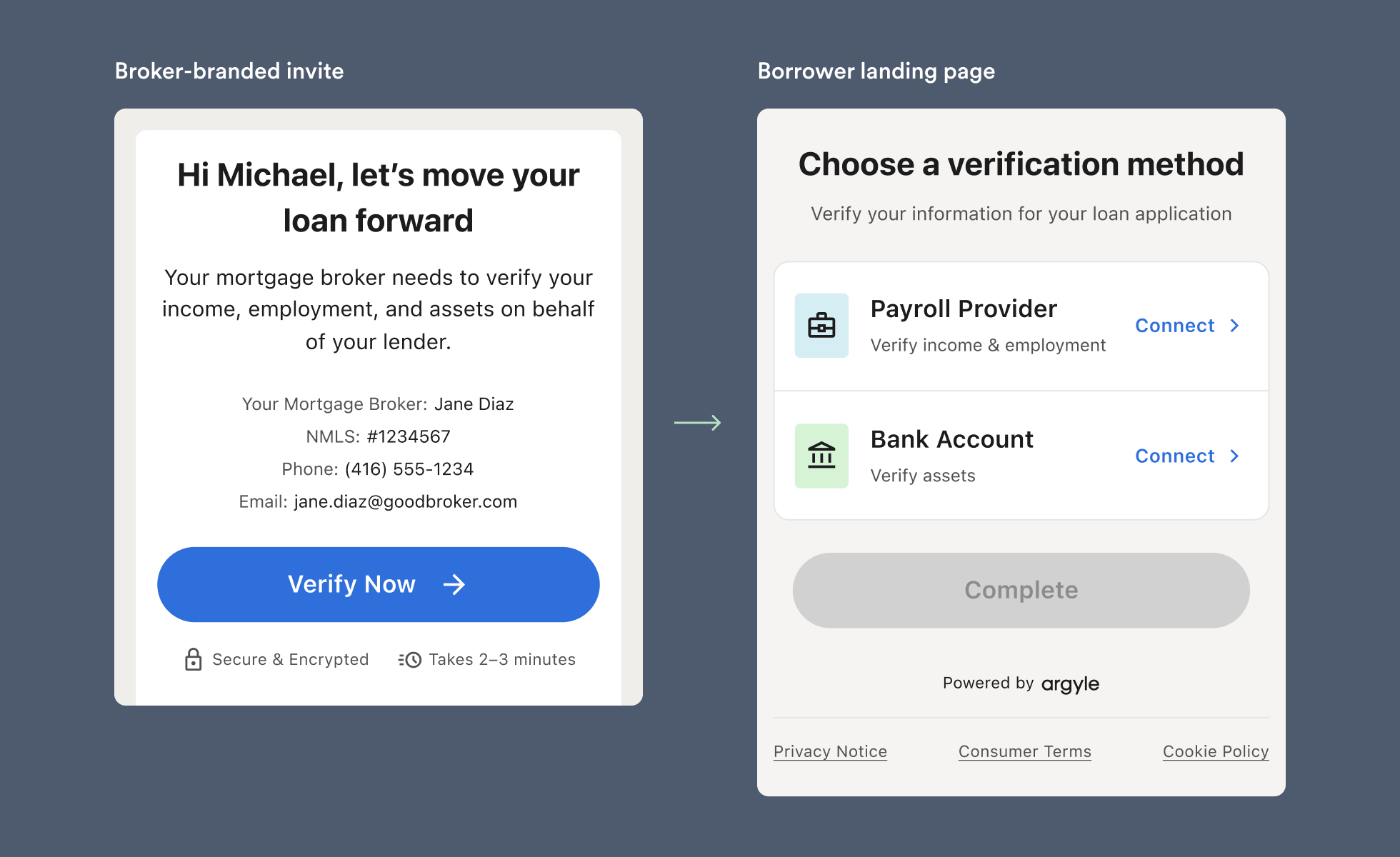
Broker details are populated from the TPO order context. You do not need to create an Argyle account or an individual flow for each broker. The default wholesale flow displays the broker’s name and contact details. For custom messaging, create a Mortgage Wholesale template and configure the flow in the Encompass integration settings in Console. If you assign flows by OrgID, use a wholesale flow for broker-originated loans.Use
[Broker_company] in a custom wholesale template to display the broker’s company name from Encompass’s TPO Company Name field (TPO.x14).Broker ordering
- Sign in to your wholesale lender’s TPO Connect portal and open the loan.
- Confirm the borrower details in Borrower Information, including Section 1A, and the employment details required for the verification type.
- Open Argyle using the link in the loan navigation if your lender provides one. Otherwise, select Service Orders, then Order Service. Choose Verifications, select Argyle, and click Next.
- In Argyle, select the borrowers and verification methods. Review the borrower contact details for payroll and banking orders, or select Add Documents for Doc VOI.
- Use Notifications to add team members who should receive order updates, then submit the order.
Borrower experience
Notifications
The wholesale lender is not automatically copied on a broker’s manual order. Add the lender’s recipients in Notifications when they need email updates.
Automated ordering
Automated Service Ordering (ASO) supports initial verification orders on broker-originated loans. Argyle uses Encompass field2626 at the loan level to identify whether the loan is retail or wholesale. For wholesale loans, ASO uses the broker details associated with the loan. The lender’s configured workflow rules and loan readiness conditions determine when the order is placed.
Use the lender’s Automated Ordering setup for templates and workflow rules. Enabling Manual ordering in TPO Connect does not configure ASO.
Create separate templates for payroll and banking orders. When both are triggered within a short window, the borrower receives one combined invite. Automated re-verification is not supported; use the manual closing verification workflow.