

This page applies to payroll Data API workflows. Banking and other report-based implementations should use verification status instead of account synchronization events to determine report readiness.
Delivery order
Initial delivery begins after the user successfully authenticates the payroll account.- Person, employment, and other information that changes less frequently is generally available first.
- Paystubs, shifts, gigs, and other time-based records are delivered from the most recent records backward.
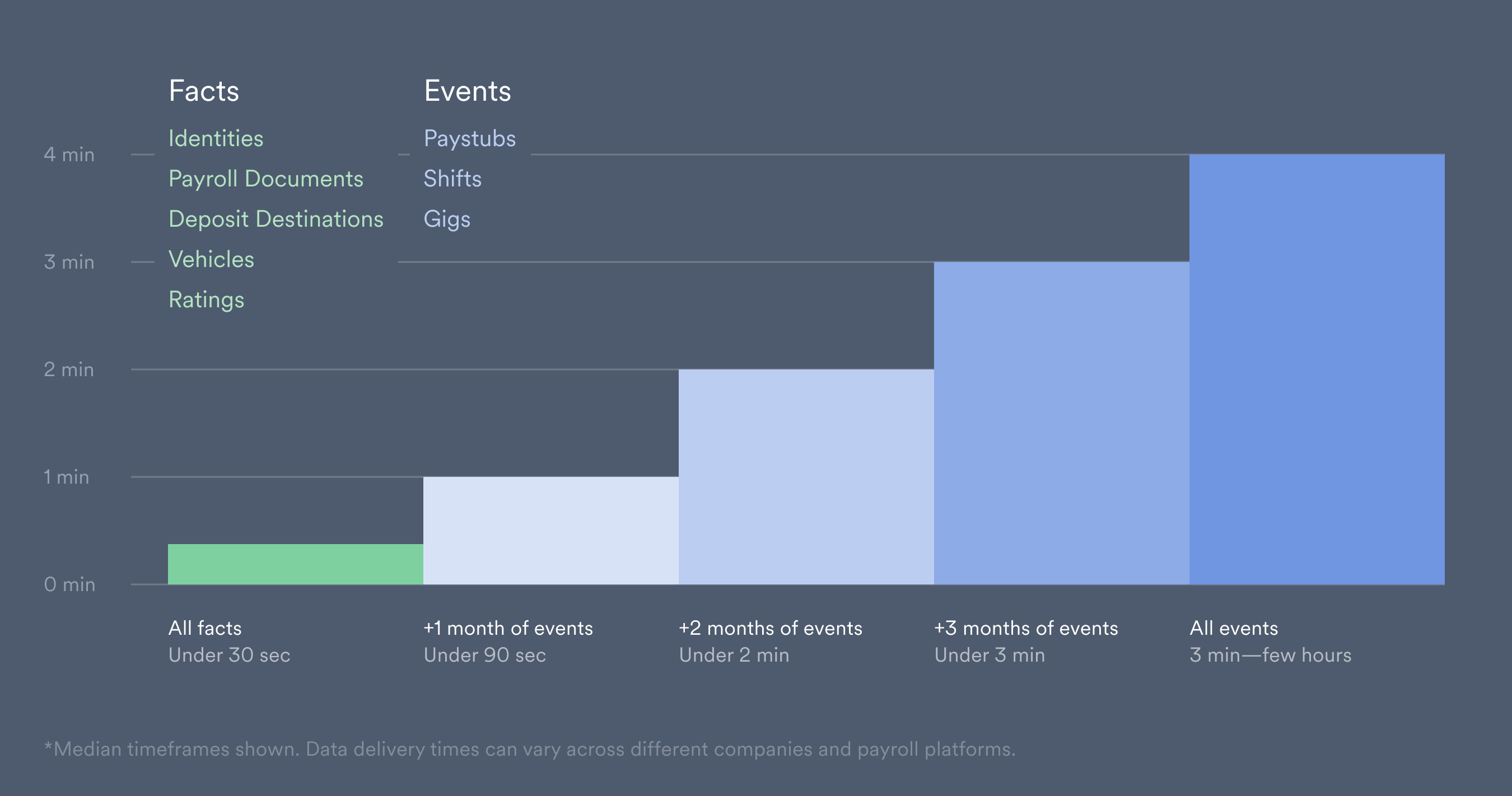
Resource availability
Resource webhooks indicate when individual records become available:- A resource
.addedevent is sent when the first available record or field is delivered. - Resource
.updatedevents can continue while additional fields or records are delivered. - Partial-synchronization events indicate that a configured amount of historical data is available.
.added event as confirmation that every field or historical record is available.
Readiness webhooks
The
users.fully_synced webhook is not sent when an existing account reconnects. Use account and resource webhooks for reconnection and ongoing-update workflows.
Multiple accounts
Track each account separately while initial data is arriving. One account can complete, fail, or require action before another account attached to the same user. Use theusers.fully_synced webhook only when the workflow must wait for all newly connected payroll accounts.
Retrieving paystubs
Setconfig.days_synced when subscribing to the paystubs.partially_synced webhook to specify the number of days of paystub history you need. You can create separate subscriptions for different history windows.
- Track the IDs of successfully connected payroll accounts using the
accounts.connectedwebhook or the Accounts API. - Wait for partial or full synchronization, with a timeout appropriate for your application.
- If the
paystubs.partially_syncedwebhook arrives, retrieve paystubs using the account ID and theavailable_from/available_todates in the webhook. Track the account anddays_syncedvalue so duplicate deliveries or different subscriptions do not count as additional accounts. - If the
paystubs.fully_syncedwebhook arrives first, retrieve the available paystubs for that account. If theusers.fully_syncedwebhook arrives first, retrieve the available records for the user’s newly connected payroll accounts. - Check whether the returned records meet your requirements. If the timeout expires before the required data is available, offer another method, such as Document Uploads.
Do not wait only for the
paystubs.partially_synced webhook. It may not be sent when no paystubs are available for the requested window. If all paystubs are retrieved in one pull, the paystubs.fully_synced webhook is sent instead.Example
A user connects two payroll accounts. Your application subscribes to theaccounts.connected, paystubs.partially_synced, paystubs.fully_synced, and users.fully_synced webhooks.
- The first account sends the
paystubs.partially_syncedwebhook for the requested window. Retrieve that account’s available paystubs. - The second account completes in one pull and sends the
paystubs.fully_syncedwebhook without a partial-sync webhook. Retrieve its available paystubs and check that they meet your requirements. - The
users.fully_syncedwebhook indicates that initial delivery has finished for both newly connected accounts. Later or duplicate events should update existing records rather than create duplicates.