

Doc VOI is designed for mortgage workflows. For standalone document collection, OCR, and authenticity, use Document Uploads.
Create or re-use a user
If the person already has an Argyle user with your organization, reuse that user ID across payroll, banking, and document workflows. Update the existing user with any missing details before ordering Doc VOI. The required fields arefirst_name, last_name, and ssn.
For a new user, send the following body to POST /v2/users:
id. Use the same ID when ordering the verification and uploading its documents.
Order a Doc VOI verification
Send the following body toPOST /v2/verifications. Set report.type to doc-voi-mortgage and include the employment details represented by the documents.
Required documents
For each employment, provide:- The most recent paystub.
- A W-2 or December/year-end paystub for each required prior year.
more_data_required, upload the additional requested documents for the same user.
Upload documents
After ordering the verification, upload each document for the same user throughPOST /v2/user-uploads. A Doc VOI verification does not require a payroll or banking session.
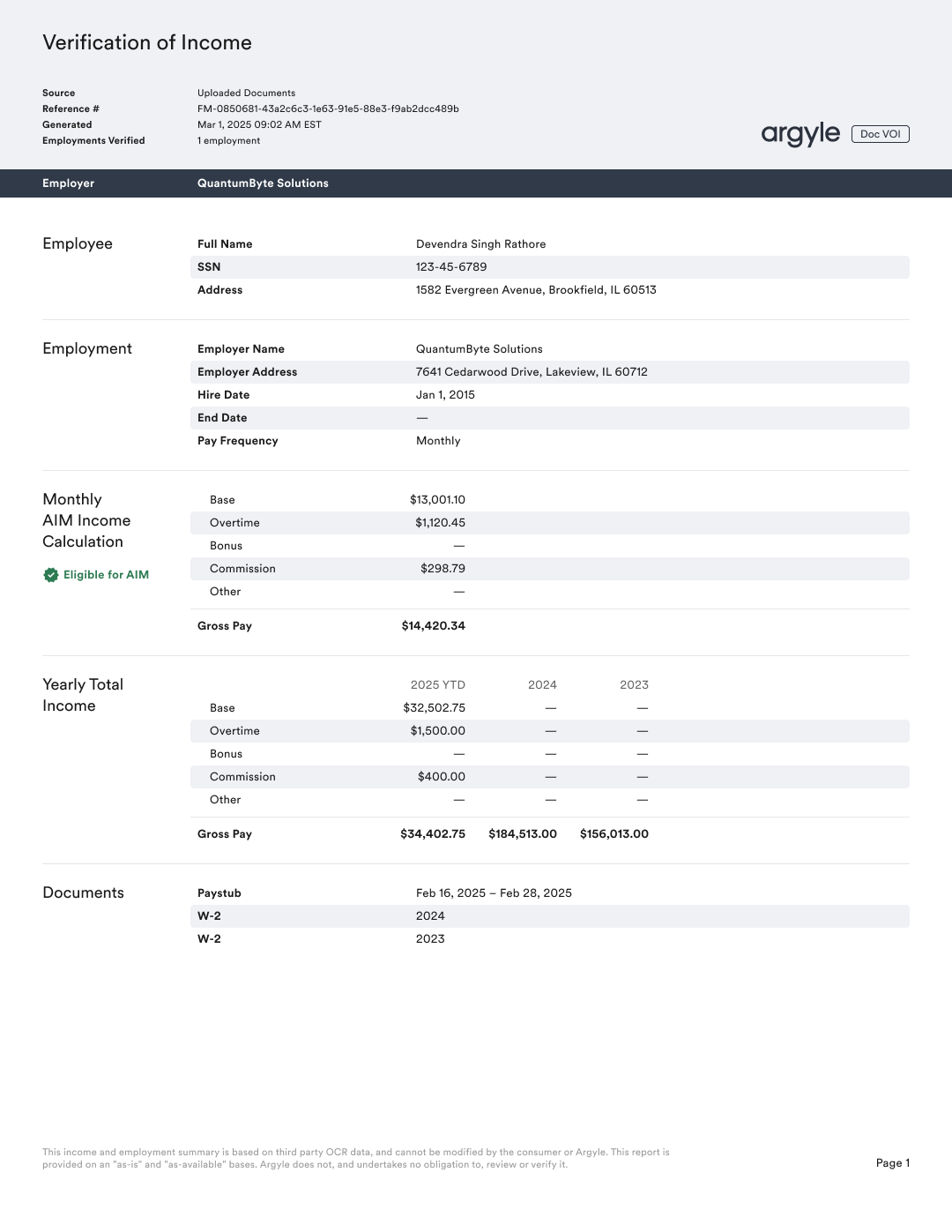
Result
Wait for theverifications.updated webhook while documents are processed and the report is generated. Retrieve the completed report from report.file_url or report.json_url.
- See Verification Statuses.
- Follow Doc VOI re-verification when updated documents are required.
- Use the Doc VOI test files.