

Overview
By default, Argyle sends user invitation and data-sharing request emails fromnotifications@argyle.com. With a custom sending domain, you can configure these emails to come from your own domain instead — for example, verifications@yourlender.com.
This means users receive emails from a domain they already recognise and trust, which typically improves open rates and conversion rates.
How it works
You provide your domain and a from address. Argyle generates a set of DNS records that authenticate your domain with our email infrastructure. Once your IT team adds those records and you verify them, Argyle will send all user emails from your configured address. Argyle does not access your mailbox or connect to your email system. No mailbox credentials or MFA are required. The DNS records authorize our email provider to send emails on behalf of your domain. The setup is a one-time DNS change. Once verified, no ongoing action is required from your side.Prerequisites
- Access to your organisation’s DNS settings (or a contact at your IT team who does)
- A domain you control (e.g.
yourlender.com) - A from address on that domain (e.g.
verifications@yourlender.com)
Setup steps
1. Open Console settings
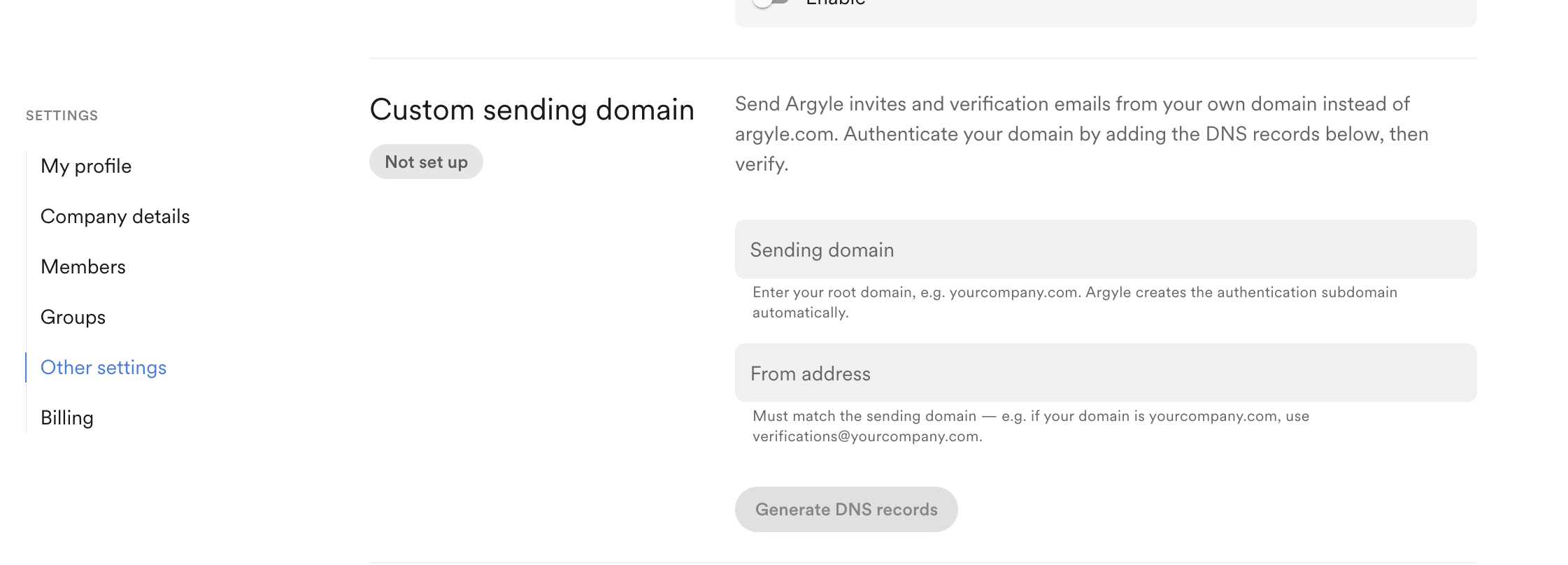
In the Argyle Console, go to Settings → Other settings → Custom sending domain.2. Enter your domain and from address
- Sending domain: enter your root domain, e.g.
yourlender.com - From address: enter the address users will see, e.g.
verifications@yourlender.com
The from address is the sender address users see. It does not need to have a mailbox, but we recommend using an address your team monitors because users may email it directly. This address is not used as the default reply-to address.
3. Add DNS records
Argyle will generate 3 CNAME records. Share these with your IT team and ask them to add all 3 to your DNS provider (e.g. Cloudflare, Route 53, GoDaddy).If your DKIM records are managed by another provider, add the two DKIM values in that provider instead. See Troubleshooting for details.
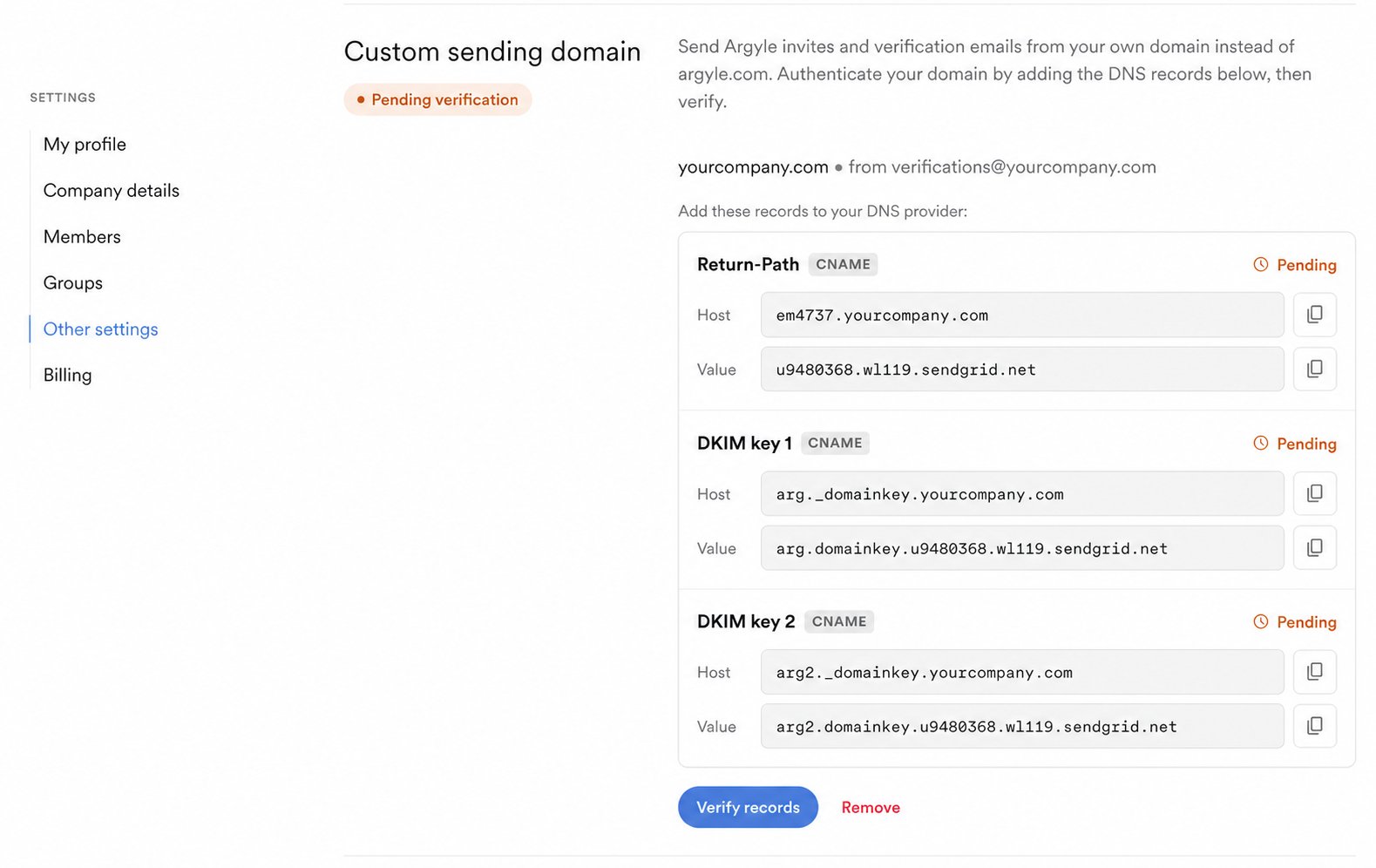
DNS changes can take up to 48 hours to propagate, though they typically complete within a few hours.
4. Verify
Once your IT team has added the records, return to Console and click Verify records. Argyle will check each record and confirm the setup. If verification fails, the Console will show which records were not found. Check that the values were entered correctly and try again after allowing more time for propagation.5. Done
Once verified, Argyle will send all user emails from your configured address. You’ll see a confirmation in Console and can remove the custom domain at any time.Troubleshooting
Check whether your DKIM is managed by another provider
Some organizations use a dedicated email authentication service to manage DKIM centrally. When they do, DKIM records added directly to your DNS host are ignored — they have to be added in that service instead.- Open Google Admin Toolbox.
- Enter
_domainkey.yourdomain.comin Name, replacingyourdomain.comwith your domain. Select NS and press Enter. - Read the result:
- No records found — your DKIM isn’t delegated. Add the records in your own DNS host, and check the auto-appended domain issue above.
- A nameserver is returned (for example,
ns.vali.email) — your DKIM is managed by that provider. Add both DKIM values in their dashboard instead.
- Once the records are added, return to Console and click Verify again.
Removing a custom domain
To stop using your custom domain, click Remove in Console. Argyle will revert to sending fromnotifications@argyle.com. You can set up a new domain at any time by going through the setup steps again.
FAQ
Will users see any Argyle branding in the email address? Once verified, the from address will show exactly what you configured (e.g.verifications@yourlender.com). Argyle will only be mentioned in the footer.
Does this affect email deliverability?
It improves it. Emails sent from an authenticated domain are less likely to land in spam. The DNS records you add are the industry-standard mechanism (DKIM and SPF) for proving the email is legitimate.
Can we use a subdomain instead of the root domain?
The setup will use a subdomain for authentication infrastructure behind the scenes, but the from address will use your root domain. You only need to provide the root domain.
What if our IT team needs more context on the DNS records?
The 3 CNAME records are standard email authentication records used by email providers. They do not grant Argyle any access to your domain or email systems — they only allow Argyle to send emails on your behalf with proper authentication.
Can we configure more than one custom sending domain?
No. Argyle currently supports only one custom sending domain, which applies across all flows.