> ## Documentation Index
> Fetch the complete documentation index at: https://docs.argyle.com/llms.txt
> Use this file to discover all available pages before exploring further.
# Deposit Switching
Redirect payouts to your bank.
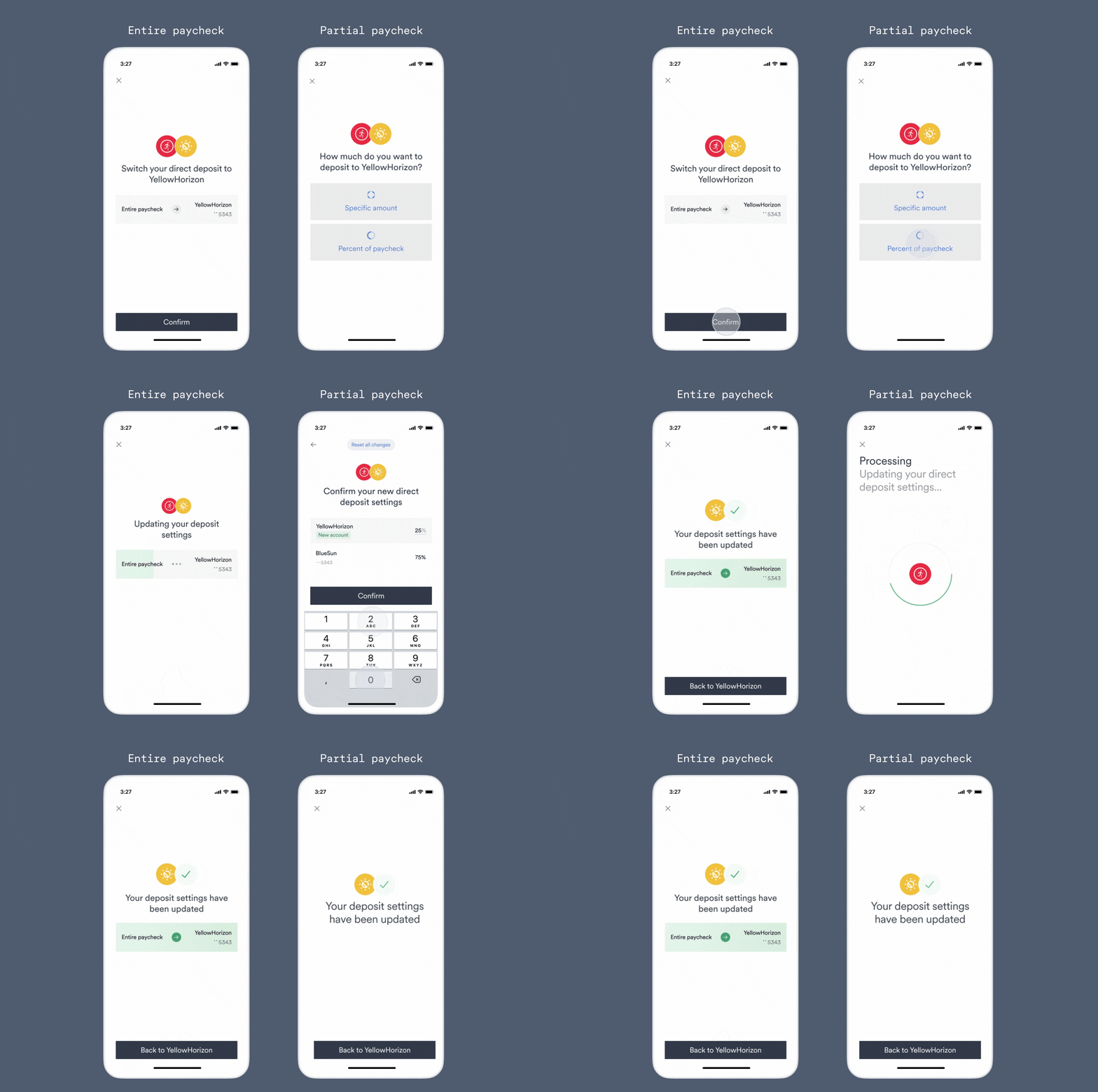
After a user connects their payroll account through Link, they can be prompted to direct all or part of their pay to a specified bank account.
 ## Platform support
To check if a specific Item supports deposit switching:
* Console — In the Coverage tab, filter or search for Items where direct deposit switching (DDS) is supported. Selecting an individual Item will display additional information on the underlying platform's DDS capabilities.
* API - Filter Items using an [Item filter](/api-reference/item-filters) or [retrieve an individual Item](/api-reference/items#retrieve) by its ID and check the [`direct_deposit_switch`](/api-reference/items#object-features-direct_deposit_switch) object to see if `deposit_account` direct deposit switches are `supported`.
## Embedded Link setup
Our direct deposit switching (DDS) solution for embedded Link integrations is outlined below.
### Structure a target deposit destination
Target deposit destinations contain the bank account information details used in a deposit switch. The steps outlined in DDS flows show how to construct target deposit destinations for different use cases, such as receiving the entirety or a partial amount of the user's paycheck.
### Create a deposit switch customization
We recommend limiting searchable Items in Link to only those that support deposit switching:
1. Create a new customization using Flows in Console.
2. Enable the setting "Only show Link items that support direct deposit switching."
3. Add additional branding, messaging, or other customizations as needed.
4. After saving your customized Flow, pass in its ID via the `flowId` parameter in your [Link initialization](/link/initialization).
### Initialize Link for DDS
Use the optional `ddsConfig` [Link initialization parameter](/link/initialization-dds-included#optional-initialization-parameters) to include an additional step for DDS after a user connects a payroll account.
```json theme={}
"ddsConfig": ""
```
For user privacy and security, sensitive banking information contained in target deposit destinations must be encrypted using the API's [`/target-deposit-destinations`](/api-reference/target-deposit-destinations#encrypt) encryption endpoint before being passed to your Link initialization via the `ddsConfig` parameter when adding deposit switching flows.
### Returning users
Depending on your use case, you may want users to initially connect their payroll accounts through Link, return to your website or application for additional steps, and then return to Link for DDS.
To initiate the DDS process for a previously connected account:
1. Check the Item's platform supports DDS.
2. Include a `ddsConfig` in your Link initialization.
3. (Optional)
## Platform support
To check if a specific Item supports deposit switching:
* Console — In the Coverage tab, filter or search for Items where direct deposit switching (DDS) is supported. Selecting an individual Item will display additional information on the underlying platform's DDS capabilities.
* API - Filter Items using an [Item filter](/api-reference/item-filters) or [retrieve an individual Item](/api-reference/items#retrieve) by its ID and check the [`direct_deposit_switch`](/api-reference/items#object-features-direct_deposit_switch) object to see if `deposit_account` direct deposit switches are `supported`.
## Embedded Link setup
Our direct deposit switching (DDS) solution for embedded Link integrations is outlined below.
### Structure a target deposit destination
Target deposit destinations contain the bank account information details used in a deposit switch. The steps outlined in DDS flows show how to construct target deposit destinations for different use cases, such as receiving the entirety or a partial amount of the user's paycheck.
### Create a deposit switch customization
We recommend limiting searchable Items in Link to only those that support deposit switching:
1. Create a new customization using Flows in Console.
2. Enable the setting "Only show Link items that support direct deposit switching."
3. Add additional branding, messaging, or other customizations as needed.
4. After saving your customized Flow, pass in its ID via the `flowId` parameter in your [Link initialization](/link/initialization).
### Initialize Link for DDS
Use the optional `ddsConfig` [Link initialization parameter](/link/initialization-dds-included#optional-initialization-parameters) to include an additional step for DDS after a user connects a payroll account.
```json theme={}
"ddsConfig": ""
```
For user privacy and security, sensitive banking information contained in target deposit destinations must be encrypted using the API's [`/target-deposit-destinations`](/api-reference/target-deposit-destinations#encrypt) encryption endpoint before being passed to your Link initialization via the `ddsConfig` parameter when adding deposit switching flows.
### Returning users
Depending on your use case, you may want users to initially connect their payroll accounts through Link, return to your website or application for additional steps, and then return to Link for DDS.
To initiate the DDS process for a previously connected account:
1. Check the Item's platform supports DDS.
2. Include a `ddsConfig` in your Link initialization.
3. (Optional)
 If you want the returning user to immediately enter the deposit switch flow, include the `accountId` of the existing account in your Link initialization:
```json theme={}
accountId: ""
```
If you want the returning user to immediately enter the deposit switch flow, include the `accountId` of the existing account in your Link initialization:
```json theme={}
accountId: ""
```
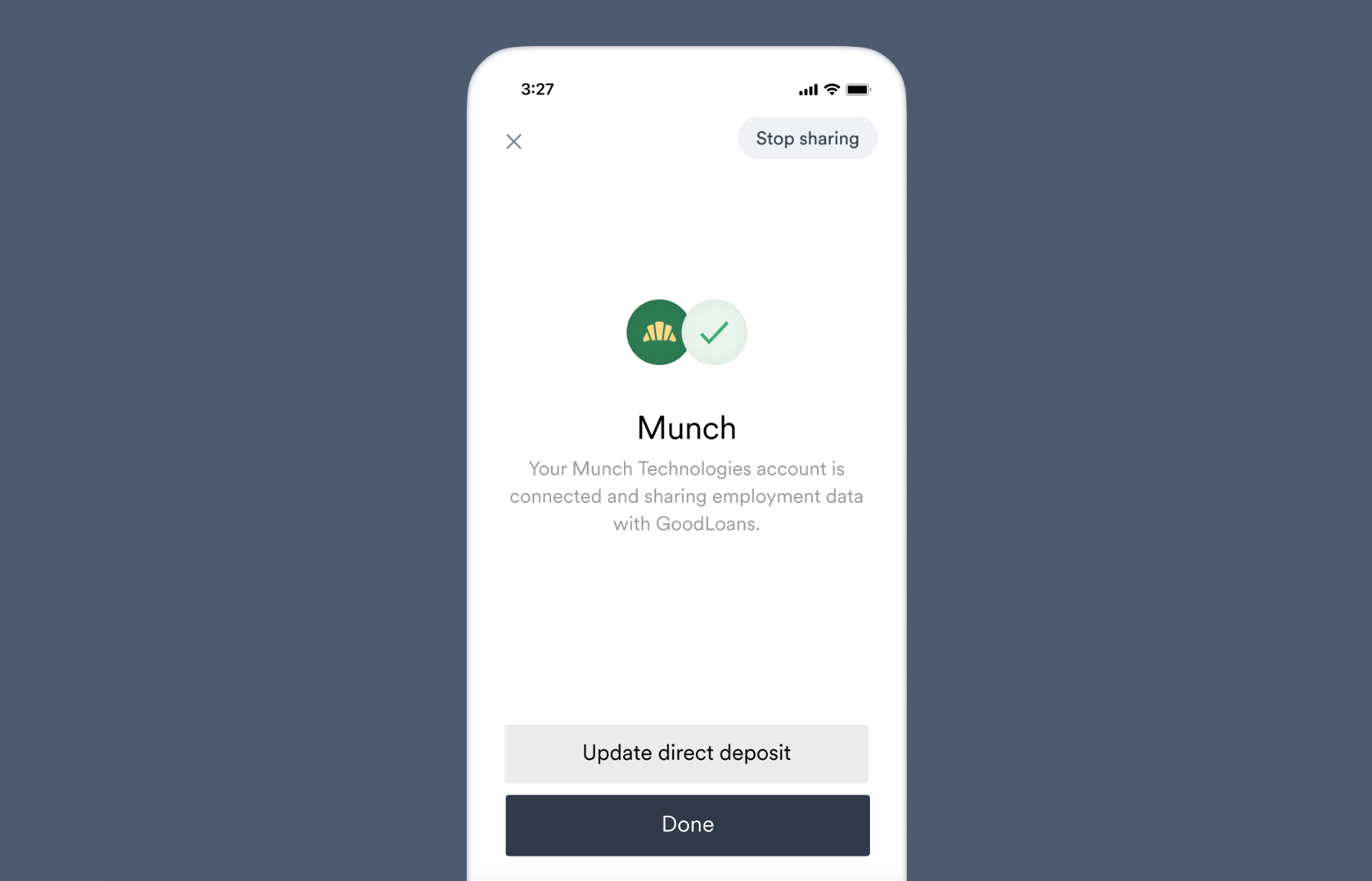 If you want the returning user to directly enter the [account status screen](/link/reference/tracking#account-status-screen), where they can decide whether to begin a deposit switch, include the [`itemId`](/api-reference/items#object-id) related to the existing account in an `items` array to your Link initialization:
```json theme={}
items: [""]
```
## DDS flows — direct deposits
Which DDS flow below you would like to perform determines what to include in your target deposit destination.
As mentioned above, target deposit destinations must then be [encrypted via the API](/api-reference/target-deposit-destinations#encrypt) to protect sensitive banking information before being passed to the `ddsConfig` Link initialization parameter.
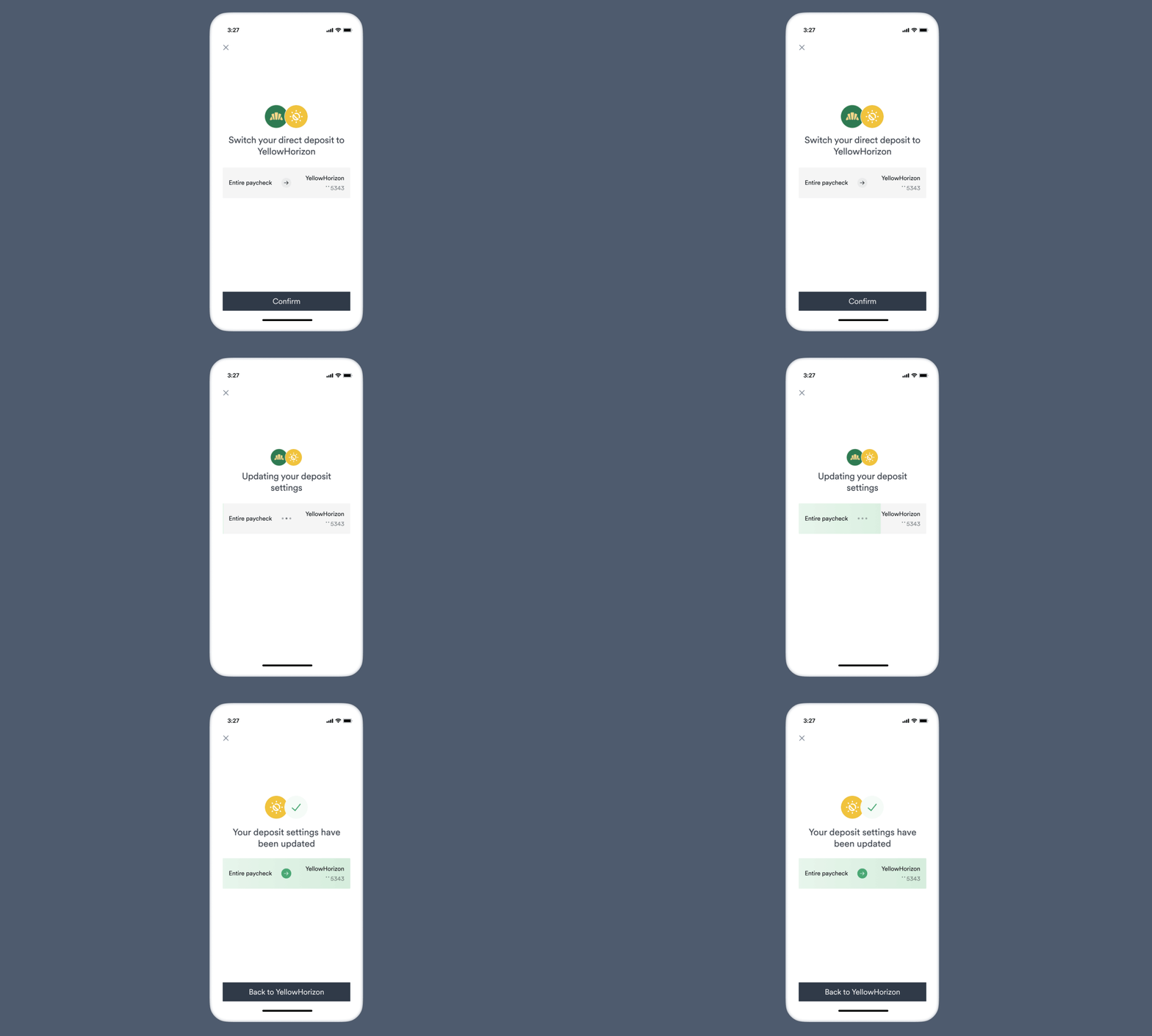
### Entire paycheck
Target deposit destination object before encryption:
```json theme={}
{
"ach_deposit_account": {
"bank_name": "YellowHorizon",
"routing_number": "084101234",
"account_number": "9483746361234",
"account_type": "checking"
},
"entire_paycheck": true,
"allow_restoring_destinations": false
}
```
After encryption:\**example that can be used for testing*
```json theme={}
"CiUAB/5leYpsv1ocZCQo557jrHu4dOzWI+ZnBixxeo7upzrEgHmtEsIGAJU0CRul87c4LbMmff9OZaykLe24fJj2TuKjYULDk4uxjHcq3NhNJ4L0lCsxZL4l/17llWlD5r7/uIIYiQbWjzZlhlrpLWix9LGGkid1bPbRqNP9kBiWTC93CG/1unJC8WHmgpDGFDyffoHCnh3V3POX/sMKMOZJPQr7wiQY9CH5KAgZ8371tu0H5aQuowzYi46QI4OwcMGPXvZP1w6fDMeUU84Undg2togDngDL6ZJckOxjlt77Ov2dZamLCoZWbZsWXHThQFMI/tvqR/apaLYWuQeDNmZ6H0/oQPeLhpnqGyNpARRq0bL+xQSr7uYc8aeVYibBWg0P8vjxA3VUTGk3MSNgJ/WMnsYndDOqH+8IrJLk/1dOOeHoGXOf7yqc3xSPKYObk1K+fpHm5R4dO5DW3vBqu0PbXQBNPwjj0Hj1ZFLTZuxjlu4E8LTZcbQbobwt5jvg+kriN3hYRZlyeCYUtMfs8L7CbVHW3ke1Z4Zmm3s1RNn6l2iEMVHU9mwOUDw2Qxs6kXoxs1cHWuTG34V55FOlFFGF3XEnqTylWuezmWiMbfF6DMhff275JOWUw4Ojlqy6J96qB7L+b+IwBi4xiH96rusgokccTf0ya51XsQgcPMNYINEumwKbJuPEJmcxBYOoq4LRjqv+yW8GEQARNEzioVzgn7Fvpu4CFzNHo9oSN+GcYSXhrmAk/Kj4W3iQYn2MTKkHJsZ1l784fwSghiyMnvBQNXEPKvAKMnEhvKWHHDBuHh9cSdaY9LB27Pchl+ILgVFB+UAAaEHGzHWvL+HgDJI3+uPWQEuo+yKRT1D787m0D64m69oalytakah9lMvhAUsGY+unUksMbdS3v3VeZsKINQBPlQrXNXIfWx0OfIlPYVq1KxzZUWUfLuyaNzHYhut2sbQdTgRd6cJjcjLfU4FeiFWMNds71D43BRRCrkMTxGu20WuAj/Pd8+Qk0se9aqlxwEeVomVkn8WsDESYGWl/8jG0LKYVZqRCwjz4h2lySImTK1RDLiaiiH9SZp8k6aMBH/sfNGIYpNupB+GuTRZvhd7rGHxOB4AragZASjTQpM9azlW3y58HuHpqb4wVgvPuZlb0M+A3XUdi"
```
If you want the returning user to directly enter the [account status screen](/link/reference/tracking#account-status-screen), where they can decide whether to begin a deposit switch, include the [`itemId`](/api-reference/items#object-id) related to the existing account in an `items` array to your Link initialization:
```json theme={}
items: [""]
```
## DDS flows — direct deposits
Which DDS flow below you would like to perform determines what to include in your target deposit destination.
As mentioned above, target deposit destinations must then be [encrypted via the API](/api-reference/target-deposit-destinations#encrypt) to protect sensitive banking information before being passed to the `ddsConfig` Link initialization parameter.
### Entire paycheck
Target deposit destination object before encryption:
```json theme={}
{
"ach_deposit_account": {
"bank_name": "YellowHorizon",
"routing_number": "084101234",
"account_number": "9483746361234",
"account_type": "checking"
},
"entire_paycheck": true,
"allow_restoring_destinations": false
}
```
After encryption:\**example that can be used for testing*
```json theme={}
"CiUAB/5leYpsv1ocZCQo557jrHu4dOzWI+ZnBixxeo7upzrEgHmtEsIGAJU0CRul87c4LbMmff9OZaykLe24fJj2TuKjYULDk4uxjHcq3NhNJ4L0lCsxZL4l/17llWlD5r7/uIIYiQbWjzZlhlrpLWix9LGGkid1bPbRqNP9kBiWTC93CG/1unJC8WHmgpDGFDyffoHCnh3V3POX/sMKMOZJPQr7wiQY9CH5KAgZ8371tu0H5aQuowzYi46QI4OwcMGPXvZP1w6fDMeUU84Undg2togDngDL6ZJckOxjlt77Ov2dZamLCoZWbZsWXHThQFMI/tvqR/apaLYWuQeDNmZ6H0/oQPeLhpnqGyNpARRq0bL+xQSr7uYc8aeVYibBWg0P8vjxA3VUTGk3MSNgJ/WMnsYndDOqH+8IrJLk/1dOOeHoGXOf7yqc3xSPKYObk1K+fpHm5R4dO5DW3vBqu0PbXQBNPwjj0Hj1ZFLTZuxjlu4E8LTZcbQbobwt5jvg+kriN3hYRZlyeCYUtMfs8L7CbVHW3ke1Z4Zmm3s1RNn6l2iEMVHU9mwOUDw2Qxs6kXoxs1cHWuTG34V55FOlFFGF3XEnqTylWuezmWiMbfF6DMhff275JOWUw4Ojlqy6J96qB7L+b+IwBi4xiH96rusgokccTf0ya51XsQgcPMNYINEumwKbJuPEJmcxBYOoq4LRjqv+yW8GEQARNEzioVzgn7Fvpu4CFzNHo9oSN+GcYSXhrmAk/Kj4W3iQYn2MTKkHJsZ1l784fwSghiyMnvBQNXEPKvAKMnEhvKWHHDBuHh9cSdaY9LB27Pchl+ILgVFB+UAAaEHGzHWvL+HgDJI3+uPWQEuo+yKRT1D787m0D64m69oalytakah9lMvhAUsGY+unUksMbdS3v3VeZsKINQBPlQrXNXIfWx0OfIlPYVq1KxzZUWUfLuyaNzHYhut2sbQdTgRd6cJjcjLfU4FeiFWMNds71D43BRRCrkMTxGu20WuAj/Pd8+Qk0se9aqlxwEeVomVkn8WsDESYGWl/8jG0LKYVZqRCwjz4h2lySImTK1RDLiaiiH9SZp8k6aMBH/sfNGIYpNupB+GuTRZvhd7rGHxOB4AragZASjTQpM9azlW3y58HuHpqb4wVgvPuZlb0M+A3XUdi"
```
 Target deposit destination object before encryption:
```json theme={}
{
"ach_deposit_account": {
"bank_name": "YellowHorizon",
"routing_number": "084101234",
"account_number": "9483746361234",
"account_type": "checking"
},
"entire_paycheck": true,
"allow_restoring_destinations": true
}
```
After encryption:\**example that can be used for testing*
```json theme={}
"CiUAB/5leR9UtO5P7TSgYWRskTXir+slbCTSjVM+VvtyyCDXsiCWEsAGAJU0CRst8Vq10j34kDc9d8BW7rIwVCdNxYBYR6n2fDuY8r25fJ6QAjb0o1QyrUl64NYYnmU5Qg5L38QlrvZzmBp4LlWo7gvAbolWmn1zAUYkilQ6FdRoDIMVWqmbpSAeazKvBczVMkjfJOMRWWiA183wHDPV0ikl5UFlqCe435t4cx896QQs1iLOfCSsa0+uK+Nu6R2W0niVL4tEDZ/QaMoEXQZbPt/C8K0fRdJ/5E3w8XDfp7b9yytlO2zXwc7dfoOggCEpk6WCUOGMiu56XNyogzi/gFTO5TIqA71MG7A0BqqsMcdnITBuai8/SjPVwsOE0e1nJgtI4+Jag8ytRgnlQ3/5GPVrjNuyvgIqLN8w30gQV3NgaDZxcOjJdaXhu5WMhRKNYPahHciI3hkCq2H79j9ulDigFML3OZYkTfSqgJ9HTq99pgAQXgKBTwr2Sw2p7HZAu4U71mPEDLMKZoURl/hiOQBHvrX80IRNd17xUsJPAAdA+8zVX6WF0zN8X7dZcLPs6M+OCYRAZUCPUJH/McACWQEOhyZIehhsbnFrLc7K1ASqlm23SybsJoMQnbA9Qws2PeQHk+3c1OPnGqu0LPaGhAevCp1qStXhE2XUD5B+WfCIyqEtnhUGyU6a6GjgUiBG08aZl+e3rZSrJz3OzqVYWgeFV1PpHsW4JYl/YvrjQEwawMZ7z+hUm4wlU7iiBvOK0upiLpWYIR2e9ZIVau2ROWGG5ysWOCM+2/ao7F9POqK+bc+u0y+nF8bEb0hPpqWTFWq9YXZHwhOxgJ++Hw1NnsMI2P0LGW2PmA6uFz2X8Af1hmOOKx+5ovJQLPhY/5I4b+fKtgzmmd7aQE6qk5OcW7xFY3e04rcb1Q09qc9FIF3fGQ4IORAU7K72pX1iUWrOt76zy5LSsOSXj4XfHVLzEXEqotPJh8xJcjbfIfz/pIbFKszNEOcvZ8U+60PObZ1aGulmKVjMMSxAtcbKq6KJHVlqIEeXicKv12wsOx/kX+y1wyGWBkVQxJRj7eXy1BdU6Sn/4AcMyUM5+eiCtEWDSqrQn89unennxyellEFkmBO66YuMh7p9Y6XRDmPqcG+DONI7YGn+gI0iaA=="
```
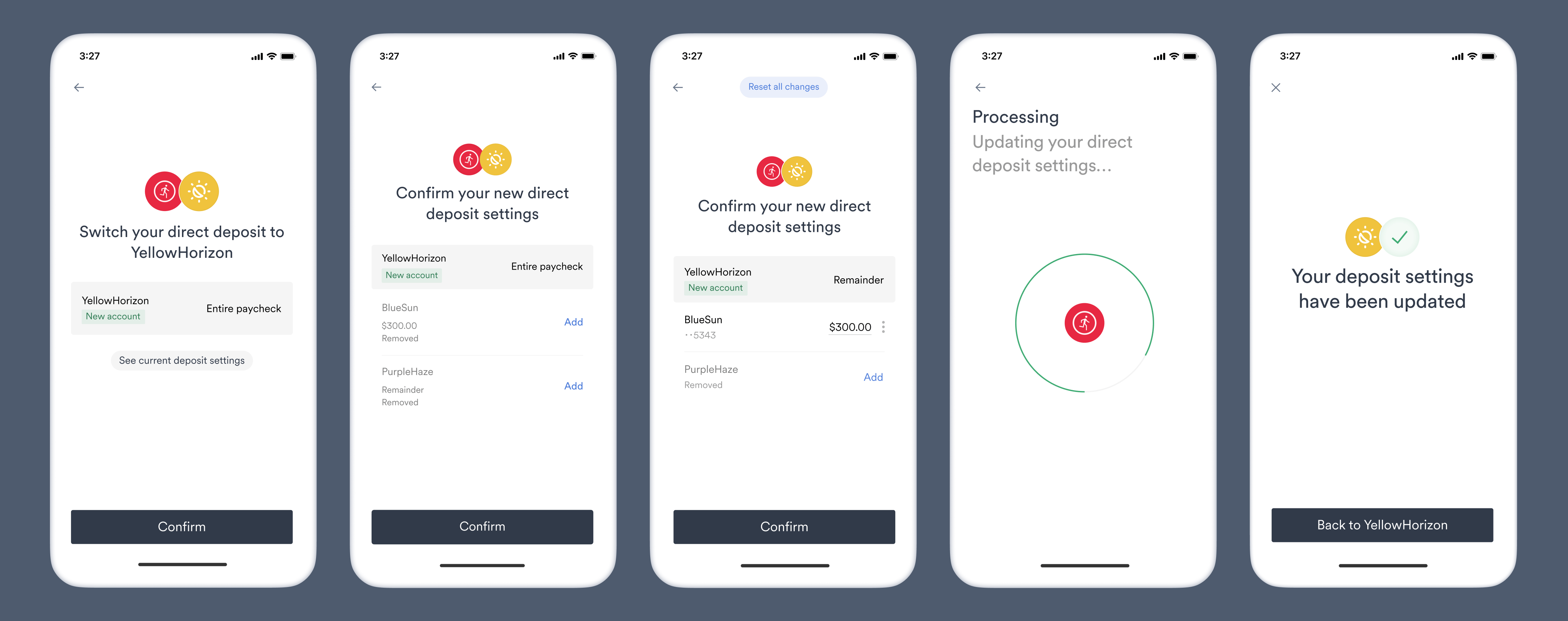
* Users are able to restore and edit previous bank accounts, where they can then allocate part of their paycheck.
* Any unallocated remainder will be sent to the bank account specified in the target deposit destination.
Target deposit destination object before encryption:
```json theme={}
{
"ach_deposit_account": {
"bank_name": "YellowHorizon",
"routing_number": "084101234",
"account_number": "9483746361234",
"account_type": "checking"
},
"entire_paycheck": true,
"allow_restoring_destinations": true
}
```
After encryption:\**example that can be used for testing*
```json theme={}
"CiUAB/5leR9UtO5P7TSgYWRskTXir+slbCTSjVM+VvtyyCDXsiCWEsAGAJU0CRst8Vq10j34kDc9d8BW7rIwVCdNxYBYR6n2fDuY8r25fJ6QAjb0o1QyrUl64NYYnmU5Qg5L38QlrvZzmBp4LlWo7gvAbolWmn1zAUYkilQ6FdRoDIMVWqmbpSAeazKvBczVMkjfJOMRWWiA183wHDPV0ikl5UFlqCe435t4cx896QQs1iLOfCSsa0+uK+Nu6R2W0niVL4tEDZ/QaMoEXQZbPt/C8K0fRdJ/5E3w8XDfp7b9yytlO2zXwc7dfoOggCEpk6WCUOGMiu56XNyogzi/gFTO5TIqA71MG7A0BqqsMcdnITBuai8/SjPVwsOE0e1nJgtI4+Jag8ytRgnlQ3/5GPVrjNuyvgIqLN8w30gQV3NgaDZxcOjJdaXhu5WMhRKNYPahHciI3hkCq2H79j9ulDigFML3OZYkTfSqgJ9HTq99pgAQXgKBTwr2Sw2p7HZAu4U71mPEDLMKZoURl/hiOQBHvrX80IRNd17xUsJPAAdA+8zVX6WF0zN8X7dZcLPs6M+OCYRAZUCPUJH/McACWQEOhyZIehhsbnFrLc7K1ASqlm23SybsJoMQnbA9Qws2PeQHk+3c1OPnGqu0LPaGhAevCp1qStXhE2XUD5B+WfCIyqEtnhUGyU6a6GjgUiBG08aZl+e3rZSrJz3OzqVYWgeFV1PpHsW4JYl/YvrjQEwawMZ7z+hUm4wlU7iiBvOK0upiLpWYIR2e9ZIVau2ROWGG5ysWOCM+2/ao7F9POqK+bc+u0y+nF8bEb0hPpqWTFWq9YXZHwhOxgJ++Hw1NnsMI2P0LGW2PmA6uFz2X8Af1hmOOKx+5ovJQLPhY/5I4b+fKtgzmmd7aQE6qk5OcW7xFY3e04rcb1Q09qc9FIF3fGQ4IORAU7K72pX1iUWrOt76zy5LSsOSXj4XfHVLzEXEqotPJh8xJcjbfIfz/pIbFKszNEOcvZ8U+60PObZ1aGulmKVjMMSxAtcbKq6KJHVlqIEeXicKv12wsOx/kX+y1wyGWBkVQxJRj7eXy1BdU6Sn/4AcMyUM5+eiCtEWDSqrQn89unennxyellEFkmBO66YuMh7p9Y6XRDmPqcG+DONI7YGn+gI0iaA=="
```
* Users are able to restore and edit previous bank accounts, where they can then allocate part of their paycheck.
* Any unallocated remainder will be sent to the bank account specified in the target deposit destination.
 Target deposit destination object before encryption:
```json theme={}
{
"ach_deposit_account": {
"bank_name": "YellowHorizon",
"routing_number": "084101234",
"account_number": "9483746361234",
"account_type": "checking"
},
"entire_paycheck": true,
"allow_restoring_destinations": true,
"allow_changing_allocation_type": true
}
```
After encryption:\**example that can be used for testing*
```json theme={}
"CiUAB/5leUfS9OxWcKN4p14UY2gapMfQGS4q/bBfKzbE9JPn5vAREr8GAJU0CRtHcHInO71NjSjVu5PejlwJMKZIEdKa1+IHqxbUAsFhY3foQ1yTsb7gmft3sqVGZnJ9GYRXYXOy5KlbOsv7apRFL+14/9oiD/h3v+VjFkbgjFdytYXOjdUR2qYQv4Com6iZ2eIGeRSj/ETW8lGL2cyGEsLGskGYiqYXG0+Z5T+09uqkZCwu8a9w/rrycN/qOZmt8mMgA8t9B1Er8b+uhwPfyEASzVr0/fgOWMuEsbrW7tHRwv5h2oQ64Grob58hxMaL1CLNK7IswbfCiifs1y7oAGalAjCQEl0UURn5B+OzWAmto5U2NDIdD2BTVr+o/eU7qLjdFItH9jB9V1L3QGe8t5QUxbIlGbK90QQdLv9K3ZBW26gVm2BSAl02kmdUlx0iWXqkKjsIseWH7cj+EDc21eupWgv6Y6l50gfrgLC79htjPYxeFkD7oMqrOceT8eKdNXdAtCUGVhc9WtZofkeyWv5uVcPeuzaCL8WySK7nnaqAmT4+y8AutwH03AGLUf2AiPNMu58SsKQ83jOPBY77gJtTQYqVlSLZMjvEj8IutqYaZVh+F6+5TsXhkOyF0aYV1vlGaxb1Z30JPhQfnNwb3MrQ8D7tjbNtBiaElEL3zoJUzshiW1nRNnkv5YFUqot/4dJa4ZSB5g6DXpn3yWTFXbtAWni6aAo90s5WWveiizA9Ach8YUYwKMIUMeu8Y4WGRJjo23XSnwWrYbY0M7xAQWarh8tEjY2XUtwqjnDKqMLTL894dm7l/+a2W5igHzEWnaPko4McZcyAYrsNDYoTKx1e18GH0YZlITe9/cLASCJiZdIevUumGG/262JqM4RD28Rd2KunB3RWhD1MrxT91+wfb36wVXxGQpACz2E8wQtXz/QF/sQxaeYdZFKcaBjb6w7TSy9b7aMPx76I/MU6MKF0CniApFJj/W24mczcd+oSGUXaIzWcvEYqqDgygdQhXpyCT32f4ZJ8kVvynioauR4A8gXwyry8v5IUtAY6vlhPBXmi5VQI8nPAnXjg6oBDBg26sdYgfnKyyGOfCl/1V6/LeDC48OyIWj12EzOaZe8kszjR81BiO3JMd42Kcl94IM3AM71Mejtg"
```
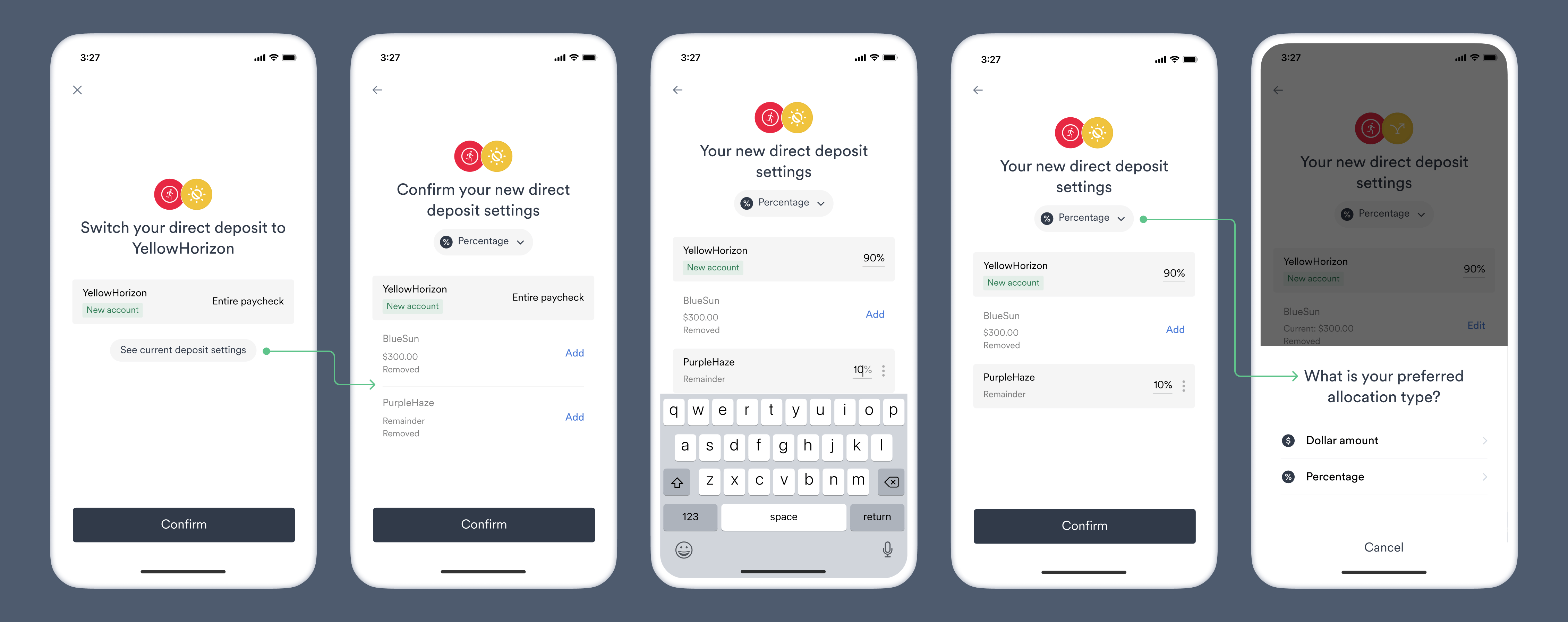
* Users are able to restore and edit previous bank accounts, where they can then allocate part of their paycheck.
* Users can switch between dollar amount or percent allocations (when both types are supported by the underlying payroll platform).
* Any unallocated remainder will be sent to the bank account specified in the target deposit destination.
Target deposit destination object before encryption:
```json theme={}
{
"ach_deposit_account": {
"bank_name": "YellowHorizon",
"routing_number": "084101234",
"account_number": "9483746361234",
"account_type": "checking"
},
"entire_paycheck": true,
"allow_restoring_destinations": true,
"allow_changing_allocation_type": true
}
```
After encryption:\**example that can be used for testing*
```json theme={}
"CiUAB/5leUfS9OxWcKN4p14UY2gapMfQGS4q/bBfKzbE9JPn5vAREr8GAJU0CRtHcHInO71NjSjVu5PejlwJMKZIEdKa1+IHqxbUAsFhY3foQ1yTsb7gmft3sqVGZnJ9GYRXYXOy5KlbOsv7apRFL+14/9oiD/h3v+VjFkbgjFdytYXOjdUR2qYQv4Com6iZ2eIGeRSj/ETW8lGL2cyGEsLGskGYiqYXG0+Z5T+09uqkZCwu8a9w/rrycN/qOZmt8mMgA8t9B1Er8b+uhwPfyEASzVr0/fgOWMuEsbrW7tHRwv5h2oQ64Grob58hxMaL1CLNK7IswbfCiifs1y7oAGalAjCQEl0UURn5B+OzWAmto5U2NDIdD2BTVr+o/eU7qLjdFItH9jB9V1L3QGe8t5QUxbIlGbK90QQdLv9K3ZBW26gVm2BSAl02kmdUlx0iWXqkKjsIseWH7cj+EDc21eupWgv6Y6l50gfrgLC79htjPYxeFkD7oMqrOceT8eKdNXdAtCUGVhc9WtZofkeyWv5uVcPeuzaCL8WySK7nnaqAmT4+y8AutwH03AGLUf2AiPNMu58SsKQ83jOPBY77gJtTQYqVlSLZMjvEj8IutqYaZVh+F6+5TsXhkOyF0aYV1vlGaxb1Z30JPhQfnNwb3MrQ8D7tjbNtBiaElEL3zoJUzshiW1nRNnkv5YFUqot/4dJa4ZSB5g6DXpn3yWTFXbtAWni6aAo90s5WWveiizA9Ach8YUYwKMIUMeu8Y4WGRJjo23XSnwWrYbY0M7xAQWarh8tEjY2XUtwqjnDKqMLTL894dm7l/+a2W5igHzEWnaPko4McZcyAYrsNDYoTKx1e18GH0YZlITe9/cLASCJiZdIevUumGG/262JqM4RD28Rd2KunB3RWhD1MrxT91+wfb36wVXxGQpACz2E8wQtXz/QF/sQxaeYdZFKcaBjb6w7TSy9b7aMPx76I/MU6MKF0CniApFJj/W24mczcd+oSGUXaIzWcvEYqqDgygdQhXpyCT32f4ZJ8kVvynioauR4A8gXwyry8v5IUtAY6vlhPBXmi5VQI8nPAnXjg6oBDBg26sdYgfnKyyGOfCl/1V6/LeDC48OyIWj12EzOaZe8kszjR81BiO3JMd42Kcl94IM3AM71Mejtg"
```
* Users are able to restore and edit previous bank accounts, where they can then allocate part of their paycheck.
* Users can switch between dollar amount or percent allocations (when both types are supported by the underlying payroll platform).
* Any unallocated remainder will be sent to the bank account specified in the target deposit destination.
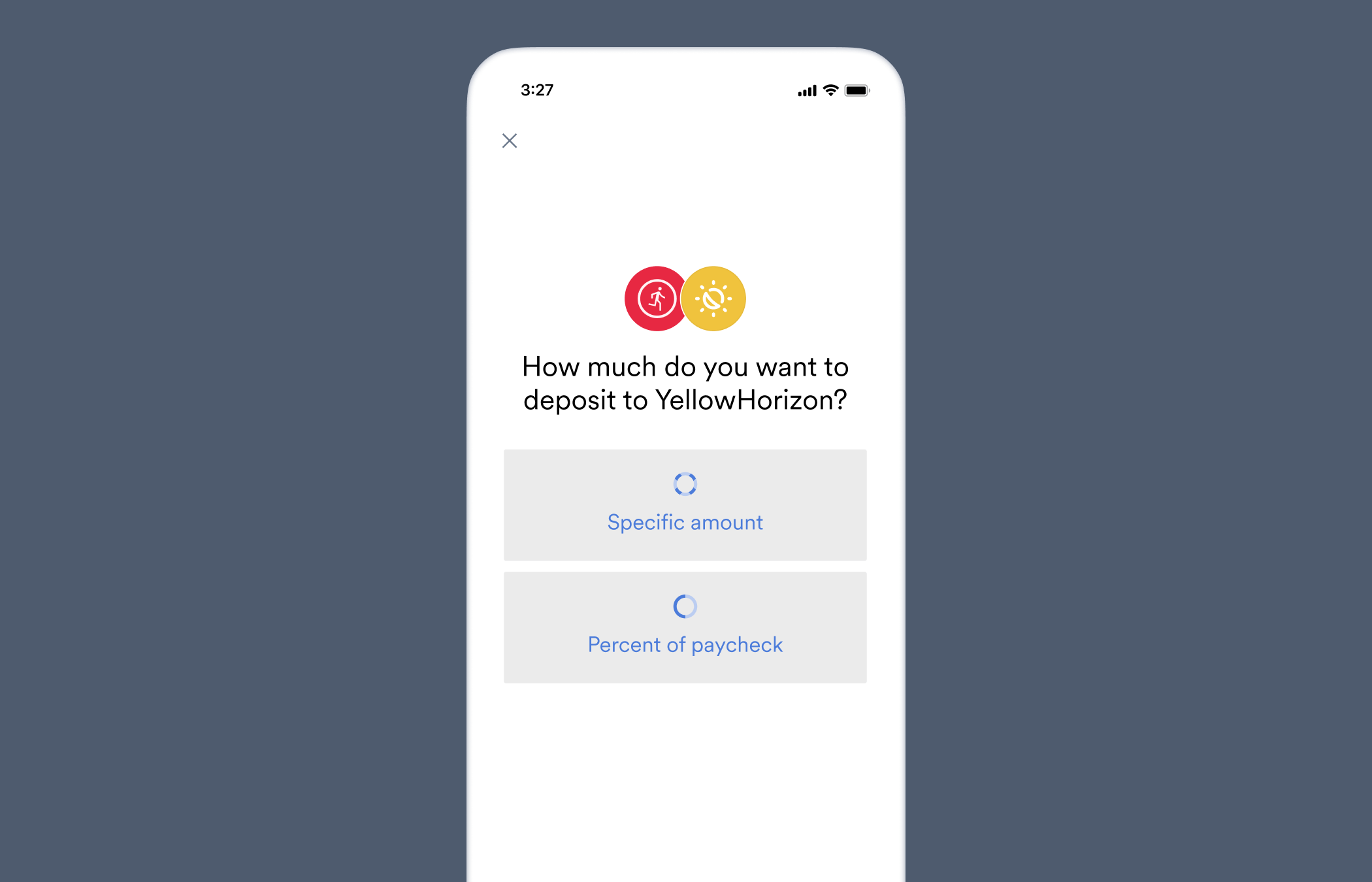
 ### Partial paycheck
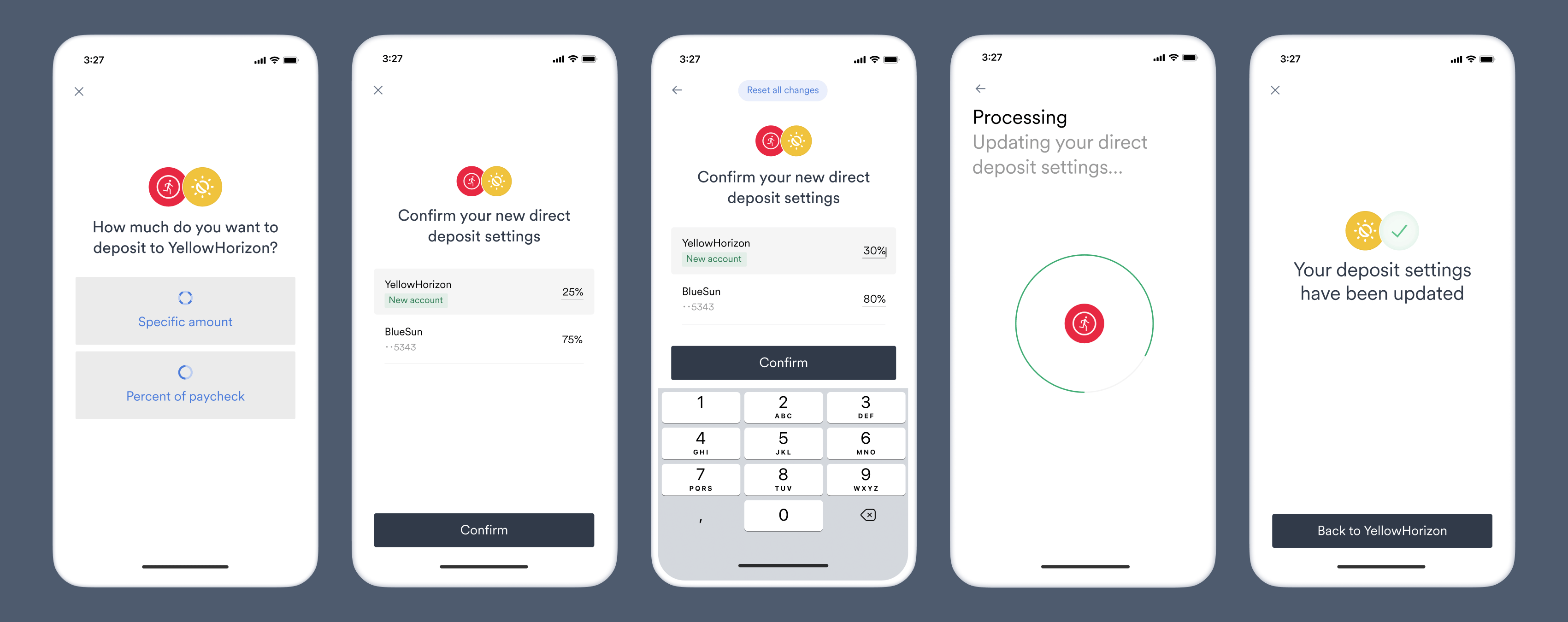
We recommend including both `percent_allocation` and `amount_allocation` with whole number values in your target deposit destination objects used for partial paychecks. Because some payroll systems only support one format, either amount values or percent values, this maximizes the number of payroll systems that will support a deposit switch with your specifications.
Target deposit destination object before encryption:
```json theme={}
{
"ach_deposit_account": {
"bank_name": "YellowHorizon",
"routing_number": "084101234",
"account_number": "9483746361234",
"account_type": "checking"
},
"percent_allocation": {
"value": "21",
"min_value": "21",
"max_value": "21"
},
"amount_allocation": {
"value": "177",
"min_value": "177",
"max_value": "177"
}
}
```
After encryption:\**example that can be used for testing*
```json theme={}
"CiUAB/5leWCxQRDKelXrywYSxm7xVBGMejFcuITkDuf/tksAYcgtEpwHAJU0CRvezDZ6G7V6xcgiJdagjqIB+8UCIhUzs2jtaqsK3zxOfnSk8St+dVo+40pKZqB34GpNXkSnGkqQQeUMrd0S9rOkiNlm3bK02/TmcEuRzDh8a9GYahrCrJaP3jvHtKkcmvTwWsXNt3vj+mKlV2CRuHRtBcHRa60R01C3GWi5cEu4isHyRPnckvHL4/Cen/lposTC+DNR5OnBYaw/bTHzWqL5Q5Plh2rUe7Stqolk8++XZHlUaLU1eUpDxuxihB1vF89D65YorVDnZ0r9jAX/M7KwLQidg0QNOxJ0KPEcpKALwbNn4/2eoX8rE/GzFLvnTRAeyDyznCU9yTa0M6D88DFinJk2WPWa5NrWqDihHga0iVwgNfg3TJem1vpg4IFmV78Xr5QcF/R7t7+LnpfD49strlF8xSBiR1ZPjAzle6KFr8rdpxSY/EGDOzz9rojDHR0Nm6n3W/LU08KuULvDxMCRhwiBZwiUkJhArN2p/bUVvholDb+dXy+M+M53aWfZBMjtSEqrufrB9KoodrSg+OySHEdk40dsC6EN2sphDroZULyXJNjPCD6PotLRkc8PVMscX2PIsDuQGIBA6/UjKN5QPXzFzT364o57trTLLoJbhA4rckfwQkGfUeV4DqmeQ2SPjxG+r7MrbqRSM3nDFK/fMr10XosoWXIw78cyfglsE8+9McvzjpoIcNPi7baf6J1d7TGPhIhbgeZ4X/IQ1WnDYOXoZ5VqXrYAsQwoIoz5dUhADyvHJSAmzudn8JQEq7UCsttiBpfgo0uraJpQm7vZZp2nsiSfobNkRiUhjSdalRiuJ4Zv10M4jAvVV2SaL9+oh8ccVfniMH2U5w/gsBU5LfCl0BZ7I7MphDSSjThAIyhq7QNdQAsZ2FL6X+RS5PBJ5aAS+orSfcQq0bLFMMRjBp63saUbifmtpCwGk0QHkCVaP211iam75Sv8U0JsLAsfEkW+OjSqa7ENKnlz5ft4im2YbKnkS2Xzk5EETUTh72Py80vaquPTTHOAuQsXFGkVzw/b8ZcjF60RQbodKekoqSiPyRvBwTIb6Ad1dbwrSqZdYBn/Pyb7HRZdu7ZYDUn41hx6rLmIoLdrIS/t+MzfAiRzI7KcZePNgAK+fBM/pB8dZmPZioOwJd2O2m7DvEt3gcxngOpW08JEfsqsc8y0c+R/gptIxhR9IQohRD8Pp7Skwef/iBhxI/Itrl0lWlOPpV2/43to"
```
Target deposit destination object before encryption:
```json theme={}
{
"ach_deposit_account": {
"bank_name": "YellowHorizon",
"routing_number": "084101234",
"account_number": "9483746361234",
"account_type": "checking"
},
"percent_allocation": {
"value": "21"
},
"amount_allocation": {
"value": "177"
}
}
```
After encryption:\**example that can be used for testing*
```json theme={}
"CiUAB/5leZofOjaHaD3dNbd/lJcgqfk+kpnQ7c63Rv4g2he/QzgzEqIHAJU0CRuTP5LRQlUJJ28W3f9rocXPzic4lmkaRCku5XfREMLkk37Lh2LXKlbdr9iIuUrrO5zyXG3AGLbZruhV0UQkTk9ZfbXT0rEHOEG1575Np6df0jHXKit9+vDtvrkFkjZcIh9KBro5QRZ0opzmcnaaVZZV8hn+12HIIeQDDzCxCBxnD85kfixUn0a9ouf1ayE3hyahKeXTUPM0QWCUZT0zJ71jHuz0KEPeHEtL5D58lE3hJ5BGXMy0SQr0j/9MixEZH8DrNFICKrBDwI/HK5xsWz2DyLWybCMZ97WZeTdA8CHU95W1PMSzMpU1E1KTdaWfdbwpPgzzGPIFLBb0ejBFG4YsUpn4UKaKZyw1u5aWkRxlMbIzrh9mbHz68gdzUq5kTOomGAWlJRMU9fBals7xlkkccKDLFPCAr/FFXYLLtdaEUSw+xFhjG6I8D9yP4SY1G5ApNgJMfHrggR93kP11u5f/d0OHiEB0pBKdnpEzVYPM4Dl2VWL2+lAJhd+OubHWkX/YZ+5DsZTCQOdt6mP4C3as9hX1VZA2SKbyCiOUEEZ322lZ8/h5L3tMRwHR+Z62yyIE5/eTgzFxFCLJqGZlSEceWSYkhADbKBsQDu7saM1ItMF4QTFWUnTMaexfPaepL2pMGAWmcR2P8fx3i6jlhRzi4D8Z9WJHcAUlYLNkY6mbkpyLq2/N9aHjDAaQwT47D7u+zdu27wdQh5z+Vdsymq+LFtRbrRHrikiD1fjwC6vv/jZNmiDCv38YZ5bFanqfz1aKSJ/oSSB5SXmC4ybWAS96q5Bb03p+HjoArBxS2qQcNOpR4ea0d1Wwu+gfBl6/uXDpNIQWkYsl5W4OJQLQP+273L7mt2thufdL4tQM8TTqH2cN9gXNY0wQvPlFW3B+D5Ng9xUGntK/dOuc1wuEt2UAyjpplzocNRBtCBBpi56dV5XveH30bkDBkhrZQzYBaXqpkxpZrQ4M3UEpMa4YXtBzg8XylllfCjcSLuiUj6LJIZbQeoDwyV1bFVrgxm1eK7lTxCB5UolHKsuzhE6TetODiqlb+ECzzSYzIYZSiuTmE8OLqoYm9amzLc/t5Jj5bHqDQXHUEqujYbo80iCQP/YdIXjmIB08WbfbvQ+xr6U9xfxjHiwu8StJxaPfgUuBgbaZ8jotn5gpYheoFnDIWIve+pZhCJyxQ2XAWrtxxUZc40M1FvvGRzFAbz9XpEqtPkEqzdf9umpt1itH1xCB"
```
Target deposit destination object before encryption:
```json theme={}
{
"ach_deposit_account": {
"bank_name": "YellowHorizon",
"routing_number": "084101234",
"account_number": "9483746361234",
"account_type": "checking"
},
"percent_allocation": {
"value": "21",
"min_value": "10"
},
"amount_allocation": {
"value": "177",
"min_value": "50"
}
}
```
After encryption:\**example that can be used for testing*
```json theme={}
"CiUAB/5lebeFYUd2OWVdJuIKUgORokixZxP7XH3BlmmSOmfIhR6XEp4HAJU0CRte7kcC2CP3jmf/30T8WGTztB1RACAWXkAKQEQx+/T5Vzm65jQu0+2tgBYnTbOaflQPfTA1pO84k6MWkMT6c+FkVkJL5hHM0Y0LDGdKDPFdnC0p9XWZSJf7lAs8YoBdYOd77lxiAOFR3wHlroEOtWL8BNHW1VD0eF1lPocwPPZ5mki9LxaXMRdxGE1lQm/kpIPZQQKfqPpRtVjd0k9EjCzN3LxDPtHTX/ylD7lqZ2LO2AiCu7rF/G+YN7w1WDxKTV6opfkR3XIMob3maI8MHLK9iLIxaTmxWx0eKRyxmZS5EuLEpAnS/xWNKPb66fYCA1ys89Ci14xSEkPmHgkloHg69o3fmAbIyL9ylGemirJR3KFeCyz9Rqx0cOsgkYZPiMtEbTL/iYOuhwpzpBDuwm7RbpXDxrTJqw9kvvO33KJdTCyi2lLgJx+j8Idl0E7Uy8PYLdotwTP48SNo8vDts0c1OtKqp8TQrm2f6vs/TD9JPzgOAZJsGqOMifShrlJcW47QoKJeuiLiLsrh/qLOR4t6IrsnscA3zBfT2FDkkXUGa9fcIOWWm7lQNzz+PUCSAuthT1+Ku9X770nn/tt1KDpIIsXpGQc32UIjgW6hDmjmHb+KY++u3bW274OELdVuGt1LtQ2DoIn4ewOVZHHHxI2hPJdGPD0f9wxhWszPPZY2goKpM632gZzj/vu1F31IFwneDRCcXzXMbA3aSU20Xq9AAmMhcsX+mZ32Wdjxf8rxkbU+H8OGQV4Efue/Dp2cwmA0OyulUZju7wNZ4DLPYXeRKcueMs3uxxLbXyEEVFimsl2lye4TIRtdgtAjbhS+mSztu+rtar0Nx3wUgeucdKFEppM0PWCeLlRyFQ2uZsQUknFKMS9198HslASsrJ6jvnazkgdAwHcAYUtwpTzHBkInRyNRKPOIq0EBS5Z2dzWGPgfsh4O7A+XsbFg2nc2JNXPrU0RAuy1PfsWhzYv5tA91H7eGahGoSxRL0+0vxLpE6thHzc7Jl4WU5qGXX/job2mO3af7EJS/I0ejx1nt4AD0BHst52niJM/1rRX52VqvEof4QQZVCQXSb4Kjyw6exRVD9y5wS++25szOK6kqn0mX89vnVj415Sr3IO9KdbHi+BWYb3b6OvYe3Wv0JXKfuXRj077NlXo9HSX+kwVO1T1WQs6SOadFigZmAAJ8RUfmx04ID9wZpPnk1H7HqAfm5VLbxyNFzM9ZgxU="
```
Target deposit destination object before encryption:
```json theme={}
{
"ach_deposit_account": {
"bank_name": "YellowHorizon",
"routing_number": "084101234",
"account_number": "9483746361234",
"account_type": "checking"
},
"percent_allocation": {
"value": "21",
"max_value": "50"
},
"amount_allocation": {
"value": "177",
"max_value": "500"
}
}
```
After encryption:\**example that can be used for testing*
```json theme={}
"CiUAB/5leTYYPTf7mZY8rdn6aM9roeOKjR9HDVJDkYAMZYH6go4OEp8HAJU0CRuszC658eG2jpYKI4ebv3KIR67oDbwXdeuvoGIwbyUVg+rJm8okQmii6oP4GLzbx/HzzEZzTBVDpNMQ9RTJwkGGTbl3jhThgeY3jao5Gg7OJOkQ4EVUxcRQGRXRVuhjZds39l+67IHsHzWFrzu7sDE0ULbCyidBQ2Y8EbPxPqWUV6E2/SJ8RKwm1ixTa/2USjnN57kDkqZFrQPDICghtEpwP8b9qWQ4TshAjt3rN87cSrVrj/uDLjGhOdQPtZW9putwfDnMlddRDGUZSM39U84DcbjJiZQi/CAVYkkBUsKwoAEXHKQjPqqvL8PObVk0UjNlqP/tekcrlbvpRpqwefNo/2s3pUxaHiIPU2WsU5DeY8UnuO+G2hJiNc70Zmi4QcaLShPrCjxfROqFfMAJVgAsV4FawkbECZtXI1CMeqZlV6DmpmVJoiBK3bfHlloWsJcvsesBbUMJMTDHHNp7yxx+vwPuK/NA+oS7Us/6h6Pl68ATdsjD2vRZOHTdwbPOEXaFPwAyaTNv/IUylg4dpBMWnhEHEUDwfYAFaZ/Z30O9KG4H4lR8i8nPr2JsRBmboCfj3ljLxhncfwYd8Gn+8GlwVZSekoWusyvjJwK7tblXy7qMH078jXwhX6vxsu3YA4GsHT+TtJruuA0SWmeaDh9SCa2SUt835b+DIcwUYvMnnNldRg2am5OaStDXGA21ioAdAsBclfOT8TCbBuklos8r5eM07RGkUivmxOy41LYzIVcIHkT0c104xNokS2xALXcsGYiZ9avorZ+VH9MbsJft6X/Fw7pZsNYJZS4GpSEDhPMz8Pi6vXauN84kaZsiq3KyM1ZQ3M9kUyEUPee6kT8qVZBl8EtDlVGvKw3XgqTXKaRWlevDLU82C3u20aDxNkPlDr95P8iKMmpfZm+0XafM71WNg1eeeWTDq68nKApz2dh9EUXfw1J6yVd/K92Uzegmnhu1noAj1nZSMGboQ83oE3Vas7bn2vGq5pDh9dHweYvLHWH/bqc6o0P1aPQPMHVaBb3NpL7lEfKeLByJzJRsgoTRQqbJzk1RjF6jtVPWO0wd2BbInulTXDFCO0XlQvSUd+ds3PagfbY2TAWK4L1GRzatFhVO/9EchZ4bFeZIdOYR/8uGwQcbus5xAUPpUtNuhfzjSGtMnY3IWDdsQnpqqi1FzemJcrHFYgE18Jqw9qZmPOfdqBulq4kcmLouNv0uQNtiOWSWriEC"
```
Target deposit destination object before encryption:
```json theme={}
{
"ach_deposit_account": {
"bank_name": "YellowHorizon",
"routing_number": "084101234",
"account_number": "9483746361234",
"account_type": "checking"
},
"percent_allocation": {
"value": "21",
"min_value": "10",
"max_value": "30"
},
"amount_allocation": {
"value": "177",
"min_value": "50",
"max_value": "250"
}
}
```
After encryption:\**example that can be used for testing*
```json theme={}
"CiUAB/5leUmctTLylX4H3qzN6JaLt2EExDu+EMkqSPKX3MmiWg/qEpsHAJU0CRsgH9okXU6Nl2Px+wUctI9SEMe52iTfhrG4c32NEu3DUi7rk4jakfdYk3IvWmL62Q7ywSZeGF5FAEeHRAAGdK8+C0wXMxpRvMAS52r0711wWt5e3CUUvQkluurtbS7KAiLnzpa/Ku4w5/CnwgWGJJCs7DlhvgbAcYxb6YWAUfmCv+JceW0eIVBf9oaxEuWVvE/0XBxHDTLwUMiYRG+6llkDrwG4OYh2Z6nqCIkaMF63p+LIHYOCUI+UMCcUWyNMtHGNFg1oP0Bfh8HI2+K3ChjoWhIyvKJ6A+RNARTxDRcak0DA4VJN5VUO+S2zBVmwZqhf4poCVCuudAUhKPmGIhOun01AtNKaUKwfc4rVGpcMgT2clPhKMYuI4kbfE12Xnkt0Q/YsKMyrCwNun9UsT4jEi2yHDwvrbJd+SGw1hHJZyMPcyIRxIXOfH2GZkb/bVOurU6EHY6LnT9pocxtttz4REf1FOVC+Q/AgqXNCjpGIzlpavPFk59ZI0bTrLxlM749uXr0fSOFxvRp47Uu+Y9H7kLSaq8no3bLSaD+QT7aT9DjY0UUiz8Ei4qOt/s3padUQ4gekBJygjnNApQbu/xgei8/HyTN4uKcs1aPG/ZHrxcZxBeW/kiX5ztcRfM66ha9qmb9J/ZzERUVoOZGJIvjEJbILcRz3yqaFztqHxo6k05JLq32xLJ1ukh/cnd/P7AUpcoDWCobOcFoXi0c/Ky2fhlK8qYE6c+kFJMEGQWgaP9c8wVt+BmvwCTmP3rQFWIiMDPQ5j15TKW33ewjLDDpSZs9YBeO1Hbm1i/Q8DD8CmkT75c5NvK+rFYinjWwhC+PbZTkX6CkPDqC+WQ15pft9WhADUN5UU5wjn1b5PiXdh7wjv7Fy39UmvDg4ueZcCA4AybT0Jw9AZoiSv7Vsr4rm0jTUdsJmNyEKhnZXSa+iEUxl1filv1CvUzm8rD0LXHKHIiqWtMmI4s+h3MzZM8InEF+CQ0Mx5Uzmb4AGAk55pRwGoL2nWn5t8Zlys2JUFo8qxVeOk7qNxer/XvBBu6gydP4DOD7IvmgVWNYaLyqLW815AlPAIF8Oc4XpkdpfCgHxyyGB9rBfzMVFvo7Jr8bs2JfSFGdPlaAJAocFTy/kU4+T3W+9wYGSyEUWoyUJzdqUboJcfb4tcMufRuYyHVjzur1HET7c4S1lV3XUL+qAJNoCe9TjAkYf1Hxn2AqEYF17aYZReEs="
```
If the underlying payroll system supports both amount and percent allocations *and* both are present in the target deposit destination, adding the following line to your target deposit destination will display an initial screen that allows the user to choose whether they prefer to see and edit their allocations in amounts or percentages:
```json theme={}
"allow_changing_allocation_type": true
```
### Partial paycheck
We recommend including both `percent_allocation` and `amount_allocation` with whole number values in your target deposit destination objects used for partial paychecks. Because some payroll systems only support one format, either amount values or percent values, this maximizes the number of payroll systems that will support a deposit switch with your specifications.
Target deposit destination object before encryption:
```json theme={}
{
"ach_deposit_account": {
"bank_name": "YellowHorizon",
"routing_number": "084101234",
"account_number": "9483746361234",
"account_type": "checking"
},
"percent_allocation": {
"value": "21",
"min_value": "21",
"max_value": "21"
},
"amount_allocation": {
"value": "177",
"min_value": "177",
"max_value": "177"
}
}
```
After encryption:\**example that can be used for testing*
```json theme={}
"CiUAB/5leWCxQRDKelXrywYSxm7xVBGMejFcuITkDuf/tksAYcgtEpwHAJU0CRvezDZ6G7V6xcgiJdagjqIB+8UCIhUzs2jtaqsK3zxOfnSk8St+dVo+40pKZqB34GpNXkSnGkqQQeUMrd0S9rOkiNlm3bK02/TmcEuRzDh8a9GYahrCrJaP3jvHtKkcmvTwWsXNt3vj+mKlV2CRuHRtBcHRa60R01C3GWi5cEu4isHyRPnckvHL4/Cen/lposTC+DNR5OnBYaw/bTHzWqL5Q5Plh2rUe7Stqolk8++XZHlUaLU1eUpDxuxihB1vF89D65YorVDnZ0r9jAX/M7KwLQidg0QNOxJ0KPEcpKALwbNn4/2eoX8rE/GzFLvnTRAeyDyznCU9yTa0M6D88DFinJk2WPWa5NrWqDihHga0iVwgNfg3TJem1vpg4IFmV78Xr5QcF/R7t7+LnpfD49strlF8xSBiR1ZPjAzle6KFr8rdpxSY/EGDOzz9rojDHR0Nm6n3W/LU08KuULvDxMCRhwiBZwiUkJhArN2p/bUVvholDb+dXy+M+M53aWfZBMjtSEqrufrB9KoodrSg+OySHEdk40dsC6EN2sphDroZULyXJNjPCD6PotLRkc8PVMscX2PIsDuQGIBA6/UjKN5QPXzFzT364o57trTLLoJbhA4rckfwQkGfUeV4DqmeQ2SPjxG+r7MrbqRSM3nDFK/fMr10XosoWXIw78cyfglsE8+9McvzjpoIcNPi7baf6J1d7TGPhIhbgeZ4X/IQ1WnDYOXoZ5VqXrYAsQwoIoz5dUhADyvHJSAmzudn8JQEq7UCsttiBpfgo0uraJpQm7vZZp2nsiSfobNkRiUhjSdalRiuJ4Zv10M4jAvVV2SaL9+oh8ccVfniMH2U5w/gsBU5LfCl0BZ7I7MphDSSjThAIyhq7QNdQAsZ2FL6X+RS5PBJ5aAS+orSfcQq0bLFMMRjBp63saUbifmtpCwGk0QHkCVaP211iam75Sv8U0JsLAsfEkW+OjSqa7ENKnlz5ft4im2YbKnkS2Xzk5EETUTh72Py80vaquPTTHOAuQsXFGkVzw/b8ZcjF60RQbodKekoqSiPyRvBwTIb6Ad1dbwrSqZdYBn/Pyb7HRZdu7ZYDUn41hx6rLmIoLdrIS/t+MzfAiRzI7KcZePNgAK+fBM/pB8dZmPZioOwJd2O2m7DvEt3gcxngOpW08JEfsqsc8y0c+R/gptIxhR9IQohRD8Pp7Skwef/iBhxI/Itrl0lWlOPpV2/43to"
```
Target deposit destination object before encryption:
```json theme={}
{
"ach_deposit_account": {
"bank_name": "YellowHorizon",
"routing_number": "084101234",
"account_number": "9483746361234",
"account_type": "checking"
},
"percent_allocation": {
"value": "21"
},
"amount_allocation": {
"value": "177"
}
}
```
After encryption:\**example that can be used for testing*
```json theme={}
"CiUAB/5leZofOjaHaD3dNbd/lJcgqfk+kpnQ7c63Rv4g2he/QzgzEqIHAJU0CRuTP5LRQlUJJ28W3f9rocXPzic4lmkaRCku5XfREMLkk37Lh2LXKlbdr9iIuUrrO5zyXG3AGLbZruhV0UQkTk9ZfbXT0rEHOEG1575Np6df0jHXKit9+vDtvrkFkjZcIh9KBro5QRZ0opzmcnaaVZZV8hn+12HIIeQDDzCxCBxnD85kfixUn0a9ouf1ayE3hyahKeXTUPM0QWCUZT0zJ71jHuz0KEPeHEtL5D58lE3hJ5BGXMy0SQr0j/9MixEZH8DrNFICKrBDwI/HK5xsWz2DyLWybCMZ97WZeTdA8CHU95W1PMSzMpU1E1KTdaWfdbwpPgzzGPIFLBb0ejBFG4YsUpn4UKaKZyw1u5aWkRxlMbIzrh9mbHz68gdzUq5kTOomGAWlJRMU9fBals7xlkkccKDLFPCAr/FFXYLLtdaEUSw+xFhjG6I8D9yP4SY1G5ApNgJMfHrggR93kP11u5f/d0OHiEB0pBKdnpEzVYPM4Dl2VWL2+lAJhd+OubHWkX/YZ+5DsZTCQOdt6mP4C3as9hX1VZA2SKbyCiOUEEZ322lZ8/h5L3tMRwHR+Z62yyIE5/eTgzFxFCLJqGZlSEceWSYkhADbKBsQDu7saM1ItMF4QTFWUnTMaexfPaepL2pMGAWmcR2P8fx3i6jlhRzi4D8Z9WJHcAUlYLNkY6mbkpyLq2/N9aHjDAaQwT47D7u+zdu27wdQh5z+Vdsymq+LFtRbrRHrikiD1fjwC6vv/jZNmiDCv38YZ5bFanqfz1aKSJ/oSSB5SXmC4ybWAS96q5Bb03p+HjoArBxS2qQcNOpR4ea0d1Wwu+gfBl6/uXDpNIQWkYsl5W4OJQLQP+273L7mt2thufdL4tQM8TTqH2cN9gXNY0wQvPlFW3B+D5Ng9xUGntK/dOuc1wuEt2UAyjpplzocNRBtCBBpi56dV5XveH30bkDBkhrZQzYBaXqpkxpZrQ4M3UEpMa4YXtBzg8XylllfCjcSLuiUj6LJIZbQeoDwyV1bFVrgxm1eK7lTxCB5UolHKsuzhE6TetODiqlb+ECzzSYzIYZSiuTmE8OLqoYm9amzLc/t5Jj5bHqDQXHUEqujYbo80iCQP/YdIXjmIB08WbfbvQ+xr6U9xfxjHiwu8StJxaPfgUuBgbaZ8jotn5gpYheoFnDIWIve+pZhCJyxQ2XAWrtxxUZc40M1FvvGRzFAbz9XpEqtPkEqzdf9umpt1itH1xCB"
```
Target deposit destination object before encryption:
```json theme={}
{
"ach_deposit_account": {
"bank_name": "YellowHorizon",
"routing_number": "084101234",
"account_number": "9483746361234",
"account_type": "checking"
},
"percent_allocation": {
"value": "21",
"min_value": "10"
},
"amount_allocation": {
"value": "177",
"min_value": "50"
}
}
```
After encryption:\**example that can be used for testing*
```json theme={}
"CiUAB/5lebeFYUd2OWVdJuIKUgORokixZxP7XH3BlmmSOmfIhR6XEp4HAJU0CRte7kcC2CP3jmf/30T8WGTztB1RACAWXkAKQEQx+/T5Vzm65jQu0+2tgBYnTbOaflQPfTA1pO84k6MWkMT6c+FkVkJL5hHM0Y0LDGdKDPFdnC0p9XWZSJf7lAs8YoBdYOd77lxiAOFR3wHlroEOtWL8BNHW1VD0eF1lPocwPPZ5mki9LxaXMRdxGE1lQm/kpIPZQQKfqPpRtVjd0k9EjCzN3LxDPtHTX/ylD7lqZ2LO2AiCu7rF/G+YN7w1WDxKTV6opfkR3XIMob3maI8MHLK9iLIxaTmxWx0eKRyxmZS5EuLEpAnS/xWNKPb66fYCA1ys89Ci14xSEkPmHgkloHg69o3fmAbIyL9ylGemirJR3KFeCyz9Rqx0cOsgkYZPiMtEbTL/iYOuhwpzpBDuwm7RbpXDxrTJqw9kvvO33KJdTCyi2lLgJx+j8Idl0E7Uy8PYLdotwTP48SNo8vDts0c1OtKqp8TQrm2f6vs/TD9JPzgOAZJsGqOMifShrlJcW47QoKJeuiLiLsrh/qLOR4t6IrsnscA3zBfT2FDkkXUGa9fcIOWWm7lQNzz+PUCSAuthT1+Ku9X770nn/tt1KDpIIsXpGQc32UIjgW6hDmjmHb+KY++u3bW274OELdVuGt1LtQ2DoIn4ewOVZHHHxI2hPJdGPD0f9wxhWszPPZY2goKpM632gZzj/vu1F31IFwneDRCcXzXMbA3aSU20Xq9AAmMhcsX+mZ32Wdjxf8rxkbU+H8OGQV4Efue/Dp2cwmA0OyulUZju7wNZ4DLPYXeRKcueMs3uxxLbXyEEVFimsl2lye4TIRtdgtAjbhS+mSztu+rtar0Nx3wUgeucdKFEppM0PWCeLlRyFQ2uZsQUknFKMS9198HslASsrJ6jvnazkgdAwHcAYUtwpTzHBkInRyNRKPOIq0EBS5Z2dzWGPgfsh4O7A+XsbFg2nc2JNXPrU0RAuy1PfsWhzYv5tA91H7eGahGoSxRL0+0vxLpE6thHzc7Jl4WU5qGXX/job2mO3af7EJS/I0ejx1nt4AD0BHst52niJM/1rRX52VqvEof4QQZVCQXSb4Kjyw6exRVD9y5wS++25szOK6kqn0mX89vnVj415Sr3IO9KdbHi+BWYb3b6OvYe3Wv0JXKfuXRj077NlXo9HSX+kwVO1T1WQs6SOadFigZmAAJ8RUfmx04ID9wZpPnk1H7HqAfm5VLbxyNFzM9ZgxU="
```
Target deposit destination object before encryption:
```json theme={}
{
"ach_deposit_account": {
"bank_name": "YellowHorizon",
"routing_number": "084101234",
"account_number": "9483746361234",
"account_type": "checking"
},
"percent_allocation": {
"value": "21",
"max_value": "50"
},
"amount_allocation": {
"value": "177",
"max_value": "500"
}
}
```
After encryption:\**example that can be used for testing*
```json theme={}
"CiUAB/5leTYYPTf7mZY8rdn6aM9roeOKjR9HDVJDkYAMZYH6go4OEp8HAJU0CRuszC658eG2jpYKI4ebv3KIR67oDbwXdeuvoGIwbyUVg+rJm8okQmii6oP4GLzbx/HzzEZzTBVDpNMQ9RTJwkGGTbl3jhThgeY3jao5Gg7OJOkQ4EVUxcRQGRXRVuhjZds39l+67IHsHzWFrzu7sDE0ULbCyidBQ2Y8EbPxPqWUV6E2/SJ8RKwm1ixTa/2USjnN57kDkqZFrQPDICghtEpwP8b9qWQ4TshAjt3rN87cSrVrj/uDLjGhOdQPtZW9putwfDnMlddRDGUZSM39U84DcbjJiZQi/CAVYkkBUsKwoAEXHKQjPqqvL8PObVk0UjNlqP/tekcrlbvpRpqwefNo/2s3pUxaHiIPU2WsU5DeY8UnuO+G2hJiNc70Zmi4QcaLShPrCjxfROqFfMAJVgAsV4FawkbECZtXI1CMeqZlV6DmpmVJoiBK3bfHlloWsJcvsesBbUMJMTDHHNp7yxx+vwPuK/NA+oS7Us/6h6Pl68ATdsjD2vRZOHTdwbPOEXaFPwAyaTNv/IUylg4dpBMWnhEHEUDwfYAFaZ/Z30O9KG4H4lR8i8nPr2JsRBmboCfj3ljLxhncfwYd8Gn+8GlwVZSekoWusyvjJwK7tblXy7qMH078jXwhX6vxsu3YA4GsHT+TtJruuA0SWmeaDh9SCa2SUt835b+DIcwUYvMnnNldRg2am5OaStDXGA21ioAdAsBclfOT8TCbBuklos8r5eM07RGkUivmxOy41LYzIVcIHkT0c104xNokS2xALXcsGYiZ9avorZ+VH9MbsJft6X/Fw7pZsNYJZS4GpSEDhPMz8Pi6vXauN84kaZsiq3KyM1ZQ3M9kUyEUPee6kT8qVZBl8EtDlVGvKw3XgqTXKaRWlevDLU82C3u20aDxNkPlDr95P8iKMmpfZm+0XafM71WNg1eeeWTDq68nKApz2dh9EUXfw1J6yVd/K92Uzegmnhu1noAj1nZSMGboQ83oE3Vas7bn2vGq5pDh9dHweYvLHWH/bqc6o0P1aPQPMHVaBb3NpL7lEfKeLByJzJRsgoTRQqbJzk1RjF6jtVPWO0wd2BbInulTXDFCO0XlQvSUd+ds3PagfbY2TAWK4L1GRzatFhVO/9EchZ4bFeZIdOYR/8uGwQcbus5xAUPpUtNuhfzjSGtMnY3IWDdsQnpqqi1FzemJcrHFYgE18Jqw9qZmPOfdqBulq4kcmLouNv0uQNtiOWSWriEC"
```
Target deposit destination object before encryption:
```json theme={}
{
"ach_deposit_account": {
"bank_name": "YellowHorizon",
"routing_number": "084101234",
"account_number": "9483746361234",
"account_type": "checking"
},
"percent_allocation": {
"value": "21",
"min_value": "10",
"max_value": "30"
},
"amount_allocation": {
"value": "177",
"min_value": "50",
"max_value": "250"
}
}
```
After encryption:\**example that can be used for testing*
```json theme={}
"CiUAB/5leUmctTLylX4H3qzN6JaLt2EExDu+EMkqSPKX3MmiWg/qEpsHAJU0CRsgH9okXU6Nl2Px+wUctI9SEMe52iTfhrG4c32NEu3DUi7rk4jakfdYk3IvWmL62Q7ywSZeGF5FAEeHRAAGdK8+C0wXMxpRvMAS52r0711wWt5e3CUUvQkluurtbS7KAiLnzpa/Ku4w5/CnwgWGJJCs7DlhvgbAcYxb6YWAUfmCv+JceW0eIVBf9oaxEuWVvE/0XBxHDTLwUMiYRG+6llkDrwG4OYh2Z6nqCIkaMF63p+LIHYOCUI+UMCcUWyNMtHGNFg1oP0Bfh8HI2+K3ChjoWhIyvKJ6A+RNARTxDRcak0DA4VJN5VUO+S2zBVmwZqhf4poCVCuudAUhKPmGIhOun01AtNKaUKwfc4rVGpcMgT2clPhKMYuI4kbfE12Xnkt0Q/YsKMyrCwNun9UsT4jEi2yHDwvrbJd+SGw1hHJZyMPcyIRxIXOfH2GZkb/bVOurU6EHY6LnT9pocxtttz4REf1FOVC+Q/AgqXNCjpGIzlpavPFk59ZI0bTrLxlM749uXr0fSOFxvRp47Uu+Y9H7kLSaq8no3bLSaD+QT7aT9DjY0UUiz8Ei4qOt/s3padUQ4gekBJygjnNApQbu/xgei8/HyTN4uKcs1aPG/ZHrxcZxBeW/kiX5ztcRfM66ha9qmb9J/ZzERUVoOZGJIvjEJbILcRz3yqaFztqHxo6k05JLq32xLJ1ukh/cnd/P7AUpcoDWCobOcFoXi0c/Ky2fhlK8qYE6c+kFJMEGQWgaP9c8wVt+BmvwCTmP3rQFWIiMDPQ5j15TKW33ewjLDDpSZs9YBeO1Hbm1i/Q8DD8CmkT75c5NvK+rFYinjWwhC+PbZTkX6CkPDqC+WQ15pft9WhADUN5UU5wjn1b5PiXdh7wjv7Fy39UmvDg4ueZcCA4AybT0Jw9AZoiSv7Vsr4rm0jTUdsJmNyEKhnZXSa+iEUxl1filv1CvUzm8rD0LXHKHIiqWtMmI4s+h3MzZM8InEF+CQ0Mx5Uzmb4AGAk55pRwGoL2nWn5t8Zlys2JUFo8qxVeOk7qNxer/XvBBu6gydP4DOD7IvmgVWNYaLyqLW815AlPAIF8Oc4XpkdpfCgHxyyGB9rBfzMVFvo7Jr8bs2JfSFGdPlaAJAocFTy/kU4+T3W+9wYGSyEUWoyUJzdqUboJcfb4tcMufRuYyHVjzur1HET7c4S1lV3XUL+qAJNoCe9TjAkYf1Hxn2AqEYF17aYZReEs="
```
If the underlying payroll system supports both amount and percent allocations *and* both are present in the target deposit destination, adding the following line to your target deposit destination will display an initial screen that allows the user to choose whether they prefer to see and edit their allocations in amounts or percentages:
```json theme={}
"allow_changing_allocation_type": true
```
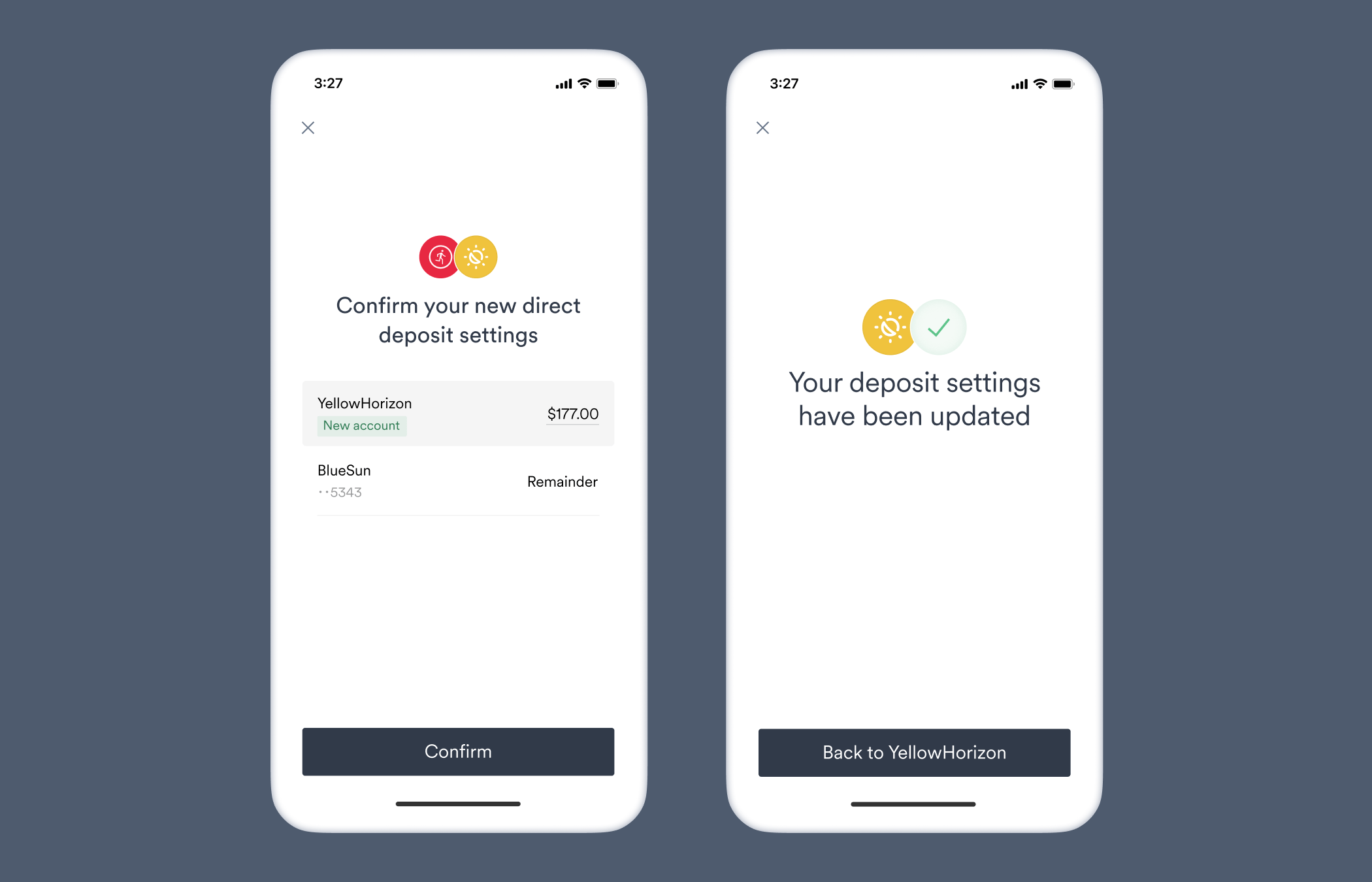
 You can also suggest an exact percentage or an exact amount exclusively, typically used in connection with loan repayments. In these cases, you would include only `percent_allocation` or only `amount_allocation` in your target deposit destination, respectively.
Target deposit destination object before encryption:
```json theme={}
{
"ach_deposit_account": {
"bank_name": "YellowHorizon",
"routing_number": "084101234",
"account_number": "9483746361234",
"account_type": "checking"
},
"percent_allocation": {
"value": "15"
}
}
```
After encryption:\**example that can be used for testing*
```json theme={}
"CiUAB/5leYIEHDon2gtzVZTPFMU9VW7EZxhGyYt2N+6es51O3jEJEvIGAJU0CRvnvIqxt3j0FxqhLwVbhmhrlvqQ5zPV7q+KST7g9UGSAbiSrn5DzIxTbE3GHTbbhEBRuHw+07yXva1blU4IQ8bBfrL+b7JReNpW4o3PGPyua7L3rIoBAJsN3c4DXPYJsxws6Cl1MzeYWK6Ts9Gt1C/t7WJBO512gH0iG5QjkuWF9c6L4eYrtiQggrIIS9lUKSlavRTktsnUJ2f1jIyvgMB8zlXvvpTI/+Cdk6y11j4FtHqUpQX7pXvLZ5EY9p7L4S9tQ/gYMjiDi9PzDDh7l5sqwOBG4mTtt6N59ZyH/Q0yrWASXEylI/TOcKWLnTbQOzyuItxGilNiMFdK6SrE9gMLRSydvK+H5Z41+z4BIuZGTs2OMiMxF/FB+jShDGC7hOirwt+DA0bdTjOQilu0HmXds/FVFxbbK1WwKt266vMqVxODwHLGJrsa4JkslUxIihtnT2YHwYYPHWHDJfwHrenPECXhD/95qwuwFwDj3JuultX3j4kvsuAN/LFh8t98DjeuYQVBdJvNnbtK6M7Aw3N6BZ9Fh16mCg9hL4oPV/iv7PgJOthYnnE5G4zdIoL0p+UVzHFpA9WWEyHd6C3lWJqO75izVSQt5eQuX8xVFOG8jaVls6TG/nqg5hjCF5A1iUzz4e3DmFFjsEJwhaXRQHSOY8ZJNhSOOixQFgQhKP7RgL2Lkfr6148QWqNx8yRXFwR2yLd5dNdlw2DvN+z9AhDNq2fSJ8Efe6uziVWrAWdb8Vwd/zCmKqCHkMjtTXD3caLCjt4iT/ss3awncvCwvxrs2aRb2LBU+WBd1t5n+ibcthfXwzjte2BHn5Bnjk8GFXjHNueOn2aNdMifimL3paLEKJEBGdhhLoKmqH1pCW5aLwGPV8V27gPQddUR8BNhsBPtVXIXoD+XpkEuysEbmYA5sOEIuF6ZPel4vit4KB2WJSwtQXr7Ae8xcAuiKV50y9Mq+m2jkwt5ilQ5rTnIqqHslsUdbWefJkE/IhlI2w0dGawIGxdp9T4uYh78k+SuCkXNGvUzMbTC0KfHQ+3tf0nmCiKFmNk07OyawZefPkend1cTLwQEYtdZpp0u+784x1MbUggtY7iacnlXiWE4Fx+3en7eS9vtVb6SXUK+wc4SMFDTBIDPKBUcBYytM4gtMxkJdbvuBKQ7CvLTYaBN"
```
Target deposit destination object before encryption:
```json theme={}
{
"ach_deposit_account": {
"bank_name": "YellowHorizon",
"routing_number": "084101234",
"account_number": "9483746361234",
"account_type": "checking"
},
"percent_allocation": {
"value": "15",
"min_value": "15",
"max_value": "15"
}
}
```
After encryption:\**example that can be used for testing*
```json theme={}
"CiUAB/5leSH1E0nFqogD9fDIJfwBz/cjI4YzM5IrKWVl35gqEo1dEu0GAJU0CRu7SHoJQYaFA44sb053h3hZIDd9qrc+f1UCpy0L83dfAyTFKkRqB2AjX9wn0jZ4lwUip4ml5ORkCQws2LGMRgKvcsbYGbtyBze0qOhmMhEZ92dEEo1ApJTuL9l2JuOssuZKhfm/D6lnazC5+1cFBu1C5KlMMCkirBp1jJUcdKIJYIMMVi22O/gLjAFRPAkQALjlJrgqW9c7hPpQpAAzXzJcPBgrWgMtvcFlPhGVYIHj6/01jNRyBOBo4drE/DuWnChnVBJcx1BNtSDj4SMpP4fZ2alrnpzw8ZSrBY8EGgijpOsPD1tOu+Ox9j3648QS9HK937QCp91XC4iVq+Ew4eBZRPF48tXE5Qu5NUKLFdmRHx+HnxUqxZAKt4XpaZq660PB32OD32nS+72Vjsxr6R3BV1E/0gzrLlodTlKZIcHClFrRyb3UKI0hzPtGgu2QJMaSY4rewUvHWc4gyaB3w12F1R1lRS1tpgKBLeueP7zRN8H+73/G9U7JEbTxy5fZSaPKLOcsk6KitxEKVyGlSzVq4/OAvjeABmYmyLn+3vEdcRF3Rs7w/qtvTF8mEJVkC5qAvzxhgcjb4r9OZau3Wk+2PmMqdRsGP+SiZtct20ChbJF6xLGZ+FnZaXHGOvm43iKcCIanGd1SaUxcujv5ijWP5d9OQUBjk/5PP/Ru5qPUZavjOhINP6MACx7WvUyOQyqA/xhA+PKYI6IbXBhjHy1CQ9i5C74nskX06Lp7MZvbUCZLBmNvTulaha/wKjbBN0GjbM5rJtibYBsUYJT9v/85YlkM2N48NEWMIX0kYvOB9MUV/fsMf7n9bkv2shVsj7zEy+XVdGSOL7dMq9Wpa0Kh7zDhCHX9xc5iGRQUTLskmRyFDwzk8+YsFo80C1tODuv0dZENVBCw/ppA/I8lSZNYMTmuq7lQO5DNkOnclXCoWOPnQjBB/Tc8jd29GGv7t7CfR4C4itZuK0j9+OgRgFZp6UaTFTZvURKFHiydVFIarL7NVnw2jKO4vcP7NZLXgVKNj4+AtWTnD3qfKI9tB8IZdmHZwrU58ubUZ6eg7svViEzcWhaHRs3NlXlKUzCY10xOF1BB1d+CdD1Lytx9UyWGaTEK3qRMOetzH/B7CuDvwayt1VzndOJRUcIg2q9lHg5sKtWUSb1x5Q=="
```
Target deposit destination object before encryption:
```json theme={}
{
"ach_deposit_account": {
"bank_name": "YellowHorizon",
"routing_number": "084101234",
"account_number": "9483746361234",
"account_type": "checking"
},
"amount_allocation": {
"value": "177"
}
}
```
After encryption:\**example that can be used for testing*
```json theme={}
"CiUAB/5leaA4Jzisxpi7es4Pdt7Krcm6SYdg3P2oqv+i7LBeDU43EvMGAJU0CRvwv+rRroFsGhBYfX01Ar1wda2OjfkaTldcfV3G/6A9kJFhBg3/ao3IaED46oO6WV/DuHeCn8tt1ZwXagL+O1Bqu/YdckquogIZol7F2h12bW+0B22uA5t78DLuUVzhJSMRkZsaOIYOq5bfyMbS1gm/aZLO1KbQi1ycWCrhtyhyUPrpx126MmhCEoExe2osdg3m8uVdEioQMGJKyi/INXMHcY1O+91/ifmIvgFwnTXHitIj5VWznOtZ9t6wPEqeoR4O+ZgUHo3NM77YFP10vX7ntr9wrhOiv/8f4i8SvHQzTbBp8ddBdGhdujMFM+3YUBk0QUvIGHzzXE708cFE0XJfhRO0iXFb4Hmbi/WaofYo3E5aCtrwQoe+FxzDqgohWnFApAwFYu4nSuao9B5t3Fyai2Rwo6Zy6FpdfvBKQ3w8iFvr3tzb1ni02UGs/BIP8HiSK/WCu8NyUn765HXvGNtgg+48yFprCIuOIl3o08qqDvZk7nQRFocyhwDbYFmO6l9l6+tYtHQRom2f3dofmu5nszojPIdHuaFzHMllACUvluSH6qZn1unP9RIMPm09v0vSuX3sqjjNeEYn1K3N09JYfpTcF3HGm0Tjat8ziJsGa1WEW9OP3mUHITTYtgxGjvQnUPYV9HcC3NGfuz1MvFXSQlTd0TFlOxNy1i+ORuPgORtLR8KHC06kqdCDfhcuSgtVSYY46z5L0SwJcuRXOzJUxs5/c13HkWBVpq8MR6V1lhqfP1JnJj5n6EzIyeYsl67XN89pt7a1faJ+BDERWXN2wo+S4uoQhBiYRn+W8A3lUSHisdHa1mfQ0stUKpbKN6ERH2opxFXL/tNAhEuRUuYxiJC+kaYKt/p7fI9bReQFIPpqY0tOukf9K+Pbk8XDPCaXSrxftwmiQrI+QWJCFm31fByan3qLmwFTexjvQsnFFtjqVHcRzsqfvniL0A4peGy42ATVLD7/bKHCn6dkvWfD7c8du28uzc/SewRqInoW5614OR3+dilNyKhn02yHsO18PE03WKYB1RHMVO47CvHZ1MS13XjrnD5piGHGN7Uxead2/LrIjKFUcaW60+XXTAJaDKwSpFV6oC5XRRb99yWEWUVO54+WdOESgJ/pFqQ0BoczQH0Lh/GoOngzPIkmnX0e2dAsZZjBHhpQhBretw=="
```
Target deposit destination object before encryption:
```json theme={}
{
"ach_deposit_account": {
"bank_name": "YellowHorizon",
"routing_number": "084101234",
"account_number": "9483746361234",
"account_type": "checking"
},
"amount_allocation": {
"value": "177",
"min_value": "177",
"max_value": "177"
}
}
```
After encryption:\**example that can be used for testing*
```json theme={}
"CiUAB/5ledikDcWfP+xaIJj7nJ6M2bYD7XW+e6a87FPvDjisaY6KEvEGAJU0CRv9L8V4ci1wrYBP2QXURVQnnh3gyuDZ0FJF0Pirdm8DblUlDh5c+7HJUeWoHIAJSwCjeunUELMuRXi1QhtLUB9ySB3BxcxCOzhFEA6vdqhv7Hbfz88xgzyIKj1pCsN5dJoEQPJOby3qOOKwRTc4fYsE0ic2/fCO/T9mvT4t8B1zV3kARtn/kyhFWoDJ+ZSBrLaA2sHwbePiSQNcWOKFfMunWftw7uZo2FMp/+CsTk/abhCwg+siqqJjJJVCUzNZzc5Wpb6+xqwcWXQFqz9Nw/pCyuss91BCFO1Ax2rF40uccyp9F93Xjaicjp79Djzp4faDQH6Pbm4+X88+MsNvk9MrZPJQmJLgzx4wH3iMs1Goll92vp9VjhzrN7iYYV9HpMywlJRFjrlCKXLai4GRg9zyFlZ4J0eiK9uBXC0IxEapKZDFYVWtJvgik6XFwIMrcvKhKWSCFF1N1l9RTuPAUaLYB7ZGhOjXju6lr5fOwejjWOj3uFrGMVh6uivTvdyFlfZpYv/fw2oO505nqMtBbT3rMNCZOd4K1ANmmYrtmn+zKTxiI4f+Aetlhes19ANsgbm6US37ZvoxDTIk/+CLzcg6JJpSYx3OqE/uIzne30rC/iYJBormIYfxBWhAtpUtYkjmoNBOtKJw/XJyGfdtvFuizBAts9msiMPupYGNtg8ztw80gsdjUzZsjWTeCs5b9vn6WsdXq8Vr8LAkeoNAH7KLVHnm0uAoFXROh19BCQx+uzEk+BFUEMzPIou7bSMEcG8Jmxm/hSBe7Rc68tn6HV0POTslI9UjSgMQYO+rZFFEwXTBEr0O14GTnd6PNNBp8HnlGgtkYjuFDBgVssQrokUjoa7gA9RbHXpJbU6yX77iZHYupwz8Pg7AAKqiJUCEOEB+5pWx0NZSXOmY8y1NyUXpAibmuwEIMeKvlpwHjgjtdoh0//q1H/wq4rSaJEJ7CzJXD4AXcvbMiaLb9uKYqzna354979Vl6vo1xPeH6AGCr0/KgfrFwjUIMFtvHzdmdSZH2q7WW8pdJQU3rVdrUygOh+bqH6vzsGyPtt/K2nP9D6KFGU7u58WiwzcG5D5KG4ID+Ggft4E2vMaTq9QPXeXTkoMdN2YR3+gQdFGWrurW7SfeIzl0siMs4vEXudGpg0x570v5DZfpu6Ykdcc="
```
You can also suggest an exact percentage or an exact amount exclusively, typically used in connection with loan repayments. In these cases, you would include only `percent_allocation` or only `amount_allocation` in your target deposit destination, respectively.
Target deposit destination object before encryption:
```json theme={}
{
"ach_deposit_account": {
"bank_name": "YellowHorizon",
"routing_number": "084101234",
"account_number": "9483746361234",
"account_type": "checking"
},
"percent_allocation": {
"value": "15"
}
}
```
After encryption:\**example that can be used for testing*
```json theme={}
"CiUAB/5leYIEHDon2gtzVZTPFMU9VW7EZxhGyYt2N+6es51O3jEJEvIGAJU0CRvnvIqxt3j0FxqhLwVbhmhrlvqQ5zPV7q+KST7g9UGSAbiSrn5DzIxTbE3GHTbbhEBRuHw+07yXva1blU4IQ8bBfrL+b7JReNpW4o3PGPyua7L3rIoBAJsN3c4DXPYJsxws6Cl1MzeYWK6Ts9Gt1C/t7WJBO512gH0iG5QjkuWF9c6L4eYrtiQggrIIS9lUKSlavRTktsnUJ2f1jIyvgMB8zlXvvpTI/+Cdk6y11j4FtHqUpQX7pXvLZ5EY9p7L4S9tQ/gYMjiDi9PzDDh7l5sqwOBG4mTtt6N59ZyH/Q0yrWASXEylI/TOcKWLnTbQOzyuItxGilNiMFdK6SrE9gMLRSydvK+H5Z41+z4BIuZGTs2OMiMxF/FB+jShDGC7hOirwt+DA0bdTjOQilu0HmXds/FVFxbbK1WwKt266vMqVxODwHLGJrsa4JkslUxIihtnT2YHwYYPHWHDJfwHrenPECXhD/95qwuwFwDj3JuultX3j4kvsuAN/LFh8t98DjeuYQVBdJvNnbtK6M7Aw3N6BZ9Fh16mCg9hL4oPV/iv7PgJOthYnnE5G4zdIoL0p+UVzHFpA9WWEyHd6C3lWJqO75izVSQt5eQuX8xVFOG8jaVls6TG/nqg5hjCF5A1iUzz4e3DmFFjsEJwhaXRQHSOY8ZJNhSOOixQFgQhKP7RgL2Lkfr6148QWqNx8yRXFwR2yLd5dNdlw2DvN+z9AhDNq2fSJ8Efe6uziVWrAWdb8Vwd/zCmKqCHkMjtTXD3caLCjt4iT/ss3awncvCwvxrs2aRb2LBU+WBd1t5n+ibcthfXwzjte2BHn5Bnjk8GFXjHNueOn2aNdMifimL3paLEKJEBGdhhLoKmqH1pCW5aLwGPV8V27gPQddUR8BNhsBPtVXIXoD+XpkEuysEbmYA5sOEIuF6ZPel4vit4KB2WJSwtQXr7Ae8xcAuiKV50y9Mq+m2jkwt5ilQ5rTnIqqHslsUdbWefJkE/IhlI2w0dGawIGxdp9T4uYh78k+SuCkXNGvUzMbTC0KfHQ+3tf0nmCiKFmNk07OyawZefPkend1cTLwQEYtdZpp0u+784x1MbUggtY7iacnlXiWE4Fx+3en7eS9vtVb6SXUK+wc4SMFDTBIDPKBUcBYytM4gtMxkJdbvuBKQ7CvLTYaBN"
```
Target deposit destination object before encryption:
```json theme={}
{
"ach_deposit_account": {
"bank_name": "YellowHorizon",
"routing_number": "084101234",
"account_number": "9483746361234",
"account_type": "checking"
},
"percent_allocation": {
"value": "15",
"min_value": "15",
"max_value": "15"
}
}
```
After encryption:\**example that can be used for testing*
```json theme={}
"CiUAB/5leSH1E0nFqogD9fDIJfwBz/cjI4YzM5IrKWVl35gqEo1dEu0GAJU0CRu7SHoJQYaFA44sb053h3hZIDd9qrc+f1UCpy0L83dfAyTFKkRqB2AjX9wn0jZ4lwUip4ml5ORkCQws2LGMRgKvcsbYGbtyBze0qOhmMhEZ92dEEo1ApJTuL9l2JuOssuZKhfm/D6lnazC5+1cFBu1C5KlMMCkirBp1jJUcdKIJYIMMVi22O/gLjAFRPAkQALjlJrgqW9c7hPpQpAAzXzJcPBgrWgMtvcFlPhGVYIHj6/01jNRyBOBo4drE/DuWnChnVBJcx1BNtSDj4SMpP4fZ2alrnpzw8ZSrBY8EGgijpOsPD1tOu+Ox9j3648QS9HK937QCp91XC4iVq+Ew4eBZRPF48tXE5Qu5NUKLFdmRHx+HnxUqxZAKt4XpaZq660PB32OD32nS+72Vjsxr6R3BV1E/0gzrLlodTlKZIcHClFrRyb3UKI0hzPtGgu2QJMaSY4rewUvHWc4gyaB3w12F1R1lRS1tpgKBLeueP7zRN8H+73/G9U7JEbTxy5fZSaPKLOcsk6KitxEKVyGlSzVq4/OAvjeABmYmyLn+3vEdcRF3Rs7w/qtvTF8mEJVkC5qAvzxhgcjb4r9OZau3Wk+2PmMqdRsGP+SiZtct20ChbJF6xLGZ+FnZaXHGOvm43iKcCIanGd1SaUxcujv5ijWP5d9OQUBjk/5PP/Ru5qPUZavjOhINP6MACx7WvUyOQyqA/xhA+PKYI6IbXBhjHy1CQ9i5C74nskX06Lp7MZvbUCZLBmNvTulaha/wKjbBN0GjbM5rJtibYBsUYJT9v/85YlkM2N48NEWMIX0kYvOB9MUV/fsMf7n9bkv2shVsj7zEy+XVdGSOL7dMq9Wpa0Kh7zDhCHX9xc5iGRQUTLskmRyFDwzk8+YsFo80C1tODuv0dZENVBCw/ppA/I8lSZNYMTmuq7lQO5DNkOnclXCoWOPnQjBB/Tc8jd29GGv7t7CfR4C4itZuK0j9+OgRgFZp6UaTFTZvURKFHiydVFIarL7NVnw2jKO4vcP7NZLXgVKNj4+AtWTnD3qfKI9tB8IZdmHZwrU58ubUZ6eg7svViEzcWhaHRs3NlXlKUzCY10xOF1BB1d+CdD1Lytx9UyWGaTEK3qRMOetzH/B7CuDvwayt1VzndOJRUcIg2q9lHg5sKtWUSb1x5Q=="
```
Target deposit destination object before encryption:
```json theme={}
{
"ach_deposit_account": {
"bank_name": "YellowHorizon",
"routing_number": "084101234",
"account_number": "9483746361234",
"account_type": "checking"
},
"amount_allocation": {
"value": "177"
}
}
```
After encryption:\**example that can be used for testing*
```json theme={}
"CiUAB/5leaA4Jzisxpi7es4Pdt7Krcm6SYdg3P2oqv+i7LBeDU43EvMGAJU0CRvwv+rRroFsGhBYfX01Ar1wda2OjfkaTldcfV3G/6A9kJFhBg3/ao3IaED46oO6WV/DuHeCn8tt1ZwXagL+O1Bqu/YdckquogIZol7F2h12bW+0B22uA5t78DLuUVzhJSMRkZsaOIYOq5bfyMbS1gm/aZLO1KbQi1ycWCrhtyhyUPrpx126MmhCEoExe2osdg3m8uVdEioQMGJKyi/INXMHcY1O+91/ifmIvgFwnTXHitIj5VWznOtZ9t6wPEqeoR4O+ZgUHo3NM77YFP10vX7ntr9wrhOiv/8f4i8SvHQzTbBp8ddBdGhdujMFM+3YUBk0QUvIGHzzXE708cFE0XJfhRO0iXFb4Hmbi/WaofYo3E5aCtrwQoe+FxzDqgohWnFApAwFYu4nSuao9B5t3Fyai2Rwo6Zy6FpdfvBKQ3w8iFvr3tzb1ni02UGs/BIP8HiSK/WCu8NyUn765HXvGNtgg+48yFprCIuOIl3o08qqDvZk7nQRFocyhwDbYFmO6l9l6+tYtHQRom2f3dofmu5nszojPIdHuaFzHMllACUvluSH6qZn1unP9RIMPm09v0vSuX3sqjjNeEYn1K3N09JYfpTcF3HGm0Tjat8ziJsGa1WEW9OP3mUHITTYtgxGjvQnUPYV9HcC3NGfuz1MvFXSQlTd0TFlOxNy1i+ORuPgORtLR8KHC06kqdCDfhcuSgtVSYY46z5L0SwJcuRXOzJUxs5/c13HkWBVpq8MR6V1lhqfP1JnJj5n6EzIyeYsl67XN89pt7a1faJ+BDERWXN2wo+S4uoQhBiYRn+W8A3lUSHisdHa1mfQ0stUKpbKN6ERH2opxFXL/tNAhEuRUuYxiJC+kaYKt/p7fI9bReQFIPpqY0tOukf9K+Pbk8XDPCaXSrxftwmiQrI+QWJCFm31fByan3qLmwFTexjvQsnFFtjqVHcRzsqfvniL0A4peGy42ATVLD7/bKHCn6dkvWfD7c8du28uzc/SewRqInoW5614OR3+dilNyKhn02yHsO18PE03WKYB1RHMVO47CvHZ1MS13XjrnD5piGHGN7Uxead2/LrIjKFUcaW60+XXTAJaDKwSpFV6oC5XRRb99yWEWUVO54+WdOESgJ/pFqQ0BoczQH0Lh/GoOngzPIkmnX0e2dAsZZjBHhpQhBretw=="
```
Target deposit destination object before encryption:
```json theme={}
{
"ach_deposit_account": {
"bank_name": "YellowHorizon",
"routing_number": "084101234",
"account_number": "9483746361234",
"account_type": "checking"
},
"amount_allocation": {
"value": "177",
"min_value": "177",
"max_value": "177"
}
}
```
After encryption:\**example that can be used for testing*
```json theme={}
"CiUAB/5ledikDcWfP+xaIJj7nJ6M2bYD7XW+e6a87FPvDjisaY6KEvEGAJU0CRv9L8V4ci1wrYBP2QXURVQnnh3gyuDZ0FJF0Pirdm8DblUlDh5c+7HJUeWoHIAJSwCjeunUELMuRXi1QhtLUB9ySB3BxcxCOzhFEA6vdqhv7Hbfz88xgzyIKj1pCsN5dJoEQPJOby3qOOKwRTc4fYsE0ic2/fCO/T9mvT4t8B1zV3kARtn/kyhFWoDJ+ZSBrLaA2sHwbePiSQNcWOKFfMunWftw7uZo2FMp/+CsTk/abhCwg+siqqJjJJVCUzNZzc5Wpb6+xqwcWXQFqz9Nw/pCyuss91BCFO1Ax2rF40uccyp9F93Xjaicjp79Djzp4faDQH6Pbm4+X88+MsNvk9MrZPJQmJLgzx4wH3iMs1Goll92vp9VjhzrN7iYYV9HpMywlJRFjrlCKXLai4GRg9zyFlZ4J0eiK9uBXC0IxEapKZDFYVWtJvgik6XFwIMrcvKhKWSCFF1N1l9RTuPAUaLYB7ZGhOjXju6lr5fOwejjWOj3uFrGMVh6uivTvdyFlfZpYv/fw2oO505nqMtBbT3rMNCZOd4K1ANmmYrtmn+zKTxiI4f+Aetlhes19ANsgbm6US37ZvoxDTIk/+CLzcg6JJpSYx3OqE/uIzne30rC/iYJBormIYfxBWhAtpUtYkjmoNBOtKJw/XJyGfdtvFuizBAts9msiMPupYGNtg8ztw80gsdjUzZsjWTeCs5b9vn6WsdXq8Vr8LAkeoNAH7KLVHnm0uAoFXROh19BCQx+uzEk+BFUEMzPIou7bSMEcG8Jmxm/hSBe7Rc68tn6HV0POTslI9UjSgMQYO+rZFFEwXTBEr0O14GTnd6PNNBp8HnlGgtkYjuFDBgVssQrokUjoa7gA9RbHXpJbU6yX77iZHYupwz8Pg7AAKqiJUCEOEB+5pWx0NZSXOmY8y1NyUXpAibmuwEIMeKvlpwHjgjtdoh0//q1H/wq4rSaJEJ7CzJXD4AXcvbMiaLb9uKYqzna354979Vl6vo1xPeH6AGCr0/KgfrFwjUIMFtvHzdmdSZH2q7WW8pdJQU3rVdrUygOh+bqH6vzsGyPtt/K2nP9D6KFGU7u58WiwzcG5D5KG4ID+Ggft4E2vMaTq9QPXeXTkoMdN2YR3+gQdFGWrurW7SfeIzl0siMs4vEXudGpg0x570v5DZfpu6Ykdcc="
```
 ## DDS flows — reference table
The table below contains the required and optional parameters of target deposit destinations for different types of DDS flows.
```json theme={}
{
"ach_deposit_account": {
"bank_name": "", // optional
"routing_number": "<9 digit code>", // *required*
"account_number": "<8 to 17 digit code>", // *required*
"account_type": "checking" or "savings" // *required*
},
"entire_paycheck": true, // *required*
"allow_restoring_destinations": true or false, // optional
"allow_changing_allocation_type": true or false // optional
}
```
```json theme={}
{
"ach_deposit_account": {
"bank_name": "", // optional
"routing_number": "<9 digit code>", // *required*
"account_number": "<8 to 17 digit code>", // *required*
"account_type": "checking" or "savings" // *required*
},
// One or both "percent_allocation" and "amount_allocation" objects must be present.
"percent_allocation": {
"value": "<0 to 100>", // *required*
"min_value": "<0 to 100>", // optional
"max_value": "<0 to 100>" // optional
},
"amount_allocation": {
"value": "<0 to Any>", // *required*
"min_value": "<0 to Any>", // optional
"max_value": "<0 to Any>" // optional
},
// Both "percent_allocation" and "amount_allocation" are present and supported by the platform.
"allow_changing_allocation_type": true // optional
}
```
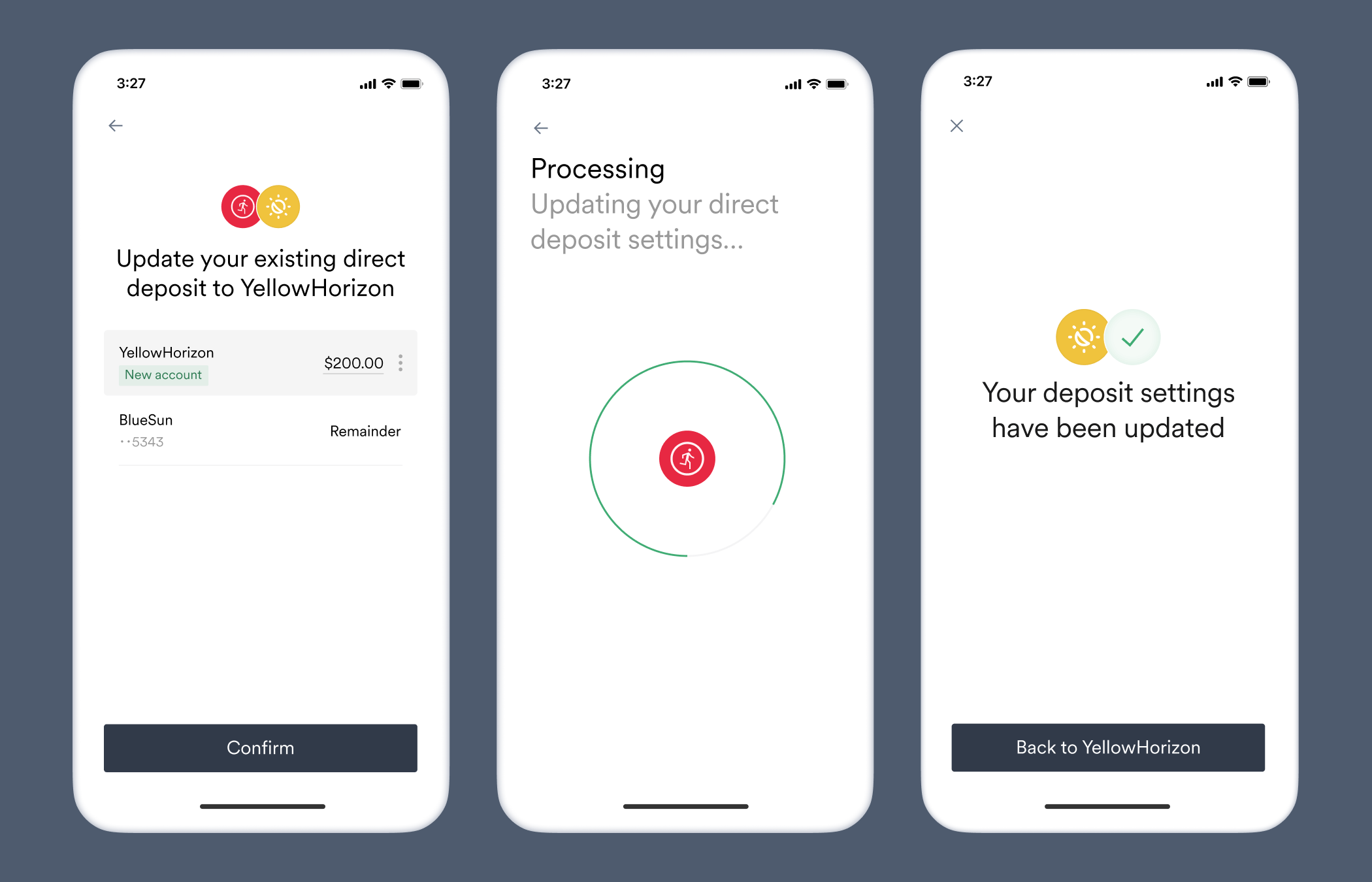
## Adjust existing direct deposits
In some situations, such as when a user's final loan payment is lower than the previous payments, you may want to adjust the pay allocations for the bank accounts that have already been added to the user's payroll system:
Users will need to [return to Link](/workflows/reconnecting-accounts) to confirm updated allocations. User consent is always required when adding, deleting, or adjusting direct deposits.
1. Include an `ach_deposit_account` object in your target deposit destination as you normally would, and add the new allocation settings you would like the user to accept.
```json theme={}
{
// Enter the bank account details of the existing allocation.
"ach_deposit_account": {
"bank_name": "YellowHorizon",
"routing_number": "084101234",
"account_number": "9483746361234",
"account_type": "checking"
},
// Enter the new allocation values.
"amount_allocation": {
"value": "200",
"min_value": "200",
"max_value": "200"
}
}
```
## DDS flows — reference table
The table below contains the required and optional parameters of target deposit destinations for different types of DDS flows.
```json theme={}
{
"ach_deposit_account": {
"bank_name": "", // optional
"routing_number": "<9 digit code>", // *required*
"account_number": "<8 to 17 digit code>", // *required*
"account_type": "checking" or "savings" // *required*
},
"entire_paycheck": true, // *required*
"allow_restoring_destinations": true or false, // optional
"allow_changing_allocation_type": true or false // optional
}
```
```json theme={}
{
"ach_deposit_account": {
"bank_name": "", // optional
"routing_number": "<9 digit code>", // *required*
"account_number": "<8 to 17 digit code>", // *required*
"account_type": "checking" or "savings" // *required*
},
// One or both "percent_allocation" and "amount_allocation" objects must be present.
"percent_allocation": {
"value": "<0 to 100>", // *required*
"min_value": "<0 to 100>", // optional
"max_value": "<0 to 100>" // optional
},
"amount_allocation": {
"value": "<0 to Any>", // *required*
"min_value": "<0 to Any>", // optional
"max_value": "<0 to Any>" // optional
},
// Both "percent_allocation" and "amount_allocation" are present and supported by the platform.
"allow_changing_allocation_type": true // optional
}
```
## Adjust existing direct deposits
In some situations, such as when a user's final loan payment is lower than the previous payments, you may want to adjust the pay allocations for the bank accounts that have already been added to the user's payroll system:
Users will need to [return to Link](/workflows/reconnecting-accounts) to confirm updated allocations. User consent is always required when adding, deleting, or adjusting direct deposits.
1. Include an `ach_deposit_account` object in your target deposit destination as you normally would, and add the new allocation settings you would like the user to accept.
```json theme={}
{
// Enter the bank account details of the existing allocation.
"ach_deposit_account": {
"bank_name": "YellowHorizon",
"routing_number": "084101234",
"account_number": "9483746361234",
"account_type": "checking"
},
// Enter the new allocation values.
"amount_allocation": {
"value": "200",
"min_value": "200",
"max_value": "200"
}
}
```
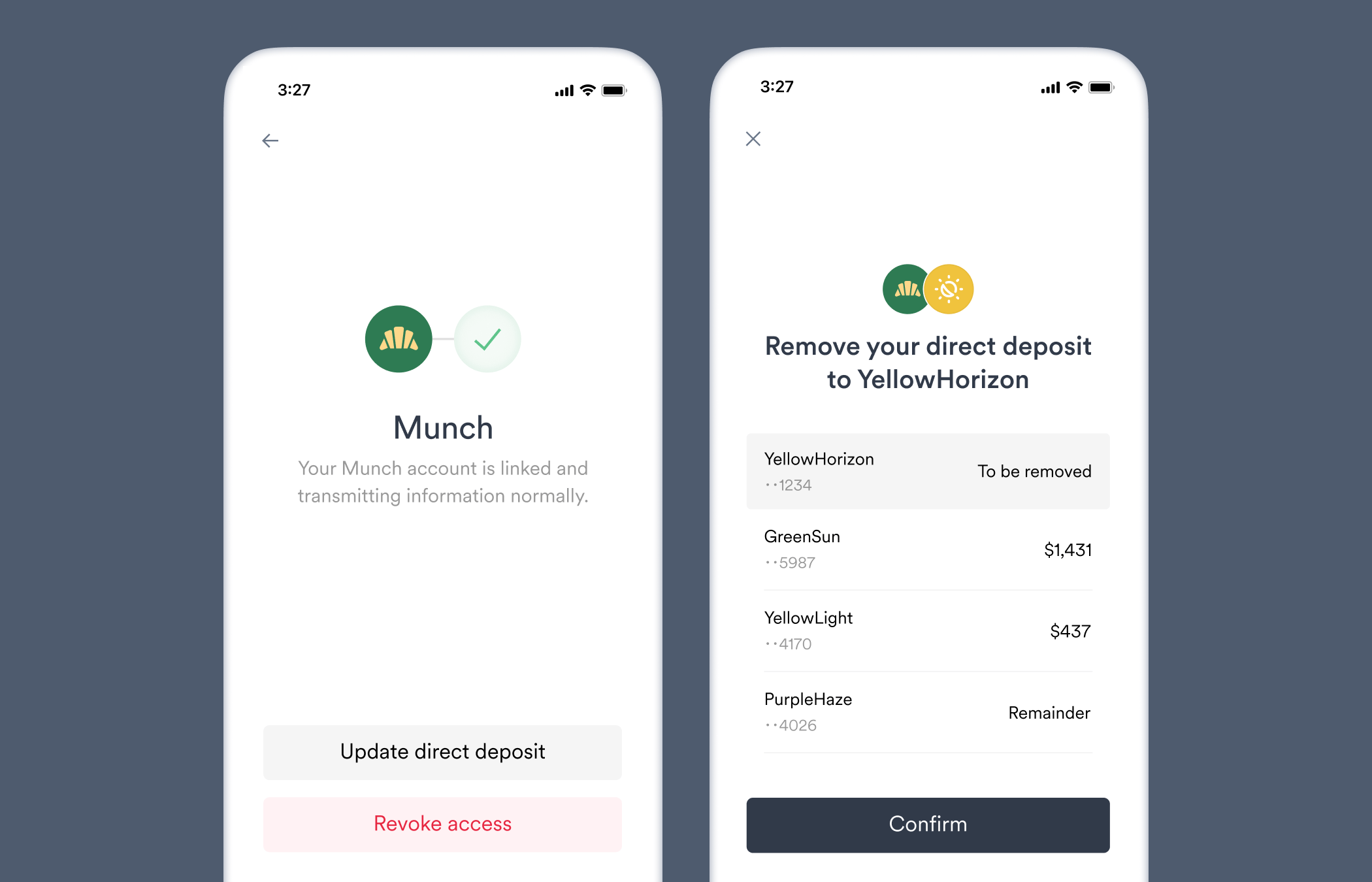
 ## Remove a bank account
Using the following steps, users can confirm through Link they would like to remove the designated bank account from their payroll system's direct deposit settings. The user will be able to adjust in Link how pay is allocated to their remaining bank accounts, as well as handle any multi-factor authentication (MFA) requests their payroll system requires.
A bank account cannot be removed if it is user's *only* [deposit destination](/api-reference/deposit-destinations). Have the user add a second bank account and then remove intended bank account.
1. Use the [direct login](/workflows/account-connections#direct-login) method to directly connect the user to the relevant account.
2. [Encrypt](/api-reference/target-deposit-destinations#encrypt) the following target deposit destination and pass it to the `ddsConfig` parameter in your Link initialization:
```json theme={}
{
"action": "remove-destination",
"deposit_destination": "0181d8c4-31ed-3338-1859-05fc7f1ca501" // Example ID.
}
```
ID's of each `deposit_destination` (bank account) can be found using the [deposit destinations](/api-reference/deposit-destinations#object) API endpoint.
## Remove a bank account
Using the following steps, users can confirm through Link they would like to remove the designated bank account from their payroll system's direct deposit settings. The user will be able to adjust in Link how pay is allocated to their remaining bank accounts, as well as handle any multi-factor authentication (MFA) requests their payroll system requires.
A bank account cannot be removed if it is user's *only* [deposit destination](/api-reference/deposit-destinations). Have the user add a second bank account and then remove intended bank account.
1. Use the [direct login](/workflows/account-connections#direct-login) method to directly connect the user to the relevant account.
2. [Encrypt](/api-reference/target-deposit-destinations#encrypt) the following target deposit destination and pass it to the `ddsConfig` parameter in your Link initialization:
```json theme={}
{
"action": "remove-destination",
"deposit_destination": "0181d8c4-31ed-3338-1859-05fc7f1ca501" // Example ID.
}
```
ID's of each `deposit_destination` (bank account) can be found using the [deposit destinations](/api-reference/deposit-destinations#object) API endpoint.
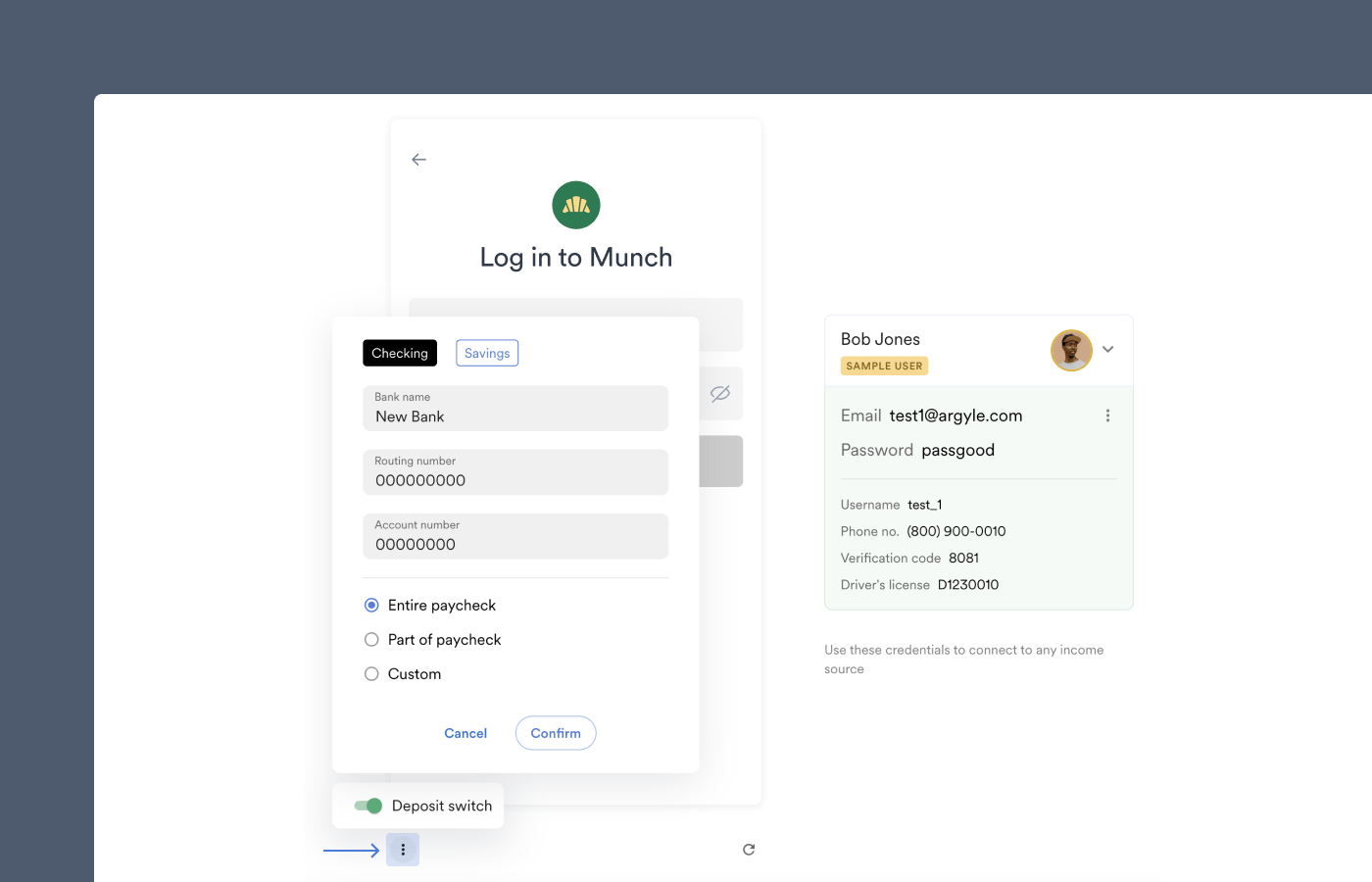
 ## Sandbox testing
You can test your target deposit destinations and customizations with Flows in Console. This allows you to simulate a user's deposit switch experience and make any adjustments necessary:
1. Enable **Sandbox mode** in Console using the toggle.
2. Select a custom or demo Flow.
3. Open the **Deposit switch** setting below the preview screen.
4. Enable **Request deposit switch** and select **Custom**.
5. Copy and paste the encrypted target deposit destination (`ddsConfig`) you would like to test.
Deposit switch errors can also be simulated by creating unique error-encoded passwords via the API. See [error testing](/overview/sandbox-testing#simulate-errors-via-the-api) in our Sandbox Testing Guide for more information.
## Sandbox testing
You can test your target deposit destinations and customizations with Flows in Console. This allows you to simulate a user's deposit switch experience and make any adjustments necessary:
1. Enable **Sandbox mode** in Console using the toggle.
2. Select a custom or demo Flow.
3. Open the **Deposit switch** setting below the preview screen.
4. Enable **Request deposit switch** and select **Custom**.
5. Copy and paste the encrypted target deposit destination (`ddsConfig`) you would like to test.
Deposit switch errors can also be simulated by creating unique error-encoded passwords via the API. See [error testing](/overview/sandbox-testing#simulate-errors-via-the-api) in our Sandbox Testing Guide for more information.
 ## Webhooks
To monitor the progress of deposit switches, we recommend subscribing to our [deposit destinations webhooks](/api-reference/deposit-destinations-webhooks/added) and [direct deposit switches webhooks](/api-reference/direct-deposit-switches-webhooks/completed).
## Status monitoring
You can view the status of any bank account updates:
* Via the API, by checking the [`direct_deposit_switch`](/api-reference/accounts#object-direct_deposit_switch) object of an [account](/api-reference/accounts#object).
* Via Console, by checking the same object using the JSON toggle on the individual user's page.
As a deposit switch progresses, the `status` value will progress from `scanning` to `updating` to `success/error`.
## FAQ
After a user confirms DDS changes in Link, the update process typically takes fifteen to thirty seconds on most payroll systems, and up to two minutes on the slowest payroll systems.
After the [`deposit_destinations.added`](/api-reference/deposit-destinations-webhooks/added) webhook is sent, which confirms the new allocation has been added and was detected during the payroll account's most recent scan, the timing of when the allocation is applied depends on the specific payroll system. Some systems apply the new allocation immediately and will apply it to the current pay cycle, while others will only apply the new allocation starting with the following full pay cycle.
Argyle suggests removing one of the previous bank accounts connected to the user's payroll system to make room for the new account.If the user's payroll system only allows for one bank account, Argyle suggests adding the new bank account you provided and removing the previously connected bank account. The user will only have the option to confirm or decline the deposit switch. \*The removal and addition will only adjust the user's payroll system settings after the user submits their confirmation of these suggested changes.\*If the user's payroll system allows two or more bank accounts, Argyle suggests adding the new bank account you provided and removing one of the previously connected bank accounts. If the user wants to restore the removed bank account, they are allowed to swap it for a previously connected bank account that was not removed before confirming or declining the deposit switch. *Removals and additions will only adjust the user's payroll system settings after the user submits their confirmation of their selected changes.*
If the user's income is not enough to satisfy all pay allocations, how the available income is distributed varies from platform to platform. Whenever possible, Argyle prioritize your allocation in the platform's payout queue.
Argyle only passes bank account and payment settings to the user's payroll platform. If there is an issue with future payments, the user must contact their payroll provider directly.
No, the pay allocations will not automatically be removed from the payroll system because of account disconnection or revoked access. Argyle cannot update pay allocations on payroll systems that have become disconnected or where the user revoked access, and Argyle does not communicate with banks regarding these pay allocations. Please contact the user directly to update the pay allocations or re-connect the disconnected account.
This is only the case if your initialization includes a Link Flow customization where the setting **“Only show Link items that support direct deposit switching”** has been enabled.Because every payroll system has different payment setting limitations, the user will only be shown payroll accounts whose payroll system supports the allocation settings in your target deposit destination. This minimizes DDS configuration errors to ensure an optimal user experience.
Some payroll systems will override the `bank_name` included in your target deposit destination and instead use a bank name they derive from another source, such as the routing number of the account.Argyle retrieves and [returns](/api-reference/deposit-destinations) the bank name as it is stored by the payroll system.
## Webhooks
To monitor the progress of deposit switches, we recommend subscribing to our [deposit destinations webhooks](/api-reference/deposit-destinations-webhooks/added) and [direct deposit switches webhooks](/api-reference/direct-deposit-switches-webhooks/completed).
## Status monitoring
You can view the status of any bank account updates:
* Via the API, by checking the [`direct_deposit_switch`](/api-reference/accounts#object-direct_deposit_switch) object of an [account](/api-reference/accounts#object).
* Via Console, by checking the same object using the JSON toggle on the individual user's page.
As a deposit switch progresses, the `status` value will progress from `scanning` to `updating` to `success/error`.
## FAQ
After a user confirms DDS changes in Link, the update process typically takes fifteen to thirty seconds on most payroll systems, and up to two minutes on the slowest payroll systems.
After the [`deposit_destinations.added`](/api-reference/deposit-destinations-webhooks/added) webhook is sent, which confirms the new allocation has been added and was detected during the payroll account's most recent scan, the timing of when the allocation is applied depends on the specific payroll system. Some systems apply the new allocation immediately and will apply it to the current pay cycle, while others will only apply the new allocation starting with the following full pay cycle.
Argyle suggests removing one of the previous bank accounts connected to the user's payroll system to make room for the new account.If the user's payroll system only allows for one bank account, Argyle suggests adding the new bank account you provided and removing the previously connected bank account. The user will only have the option to confirm or decline the deposit switch. \*The removal and addition will only adjust the user's payroll system settings after the user submits their confirmation of these suggested changes.\*If the user's payroll system allows two or more bank accounts, Argyle suggests adding the new bank account you provided and removing one of the previously connected bank accounts. If the user wants to restore the removed bank account, they are allowed to swap it for a previously connected bank account that was not removed before confirming or declining the deposit switch. *Removals and additions will only adjust the user's payroll system settings after the user submits their confirmation of their selected changes.*
If the user's income is not enough to satisfy all pay allocations, how the available income is distributed varies from platform to platform. Whenever possible, Argyle prioritize your allocation in the platform's payout queue.
Argyle only passes bank account and payment settings to the user's payroll platform. If there is an issue with future payments, the user must contact their payroll provider directly.
No, the pay allocations will not automatically be removed from the payroll system because of account disconnection or revoked access. Argyle cannot update pay allocations on payroll systems that have become disconnected or where the user revoked access, and Argyle does not communicate with banks regarding these pay allocations. Please contact the user directly to update the pay allocations or re-connect the disconnected account.
This is only the case if your initialization includes a Link Flow customization where the setting **“Only show Link items that support direct deposit switching”** has been enabled.Because every payroll system has different payment setting limitations, the user will only be shown payroll accounts whose payroll system supports the allocation settings in your target deposit destination. This minimizes DDS configuration errors to ensure an optimal user experience.
Some payroll systems will override the `bank_name` included in your target deposit destination and instead use a bank name they derive from another source, such as the routing number of the account.Argyle retrieves and [returns](/api-reference/deposit-destinations) the bank name as it is stored by the payroll system.