> ## Documentation Index
> Fetch the complete documentation index at: https://docs.argyle.com/llms.txt
> Use this file to discover all available pages before exploring further.
# Items
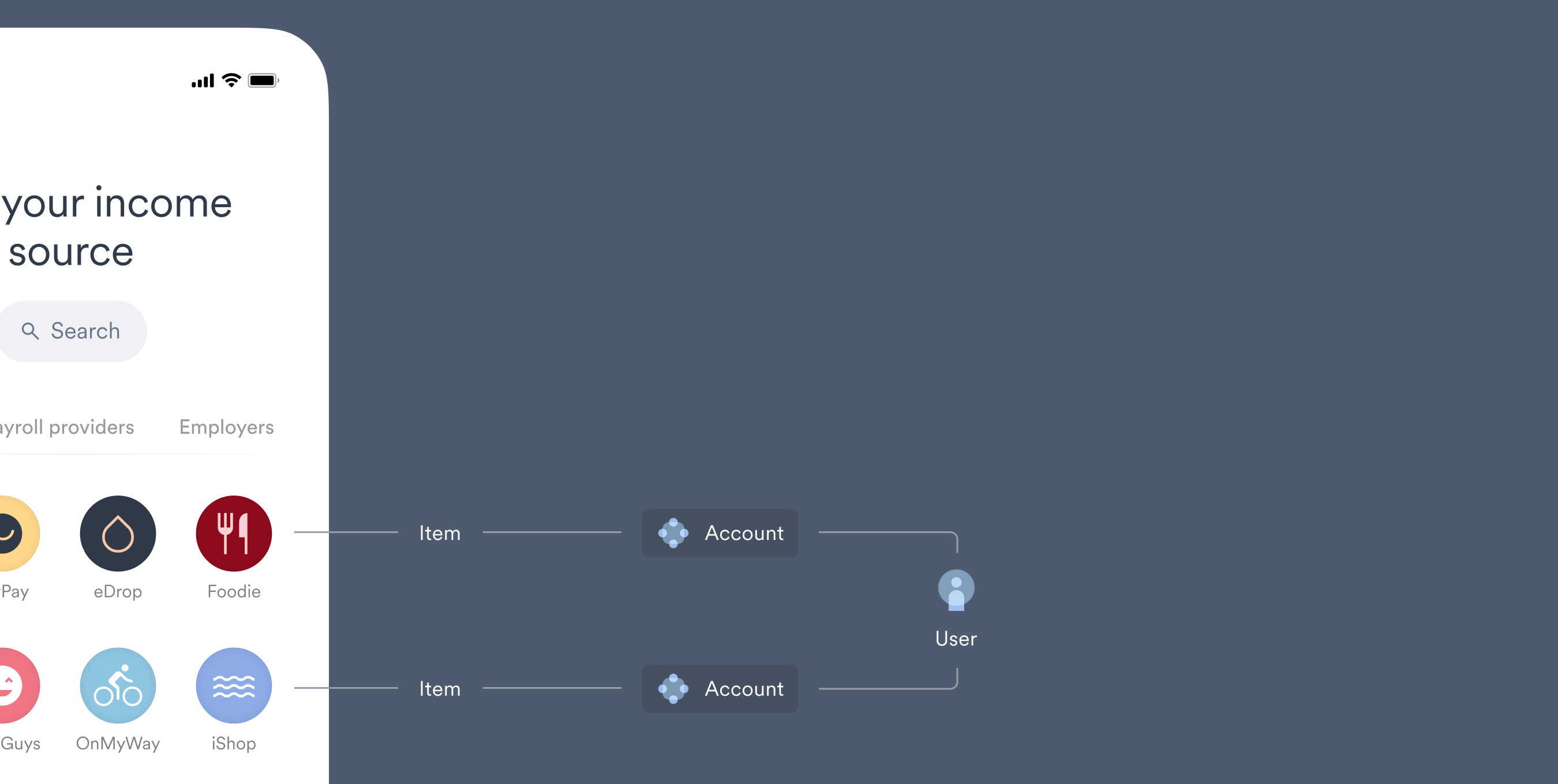
> Items are the employers or payroll platforms available in Link.
## Definition
"Items" are the searchable employers and payroll platforms in Link through which payroll accounts are connected.
 A full list of supported Items can be viewed in the Coverage section of Console. You can also subscribe to our [Changelog](https://changelog.argyle.com/) for ongoing updates on Argyle's coverage expansion.
## Types of Items
There are four different types of Items, representing where payroll information is ultimately sourced.
| Type | Description |
| ------------------- | ------------------------------------------------------------------------------------------------------------- |
| Employers | Individual employers that have an in-house payroll system or internal log-in process to a third party system. |
| Gig platforms | Gig economy platforms, which typically have an in-house payment system. |
| Payroll providers | Payroll providers are third party systems that provide payroll services to multiples employers. |
| Government benefits | Government platforms, typically related to social security or veteran income. |
### Note: there are two types of payroll providers shown in Link:
1. Payroll providers that the user connects to directly by entering login credentials specific to the payroll provider.
2. Payroll providers that act as a **Grouping**. When this type of payroll provider is selected, the user is shown a list of employers that use this payroll provider. The user chooses the appropriate employer and proceeds to a login screen that is specific to the employer—payroll-provider combination.
## Individual Item information
### Health status
Items that currently support new connections with no known issues are considered `healthy`. If the connection process or [ongoing refresh](/overview/ongoing-refresh) is not available or partially degraded, the Item is tagged as `unavailable` or having `issues`.
You can view each Item's health status by searching for the Item in the Coverage section of Console and checking the **status** column, or [retrieve the Item](/api-reference/items#retrieve) via the API and check the [`status`](/api-reference/items#object-status) property. Subscribing to the [`items.updated`](/api-reference/items-webhooks/updated) webhook [via Console](/console/management/webhooks#subscribing-to-webhooks) or [via the API](/api-guide/webhooks#subscribing-to-webhooks) will also notify you when an Item's health status changes.
### Data fields returned
While essential payroll data can be retrieved from most Item connections, some data fields are not supported by all Items. For example, a non-gig platform may not contain vehicle data.
To check which data fields are available on an Item by Item basis:
* Console — search for and select an individual Item in the Coverage section of Console, and expand the relevant data category within the **Field availability** area.
* API — [retrieve the Item](/api-reference/items#retrieve) and check the [`field_coverage`](/api-reference/items#object-features-field_coverage) object to see if an individual data field is `supported`.
#### Example
To see if an Item supports the `job_title` field from the [Identities](/api-reference/identities#object) data set.
1. [Retrieve the Item](/api-reference/items#retrieve) via the API using its ID.
2. Search the response, in this case by `job_title`, and check if the desired field is `supported`.
```json theme={}
"field_coverage": {
"identities": {
"job_title": {
"supported": true
}
}
}
```
### Data refresh frequency
How often an Item is re-scanned to check for new data, which is used to update all accounts that were connected through the Item in Link, is returned in the [`refresh_frequency`](/api-reference/items#object-features-data_retrieval-refresh_frequency) field when [retrieving an Item](/api-reference/items#retrieve) by its ID via the API.
See our [Ongoing Refresh Guide](/overview/ongoing-refresh) for more information.
### Mapping status
Items are classified into three mapping statuses, which represent the Item's previous connection history:
* `verified` — The payroll system associated with the Item is known, and the Item has previously experienced a successful connection that returned paystub data.
* `mapped` — The payroll system associated with the Item is known, but the Item is awaiting a successful connection.
* `unmapped` — The payroll system associated with this Item is not yet known.
If an `unmapped` Item is selected in Link, the user will be given the option to search for the relevant payroll system and attempt to connect using their login credentials.
An Item's mapping status can be retrieved by filtering or selecting an individual Item or within the Coverage section of Console, or via the API using the [Items endpoint](/api-reference/items#object-mapping_status). You can choose which Items to show in Link search based on their mapping status when customizing a Flow in Console by using the **Display income sources based on mapping status** toggle within the **Search and connect** tab.
### Data limits and obfuscations
Items with specific constraints, such as historical data limits or obscured values, are documented in:
* Console — search for and select an individual Item in the Coverage section of Console. A **known limitations** area will be present only when the Item has data limitations.
* API — [retrieve the Item](/api-reference/items#retrieve) and check the [`known_limitations`](/api-reference/items#object-known_limitations) property.
## Creating Item filters
Using the API's [`/item-filters`](/api-reference/item-filters#create) endpoint, you can create custom filters to search for Items that support specific requirements:
1. Create an [Item filter](/api-reference/item-filters).
2. Add `supported` filters for your desired fields.
3. When [listing Items](/api-reference/items#list), use the Item filter ID as a query parameter.
A full list of supported Items can be viewed in the Coverage section of Console. You can also subscribe to our [Changelog](https://changelog.argyle.com/) for ongoing updates on Argyle's coverage expansion.
## Types of Items
There are four different types of Items, representing where payroll information is ultimately sourced.
| Type | Description |
| ------------------- | ------------------------------------------------------------------------------------------------------------- |
| Employers | Individual employers that have an in-house payroll system or internal log-in process to a third party system. |
| Gig platforms | Gig economy platforms, which typically have an in-house payment system. |
| Payroll providers | Payroll providers are third party systems that provide payroll services to multiples employers. |
| Government benefits | Government platforms, typically related to social security or veteran income. |
### Note: there are two types of payroll providers shown in Link:
1. Payroll providers that the user connects to directly by entering login credentials specific to the payroll provider.
2. Payroll providers that act as a **Grouping**. When this type of payroll provider is selected, the user is shown a list of employers that use this payroll provider. The user chooses the appropriate employer and proceeds to a login screen that is specific to the employer—payroll-provider combination.
## Individual Item information
### Health status
Items that currently support new connections with no known issues are considered `healthy`. If the connection process or [ongoing refresh](/overview/ongoing-refresh) is not available or partially degraded, the Item is tagged as `unavailable` or having `issues`.
You can view each Item's health status by searching for the Item in the Coverage section of Console and checking the **status** column, or [retrieve the Item](/api-reference/items#retrieve) via the API and check the [`status`](/api-reference/items#object-status) property. Subscribing to the [`items.updated`](/api-reference/items-webhooks/updated) webhook [via Console](/console/management/webhooks#subscribing-to-webhooks) or [via the API](/api-guide/webhooks#subscribing-to-webhooks) will also notify you when an Item's health status changes.
### Data fields returned
While essential payroll data can be retrieved from most Item connections, some data fields are not supported by all Items. For example, a non-gig platform may not contain vehicle data.
To check which data fields are available on an Item by Item basis:
* Console — search for and select an individual Item in the Coverage section of Console, and expand the relevant data category within the **Field availability** area.
* API — [retrieve the Item](/api-reference/items#retrieve) and check the [`field_coverage`](/api-reference/items#object-features-field_coverage) object to see if an individual data field is `supported`.
#### Example
To see if an Item supports the `job_title` field from the [Identities](/api-reference/identities#object) data set.
1. [Retrieve the Item](/api-reference/items#retrieve) via the API using its ID.
2. Search the response, in this case by `job_title`, and check if the desired field is `supported`.
```json theme={}
"field_coverage": {
"identities": {
"job_title": {
"supported": true
}
}
}
```
### Data refresh frequency
How often an Item is re-scanned to check for new data, which is used to update all accounts that were connected through the Item in Link, is returned in the [`refresh_frequency`](/api-reference/items#object-features-data_retrieval-refresh_frequency) field when [retrieving an Item](/api-reference/items#retrieve) by its ID via the API.
See our [Ongoing Refresh Guide](/overview/ongoing-refresh) for more information.
### Mapping status
Items are classified into three mapping statuses, which represent the Item's previous connection history:
* `verified` — The payroll system associated with the Item is known, and the Item has previously experienced a successful connection that returned paystub data.
* `mapped` — The payroll system associated with the Item is known, but the Item is awaiting a successful connection.
* `unmapped` — The payroll system associated with this Item is not yet known.
If an `unmapped` Item is selected in Link, the user will be given the option to search for the relevant payroll system and attempt to connect using their login credentials.
An Item's mapping status can be retrieved by filtering or selecting an individual Item or within the Coverage section of Console, or via the API using the [Items endpoint](/api-reference/items#object-mapping_status). You can choose which Items to show in Link search based on their mapping status when customizing a Flow in Console by using the **Display income sources based on mapping status** toggle within the **Search and connect** tab.
### Data limits and obfuscations
Items with specific constraints, such as historical data limits or obscured values, are documented in:
* Console — search for and select an individual Item in the Coverage section of Console. A **known limitations** area will be present only when the Item has data limitations.
* API — [retrieve the Item](/api-reference/items#retrieve) and check the [`known_limitations`](/api-reference/items#object-known_limitations) property.
## Creating Item filters
Using the API's [`/item-filters`](/api-reference/item-filters#create) endpoint, you can create custom filters to search for Items that support specific requirements:
1. Create an [Item filter](/api-reference/item-filters).
2. Add `supported` filters for your desired fields.
3. When [listing Items](/api-reference/items#list), use the Item filter ID as a query parameter.