> ## Documentation Index
> Fetch the complete documentation index at: https://docs.argyle.com/llms.txt
> Use this file to discover all available pages before exploring further.
# Data Delivery
> When to expect data after a payroll account connection.
## Timing
Initial data retrieval begins immediately when a payroll account is connected. An account is considered connected once the login credentials a user provides through Link are authenticated to the respective payroll system.
* Static information that tends to change less over time is delivered soon after a payroll connection.
* Time-dependent information that can go back a number of years is retrieved and delivered from most recent to least recent.
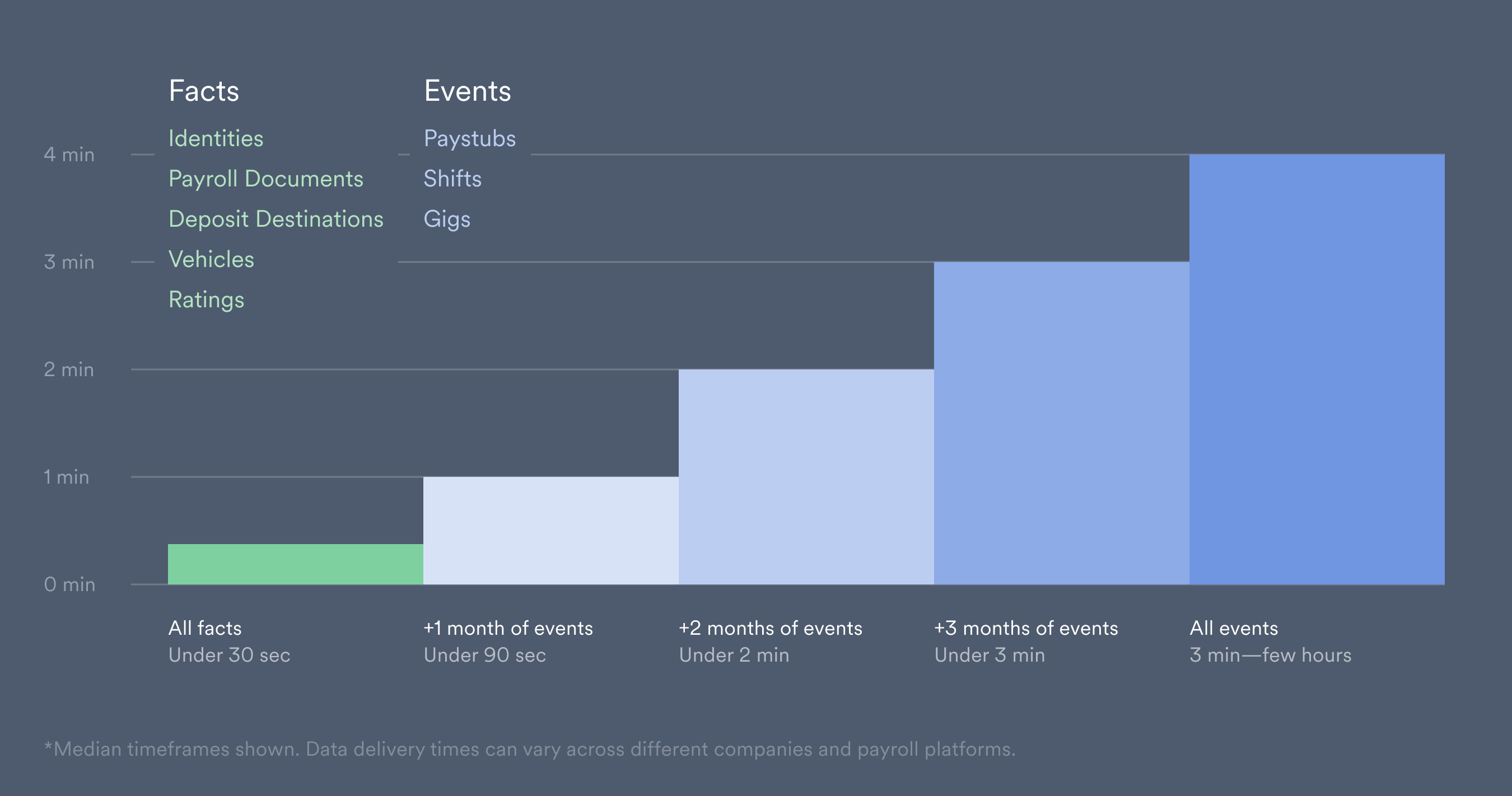 Some types of employment, gig work for example, contain a higher number of discrete events, which can increase the total delivery time. Argyle is limited by the data retrieval speeds a particular payroll system can support.
## Availability
Data is collected in stages after a new account is connected.
Fact data is initially used to populate fields within Argyle's [data sets](/overview/data-structure/data-sets#categories). As event data is retrieved, previously populated fields are updated and refined, and new data is added to the relevant fields that were previously empty.
During the initial data retrieval process, `.added` webhooks (such as the [`identities.added`](/api-reference/identities-webhooks/added) webhook) are sent only once when the first field within a data set category is populated. As new data is retrieved, `.updated` webhooks will continue to be sent while data fields within a category are refined or populated.
Data values will continue to update until all data is retrieved and the [`users.fully_synced`](/api-reference/users-webhooks/fully-synced) webhook is sent.
## Webhooks
We recommend monitoring data delivery by subscribing [via Console](/console/management/webhooks) or [via the API](/api-guide/webhooks) to the following webhooks:
* The [`accounts.added`](/api-reference/accounts-webhooks/added) webhook is sent when a user submits login credentials through Link.
* The [`users.fully_synced`](/api-reference/users-webhooks/fully-synced) webhook is sent when all data has been fully retrieved for *every* payroll account the user connected through Link.
* The [`paystubs.partially_synced`](/api-reference/paystubs-webhooks/partially-synced) webhook is sent when paystubs going back a specified number of days have been retrieved.
Visit our [API Reference](/api-reference/users-webhooks/fully-synced) to see a full list of available webhooks and their descriptions.
### Example scenario
You subscribe to the `accounts.added`, `payouts.partially_synced`, and `users.fully_synced` webhooks, and a user connects multiple payroll accounts through Link in the same session.
* The `accounts.added` webhook is sent each time the user submits login credentials.
* The `paystubs.partially_synced` webhook is sent for each account independently, after paystubs going back a specified number of days are retrieved.
* The `users.fully_synced` webhook is sent only once after initial data retrieval has fully completed, and all data has been retrieved from every account the user connected.
Some types of employment, gig work for example, contain a higher number of discrete events, which can increase the total delivery time. Argyle is limited by the data retrieval speeds a particular payroll system can support.
## Availability
Data is collected in stages after a new account is connected.
Fact data is initially used to populate fields within Argyle's [data sets](/overview/data-structure/data-sets#categories). As event data is retrieved, previously populated fields are updated and refined, and new data is added to the relevant fields that were previously empty.
During the initial data retrieval process, `.added` webhooks (such as the [`identities.added`](/api-reference/identities-webhooks/added) webhook) are sent only once when the first field within a data set category is populated. As new data is retrieved, `.updated` webhooks will continue to be sent while data fields within a category are refined or populated.
Data values will continue to update until all data is retrieved and the [`users.fully_synced`](/api-reference/users-webhooks/fully-synced) webhook is sent.
## Webhooks
We recommend monitoring data delivery by subscribing [via Console](/console/management/webhooks) or [via the API](/api-guide/webhooks) to the following webhooks:
* The [`accounts.added`](/api-reference/accounts-webhooks/added) webhook is sent when a user submits login credentials through Link.
* The [`users.fully_synced`](/api-reference/users-webhooks/fully-synced) webhook is sent when all data has been fully retrieved for *every* payroll account the user connected through Link.
* The [`paystubs.partially_synced`](/api-reference/paystubs-webhooks/partially-synced) webhook is sent when paystubs going back a specified number of days have been retrieved.
Visit our [API Reference](/api-reference/users-webhooks/fully-synced) to see a full list of available webhooks and their descriptions.
### Example scenario
You subscribe to the `accounts.added`, `payouts.partially_synced`, and `users.fully_synced` webhooks, and a user connects multiple payroll accounts through Link in the same session.
* The `accounts.added` webhook is sent each time the user submits login credentials.
* The `paystubs.partially_synced` webhook is sent for each account independently, after paystubs going back a specified number of days are retrieved.
* The `users.fully_synced` webhook is sent only once after initial data retrieval has fully completed, and all data has been retrieved from every account the user connected.