> ## Documentation Index
> Fetch the complete documentation index at: https://docs.argyle.com/llms.txt
> Use this file to discover all available pages before exploring further.
# Overview
> Learn how to use Argyle webhooks.
Learn how to use Argyle's webhooks.
Webhooks let you stay up-to-date with any new data **added**, **updated**, or **deleted** in real-time. For example, when the user connects a new payroll account, Argyle will immediately call an `HTTP` endpoint on your system to let you know about the event.
You can find the full list of webhook events in this Webhooks reference.
Argyle webhooks are delivered from four static IP addresses:
* `34.27.251.226`
* `34.122.50.253`
* `35.188.163.115`
* `35.226.53.251`
## Subscribing to webhooks
### Using the API
The webhook events you subscribe to are delivered for all accounts. Each time a new account is connected or an existing one is updated, a corresponding webhook will notify your system.
* You can subscribe to webhooks by sending a POST request to Argyle's [webhooks endpoint](/legacy/api-reference/webhooks) with the event name you want to subscribe to. This Webhooks reference contains the list of examples for all webhook subscription calls.
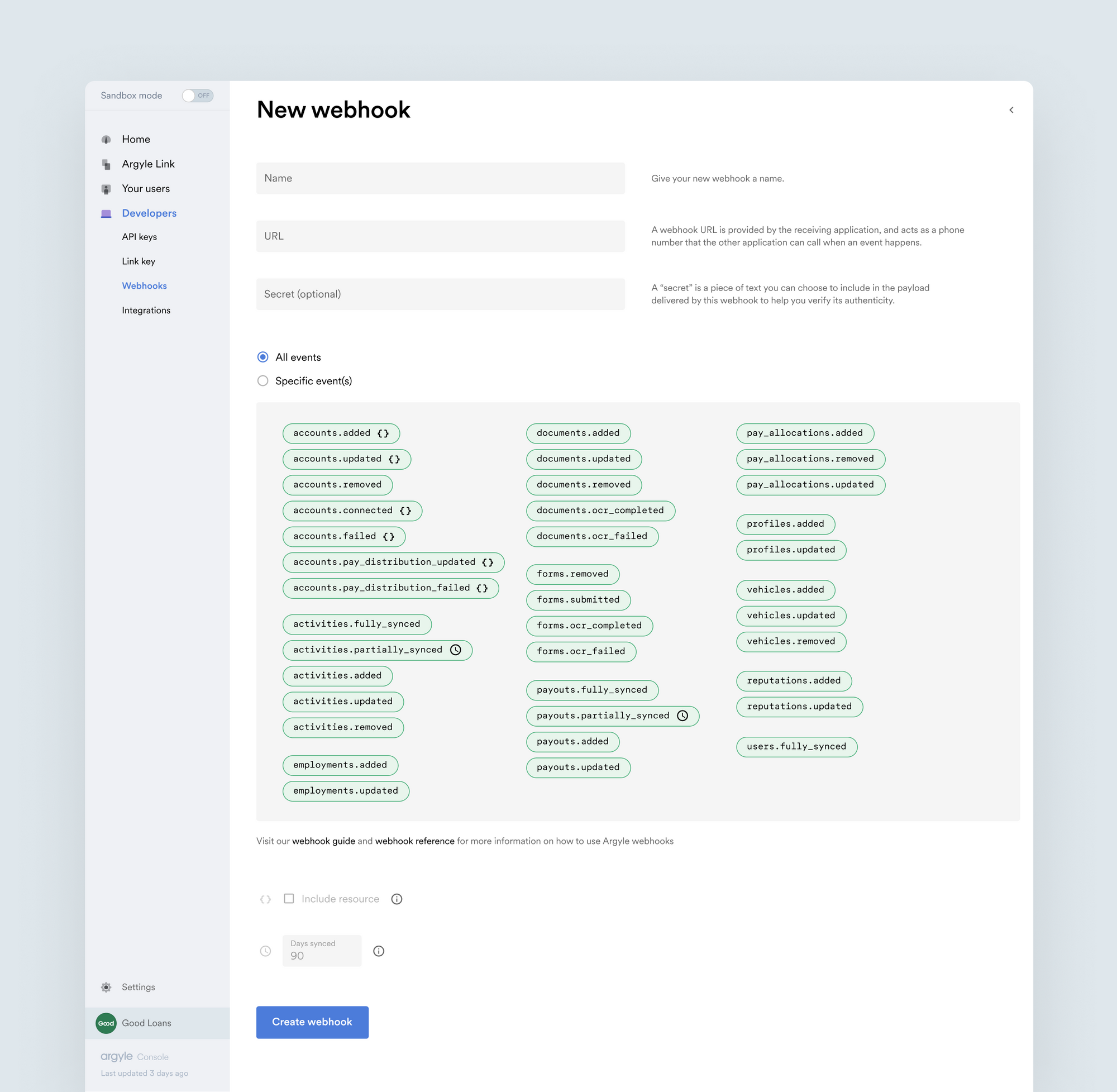
* To subscribe to all webhooks, use an asterisk for events: `"events": "*"`.
#### Subscribing to the `activities.fully_synced` webhook:
```curl theme={}
curl -X POST https://api-sandbox.argyle.com/v1/webhooks \
-u api_key_id:api_key_secret \
-H "Content-Type: application/json" \
-d '{
"events": ["activities.fully_synced"], \
"secret": "", \
"name": "name-of-the-webhook", \
"url": "https://mybackend.com/callback/argyle"
}'
```
While optional, we suggest choosing a random value for the `secret` parameter when subscribing to webhooks. You will use this value during [signature validation](/legacy/api-reference/webhooks-overview#signature-validation) to determine the authenticity of the webhook.
* For example, if you subscribe to the `activities.fully_synced` webhook, every time all activities have finished syncing during the initial scan, the specified url will be invoked with the JSON payload specific to that event.
#### Example payload for `activities.fully_synced`:
```json theme={}
{
"event": "activities.fully_synced",
"name": "Fully synced",
"data": {
"account": "12db5af4-fd5f-4d1f-bd98-0360df770aa8",
"user": "abdb5af4-fd5f-4d1f-bd10-0360df77012c",
"available_from": "2017-07-15T00:00:00",
"available_to": "2019-10-01T15:47:00",
"available_count": 324
}
}
```
### Using Console
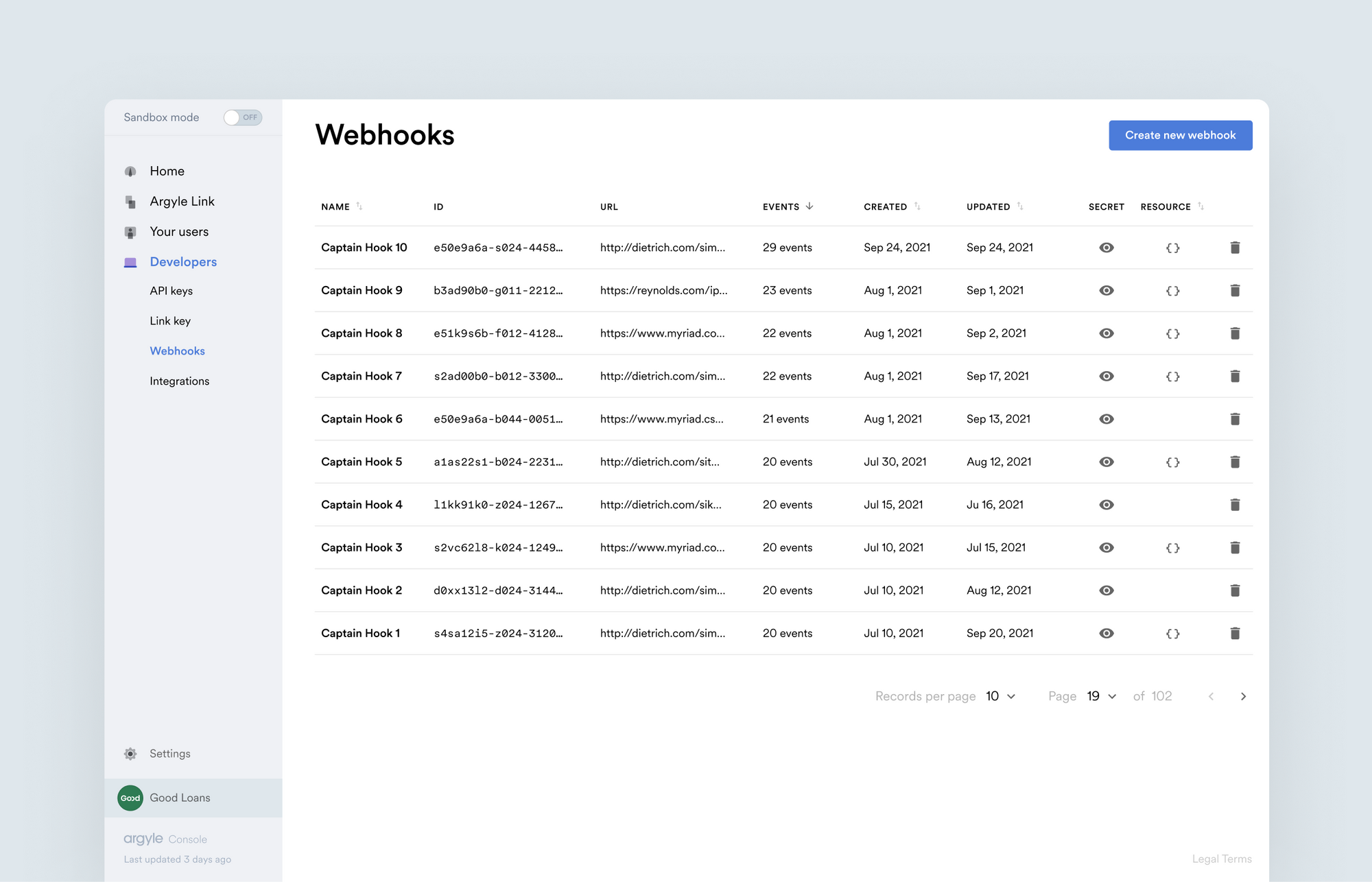
Visit the [Webhooks tab](https://console.argyle.com/webhooks) in the Developers section of Console to view and manage your existing webhook subscriptions as well as create new ones.
## Signature validation
When you subscribe to a webhook, you may choose to include a `secret` to ensure the authenticity of the webhooks you receive. If you do, each webhook you receive will include a signature in the header that you can use to verify that the webhook is genuine.
To verify the authenticity of a webhook, directly encode the received payload body without any added adjustments by using `HMAC-SHA512` with the `secret` that you provided when subscribing to the webhook as the secret key. If the encoded payload matches the signature in the header, you can be confident that the webhook and its payload are genuine.
### Signature example
For example, if your `secret` was `my little secret`, you would expect the following signature:
```text theme={}
'X-Argyle-Signature': '13b68c651cdf714d8d00e88d3c9997d2ea2cb6ffcc57ba2d9164af5898169124e75505f354ded4350c96b03b2cddf01cbe71bc26cb2dc656a69ef670bcda0f86'
```
For the following body:
```json theme={}
{"name": "Account added", "event": "accounts.added"}
```
### Verification example in Node
```js theme={}
const http = require('http');
const crypto = require('crypto');
const serverPort = 80
const requestListener = function (req, res) {
// the client secret is being configured when a webhook is created
const client_secret = 'my little secret';
var requestBody = '';
req.on('readable', () => {
var read = req.read()
if (read != null) {
requestBody += read;
}
});
req.on('end', () => {
signature = crypto.createHmac('sha512', client_secret).update(requestBody).digest('hex');
console.log('Signature:' + signature);
res.writeHead(200);
res.end(signature);
})
}
const server = http.createServer(requestListener);
server.listen(serverPort);
```
Verifying webhook authenticity via IP address is not recommended and should only be used as a fallback method, given the addresses may change in the future.
## Account connection status
If an account becomes disconnected, some events will not trigger their associated webhook until the account connection is re-established.
* Check the account object's `connection.status` attribute to see if an account is connected.
* You can also subscribe to the `accounts.updated` webhook to be notified when an account becomes disconnected, as the account object's `connection.status` changing from `connected` to `error` triggers the `accounts.updated` webhook.
When subscribing to the `accounts.updated` webhook, setting `include_resource` to `true` allows you to view the account object directly in the webhook payload.
## Example: Keeping activities synced between your server and Argyle's API
Webhooks can help you to keep all activity data downloaded on your servers and synced with the Argyle API:
1. Subscribe to `activities.fully_synced` to get notified when the initial account sync of all historical data is finished. Whenever the webhook is invoked, query the activities from the API with the following query: `/activities?from_start_date=available_from&account=account_id&to_start_date=available_to` where `account` is the account ID, and `available_from` and `available_to` are timestamps from the webhook payload.
2. Subscribe to `activities.added` to get notified when new activities are added after the initial sync. Argyle scans all accounts periodically for new activities and other changes in data. Use the same API call, but with `added_from` and `added_to` timestamps from the webhook payload.
3. Subscribe to `activities.updated` to get notified when existing activities change. An example of this would be when additional information about a completed activity is passed along at a later time (e.g. tips for a completed delivery or ride). The webhook payload provides the date range that was updated (`updated_from` and `updated_to`) along with an array of activity IDs that were updated (`updated_activities`) to make syncing of the data more convenient.
4. Subscribe to `activities.removed` to get notified when activities are removed by a payroll provider. This webhook is an indication to make sure that the activities are removed from your database to avoid duplicate data for a specific account. The webhook payload provides the date range when activities were removed (`removed_from` and `removed_to`), the number of activities that were removed (`removed_count`), along with an array of activity IDs that were removed (`removed_activities`).