> ## Documentation Index
> Fetch the complete documentation index at: https://docs.argyle.com/llms.txt
> Use this file to discover all available pages before exploring further.
# Consumer Connect
> Provide an enhanced borrower experience with direct payroll and banking connections.
Encompass® Consumer Connect is a digital mortgage point-of-sale (POS) platform developed by ICE Mortgage Technology®. The platform is designed to enhance the borrower experience by providing a seamless, paperless process accessible from any device.
With Argyle embedded in Consumer Connect, borrowers can link both their payroll and financial accounts through guided flows within their application.
Argyle delivers verified employment & income data alongside real-time asset information straight into Encompass®, eliminating manual uploads and giving lenders the complete picture they need for faster, Day 1 Certainty® ready decisions.
## Employment & Income
### Overview
Incorporating Argyle makes the borrower experience truly paperless:
1. Borrowers connect their payroll accounts through Argyle within Consumer Connect.
2. Argyle pre-fills loan application fields for the borrower using direct-from-the-source payroll data.
3. Imported payroll documents from the borrower's connections and Argyle income & employment verification reports will automatically be made viewable within [Argyle's Encompass® integration](/integrations/pos-los/encompass/verifications) for the borrower's loan file.
 ### Borrower experience
#### Starting a new loan application
1. Borrowers apply through your Consumer Connect site.
2. Borrowers register for an account or log in to an existing one.
Borrowers must be registered and logged in to their account to access third-party services such as Argyle.
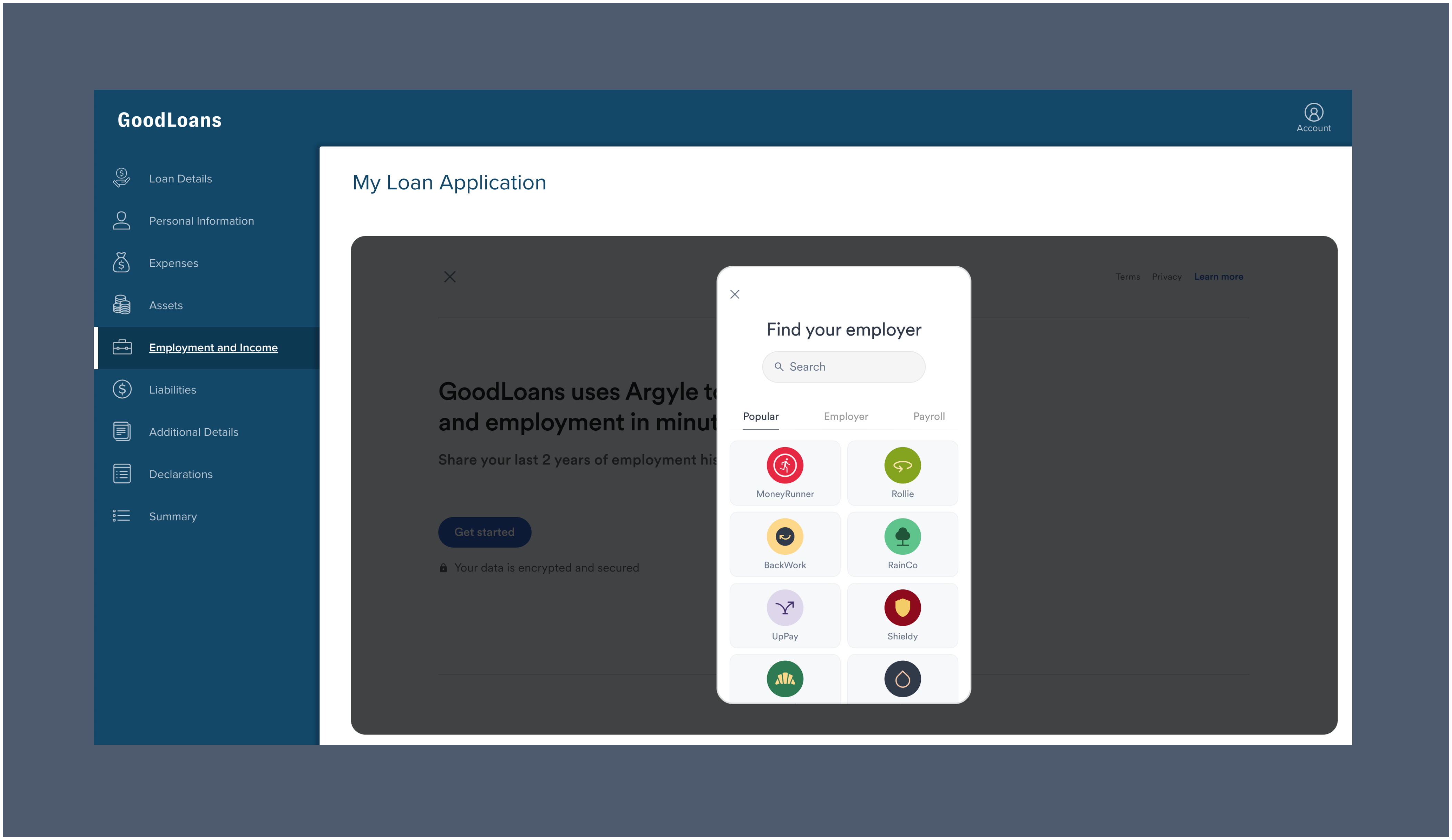
#### Importing employment and income
1. When borrowers arrive at the **Employment and Income** section of the application, they first need to provide their consent to having their employment and income data imported by a third-party provider.
2. After consent, borrowers must select `Import Employment/Income`
### Borrower experience
#### Starting a new loan application
1. Borrowers apply through your Consumer Connect site.
2. Borrowers register for an account or log in to an existing one.
Borrowers must be registered and logged in to their account to access third-party services such as Argyle.
#### Importing employment and income
1. When borrowers arrive at the **Employment and Income** section of the application, they first need to provide their consent to having their employment and income data imported by a third-party provider.
2. After consent, borrowers must select `Import Employment/Income`
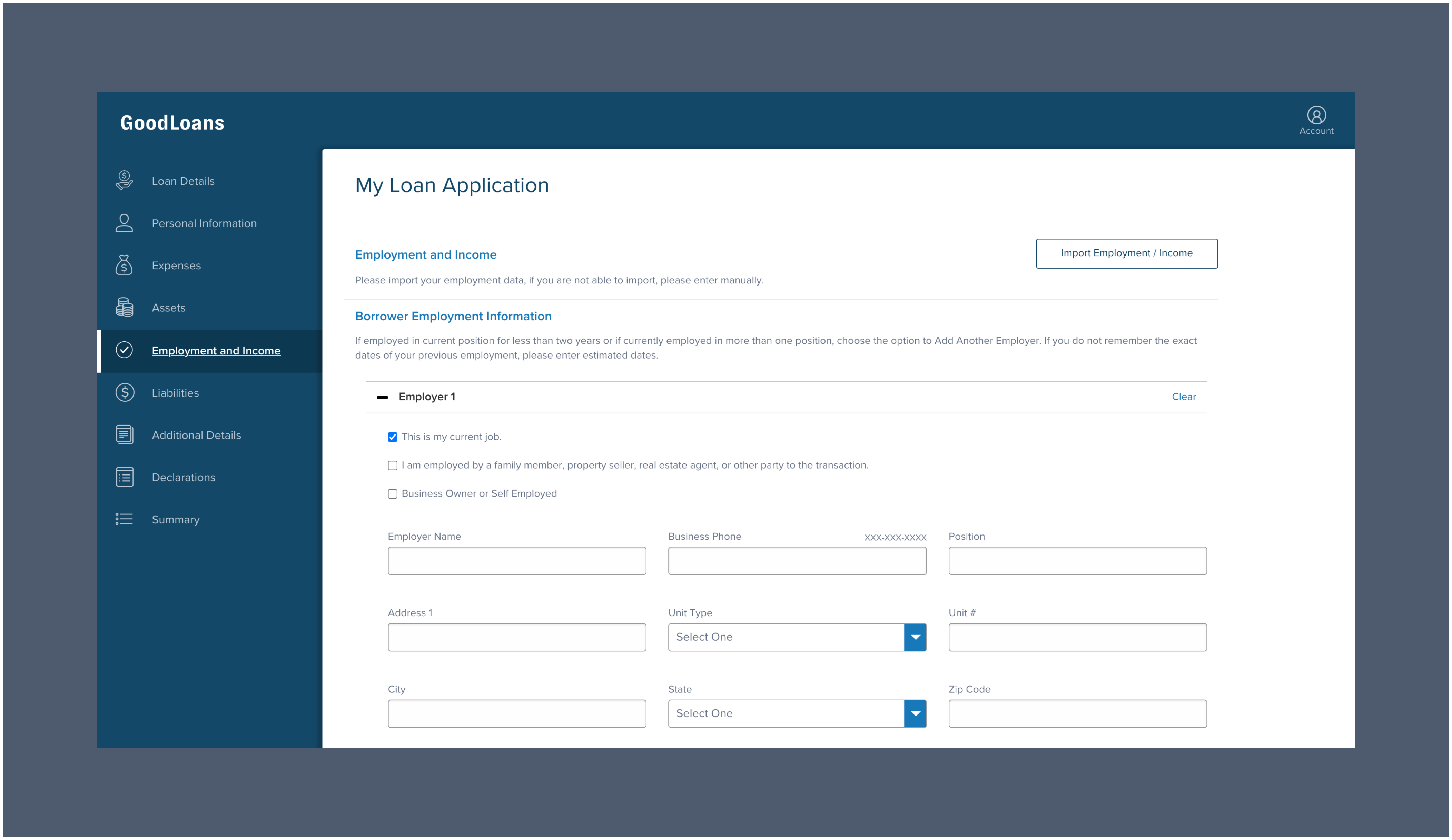 3. The borrower will then fill out preliminary information such as their name, social security number, and date of birth (this information is typically pre-filled). Once completed, the borrower must click `Next` to open the Argyle interface:
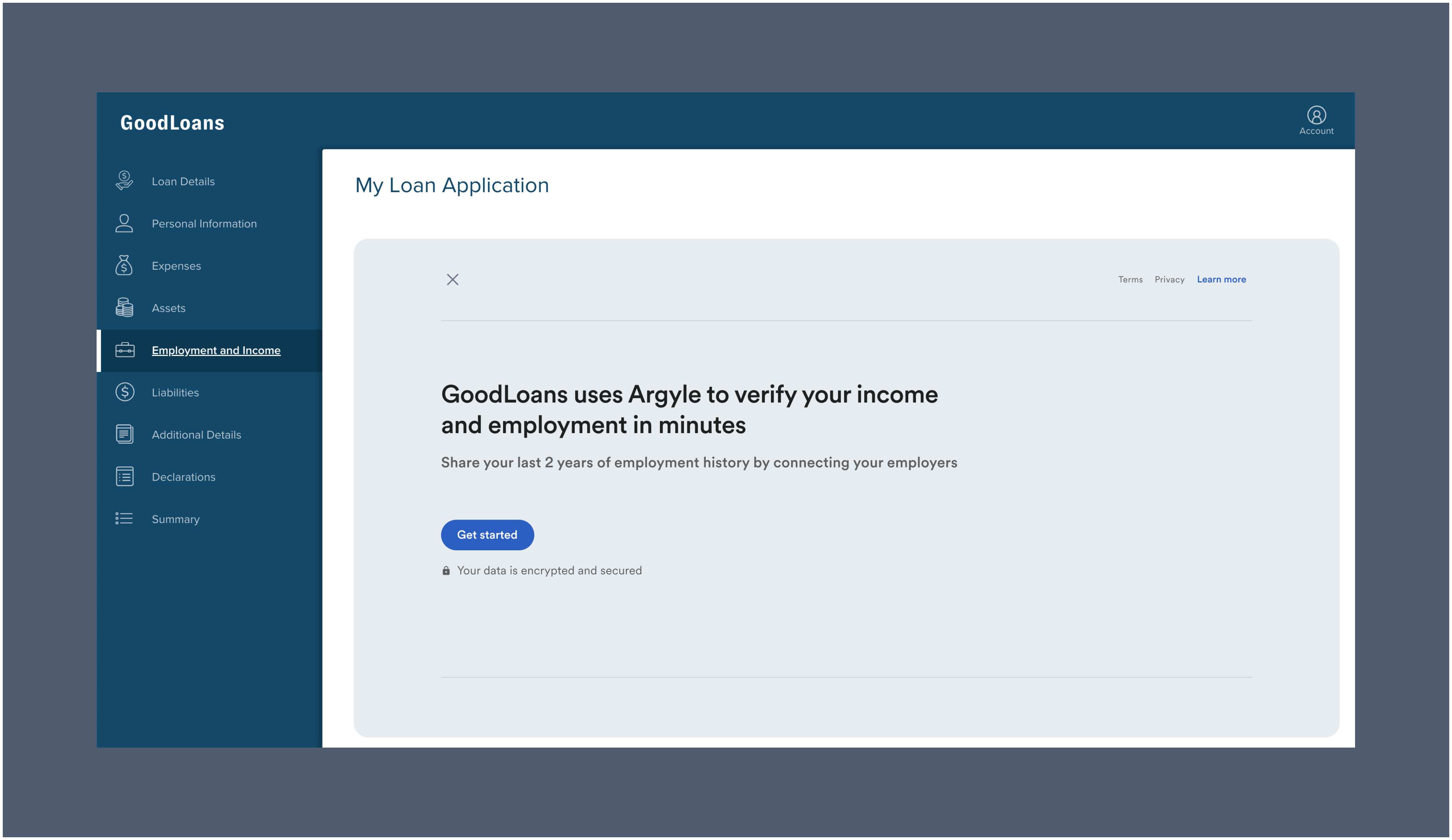 #### Connecting payroll via Argyle
1. Argyle's interface will guide the borrower through the process of logging in to their employers or payroll providers to establish a data connection.
#### Connecting payroll via Argyle
1. Argyle's interface will guide the borrower through the process of logging in to their employers or payroll providers to establish a data connection.
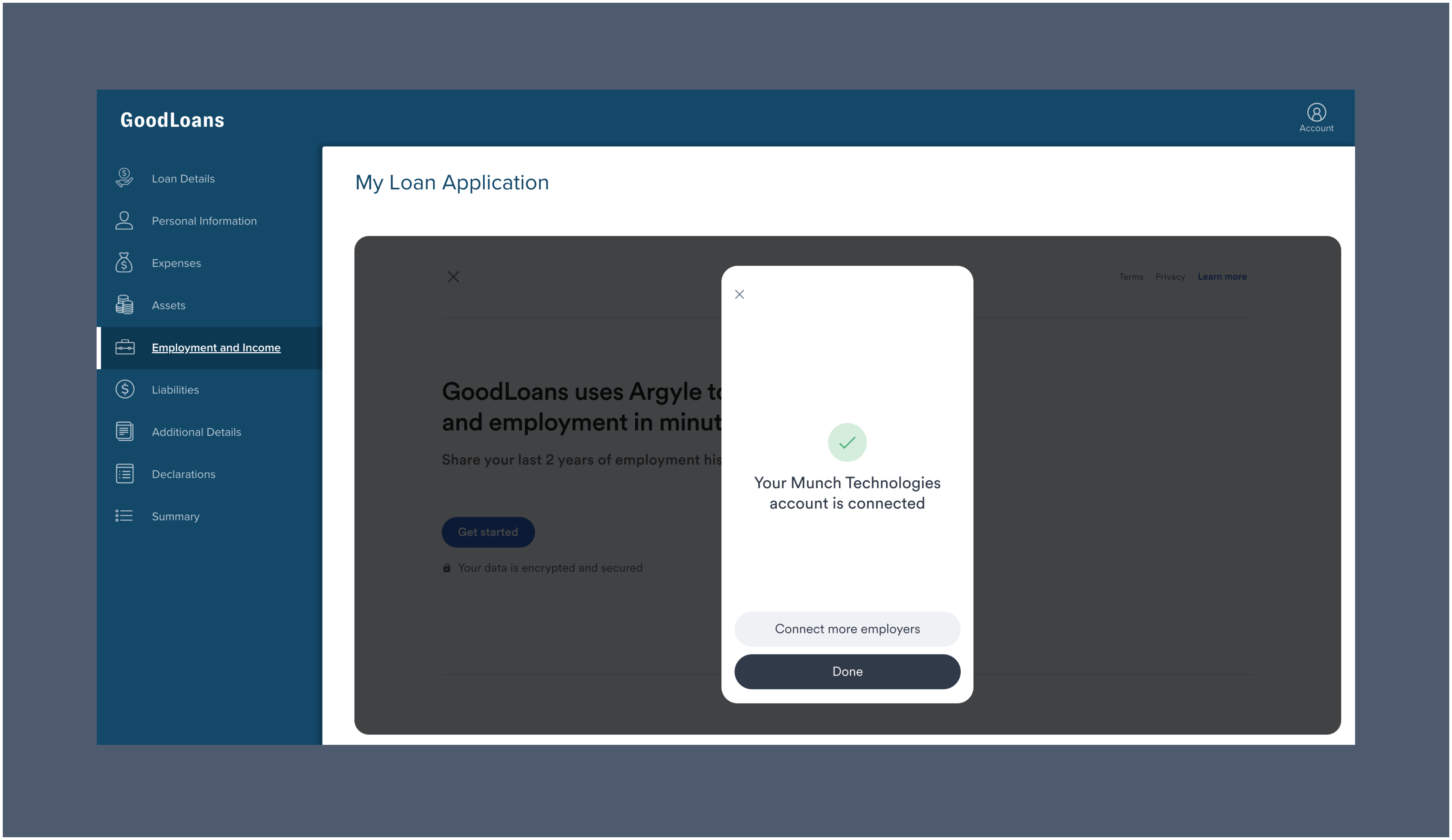 2. Argyle will immediately begin importing the borrower's payroll data. If more employment history is required, the borrower will be prompted to connect additional accounts. Otherwise, the borrower can click `Done` to finish and exit the process.
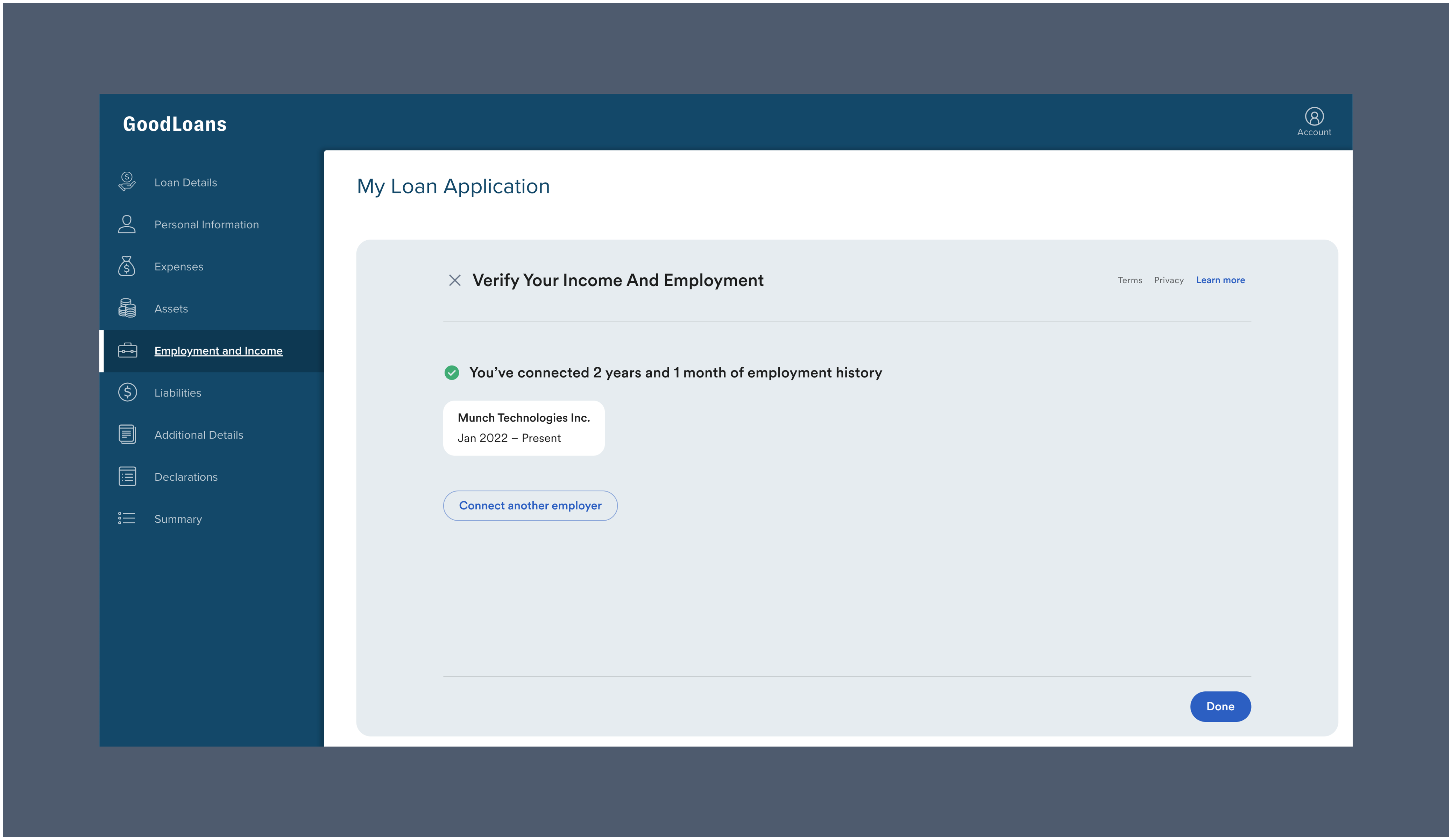 ### Payroll data populates the application
After the borrower completes the Argyle connection process, verified employment and income data will automatically populate the borrower's application and be mapped to the loan file, including:
* Borrower Employer Information (including start date and length of employment)
* Borrower Gross Monthly Income
### Payroll documents and verification reports available in Encompass
Imported payroll documents from the borrower's connections and Argyle income & employment verification reports will automatically be made viewable within [Argyle's Encompass® integration](/integrations/pos-los/encompass/verifications) for the borrower's loan file.
### Admin setup
1. Log in to the **Consumer Connect Admin** portal via Encompass®.
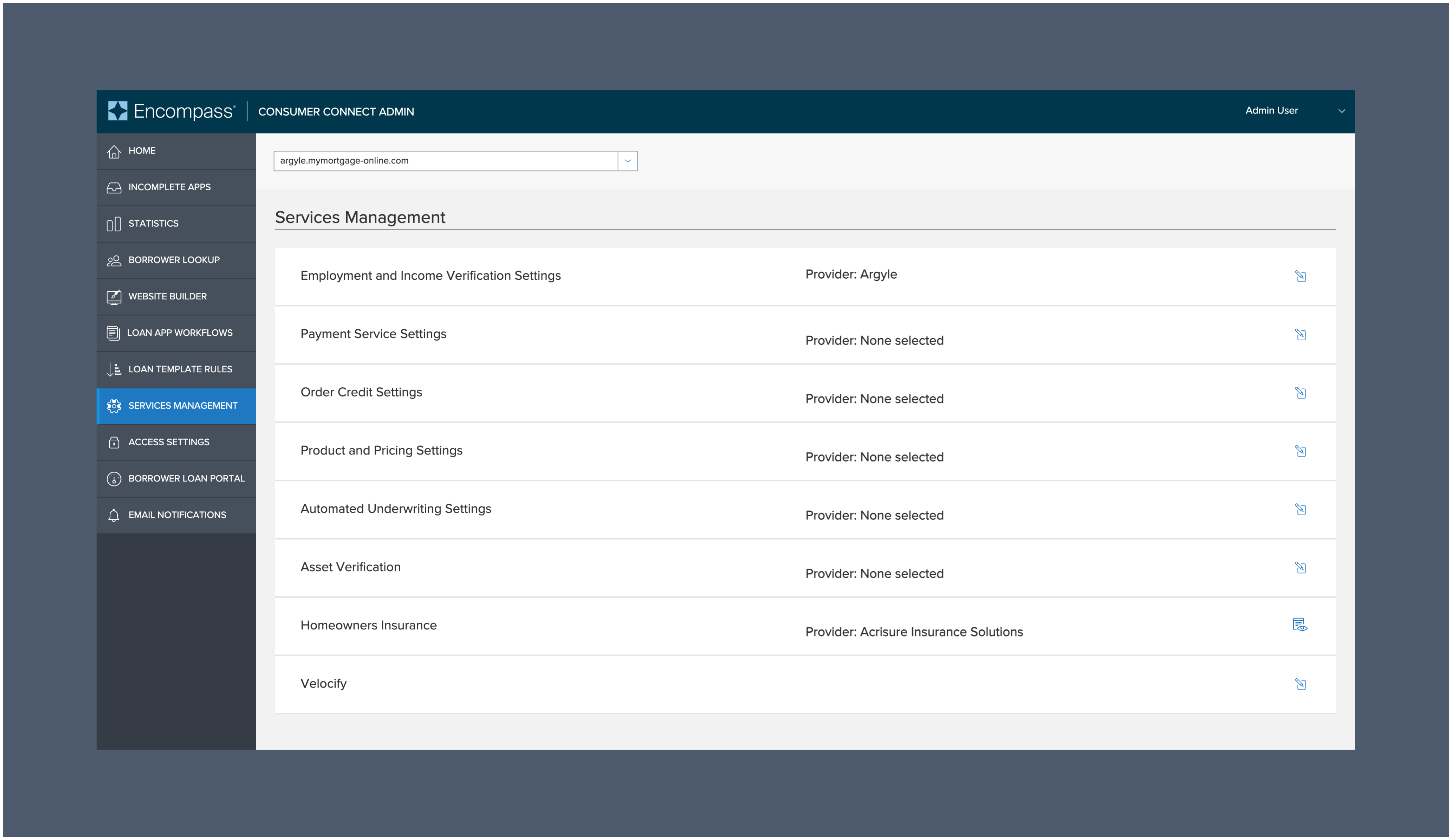
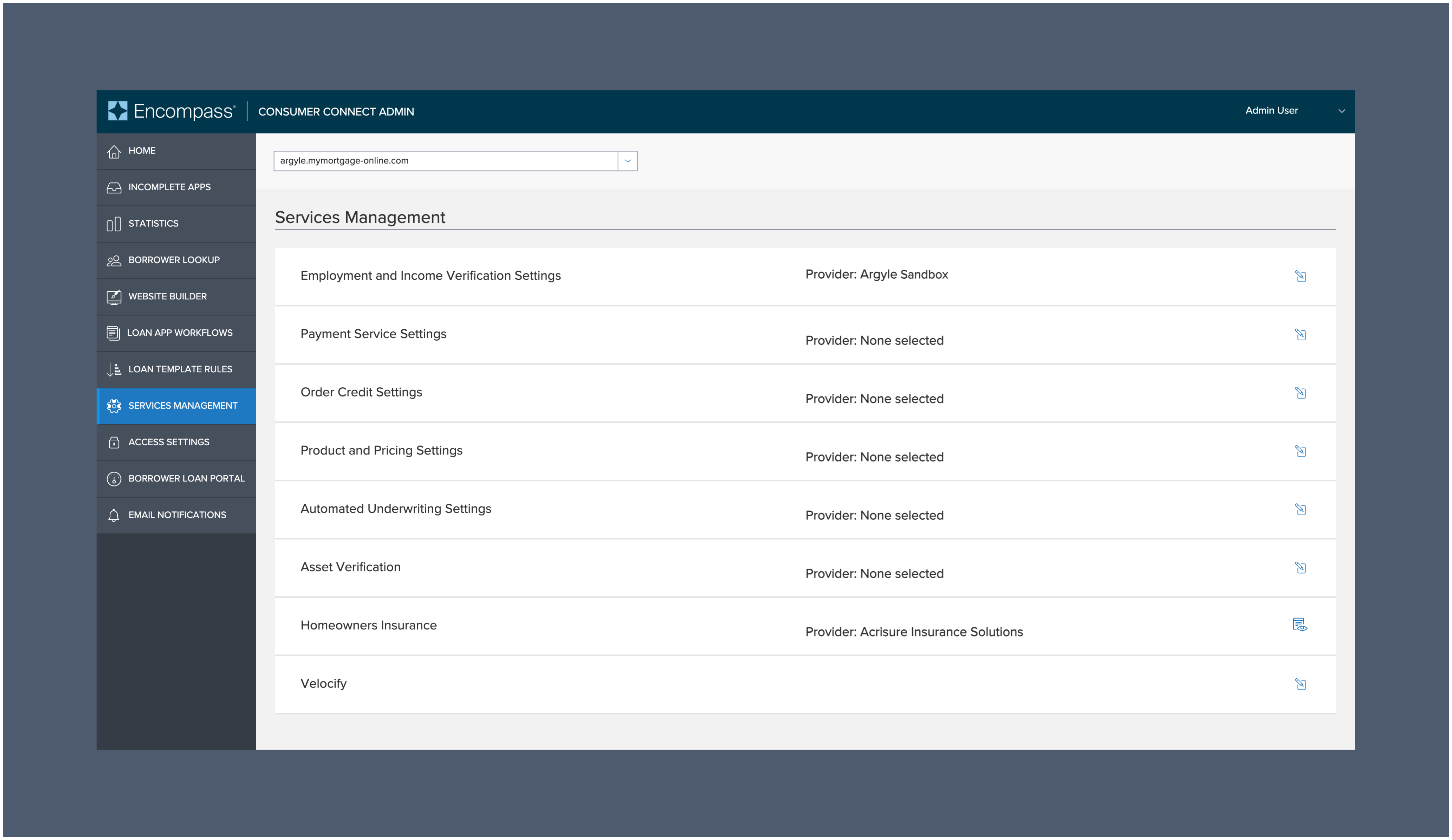
2. Go to **Services Management** and select `Argyle` as the **Provider** next to **Employment and Income Verification Settings**.
### Payroll data populates the application
After the borrower completes the Argyle connection process, verified employment and income data will automatically populate the borrower's application and be mapped to the loan file, including:
* Borrower Employer Information (including start date and length of employment)
* Borrower Gross Monthly Income
### Payroll documents and verification reports available in Encompass
Imported payroll documents from the borrower's connections and Argyle income & employment verification reports will automatically be made viewable within [Argyle's Encompass® integration](/integrations/pos-los/encompass/verifications) for the borrower's loan file.
### Admin setup
1. Log in to the **Consumer Connect Admin** portal via Encompass®.
2. Go to **Services Management** and select `Argyle` as the **Provider** next to **Employment and Income Verification Settings**.
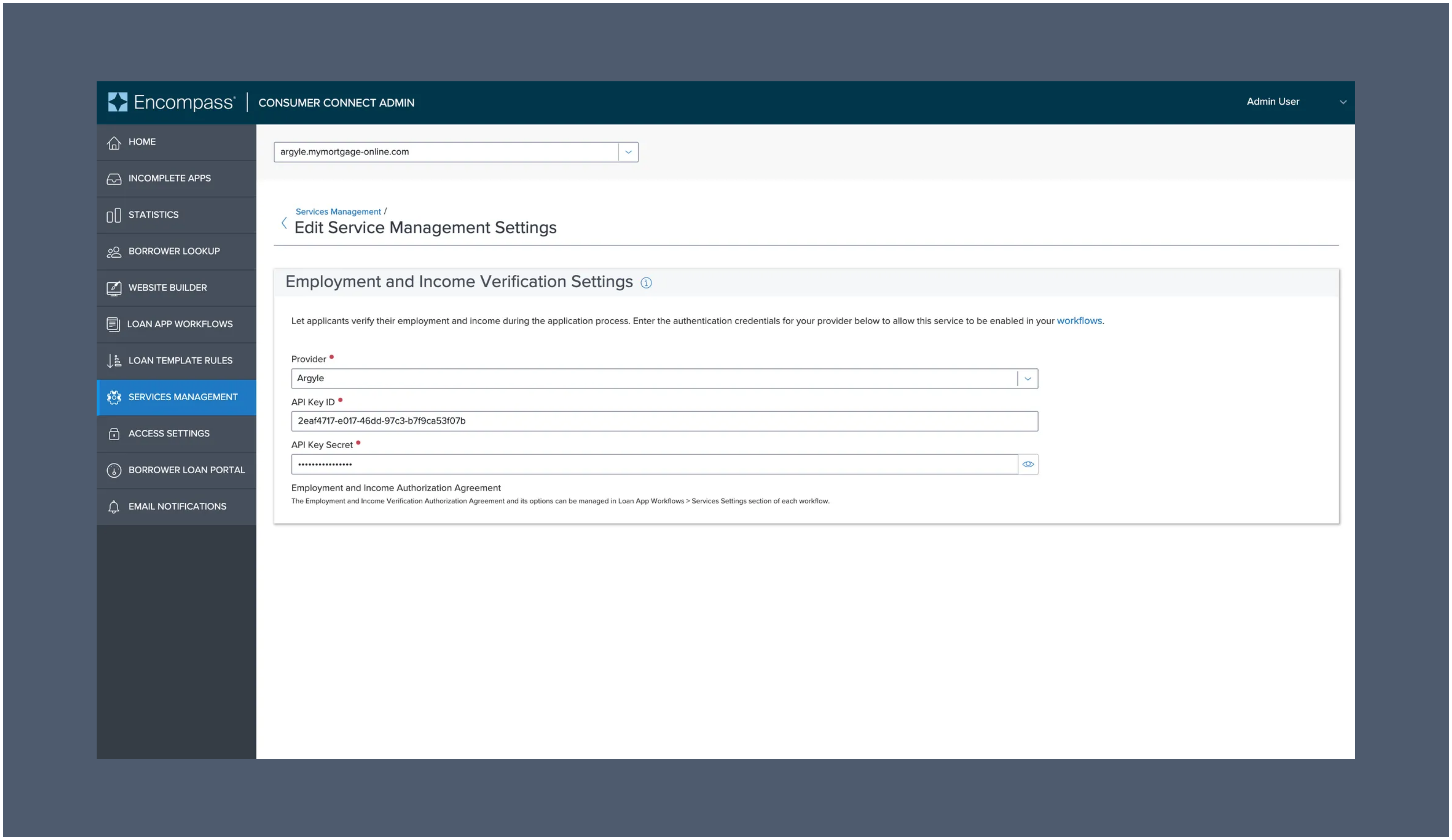
 3. When prompted, enter your Argyle API key and secret, which can be found in the Developers section of Argyle Console.
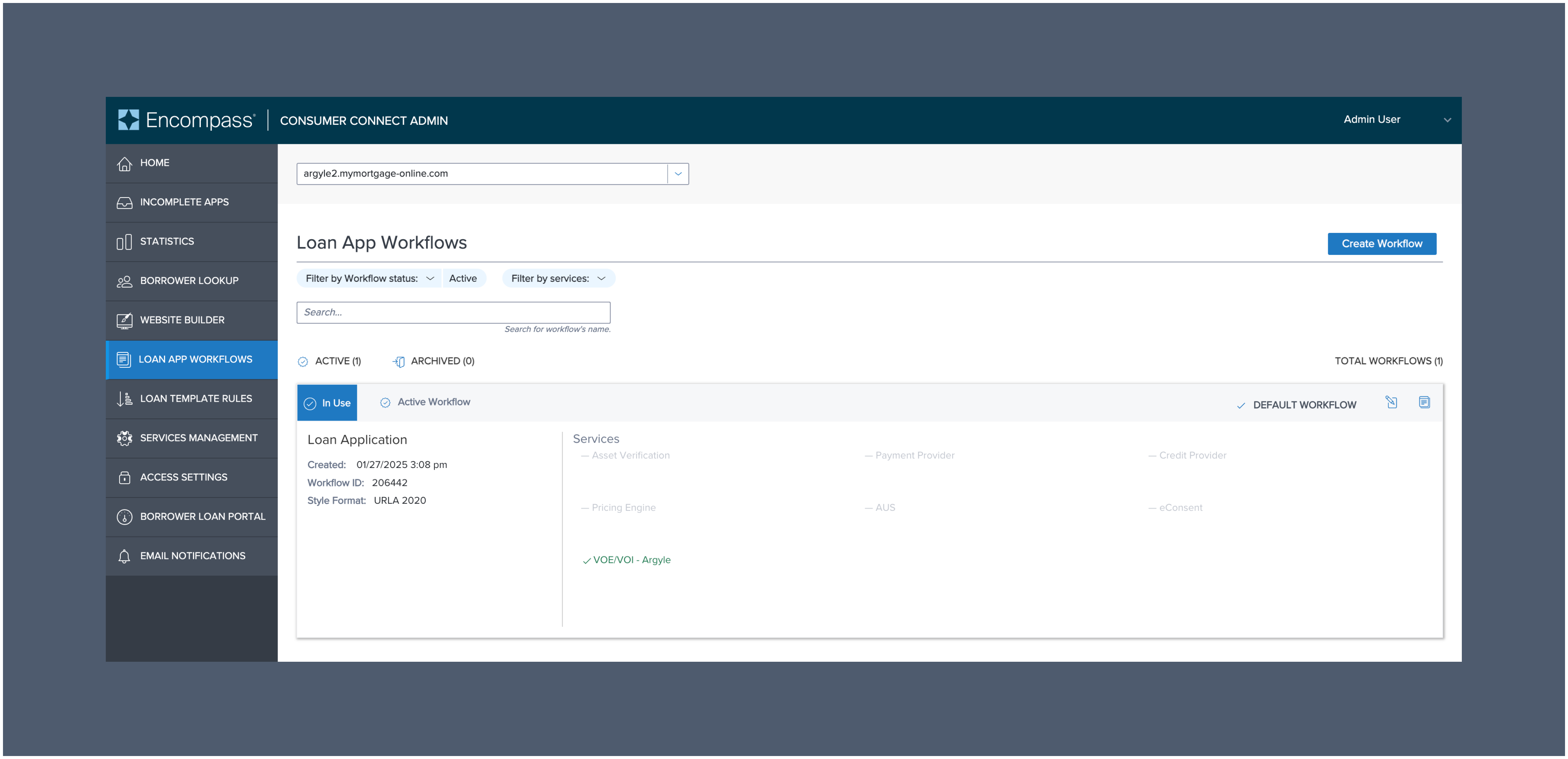
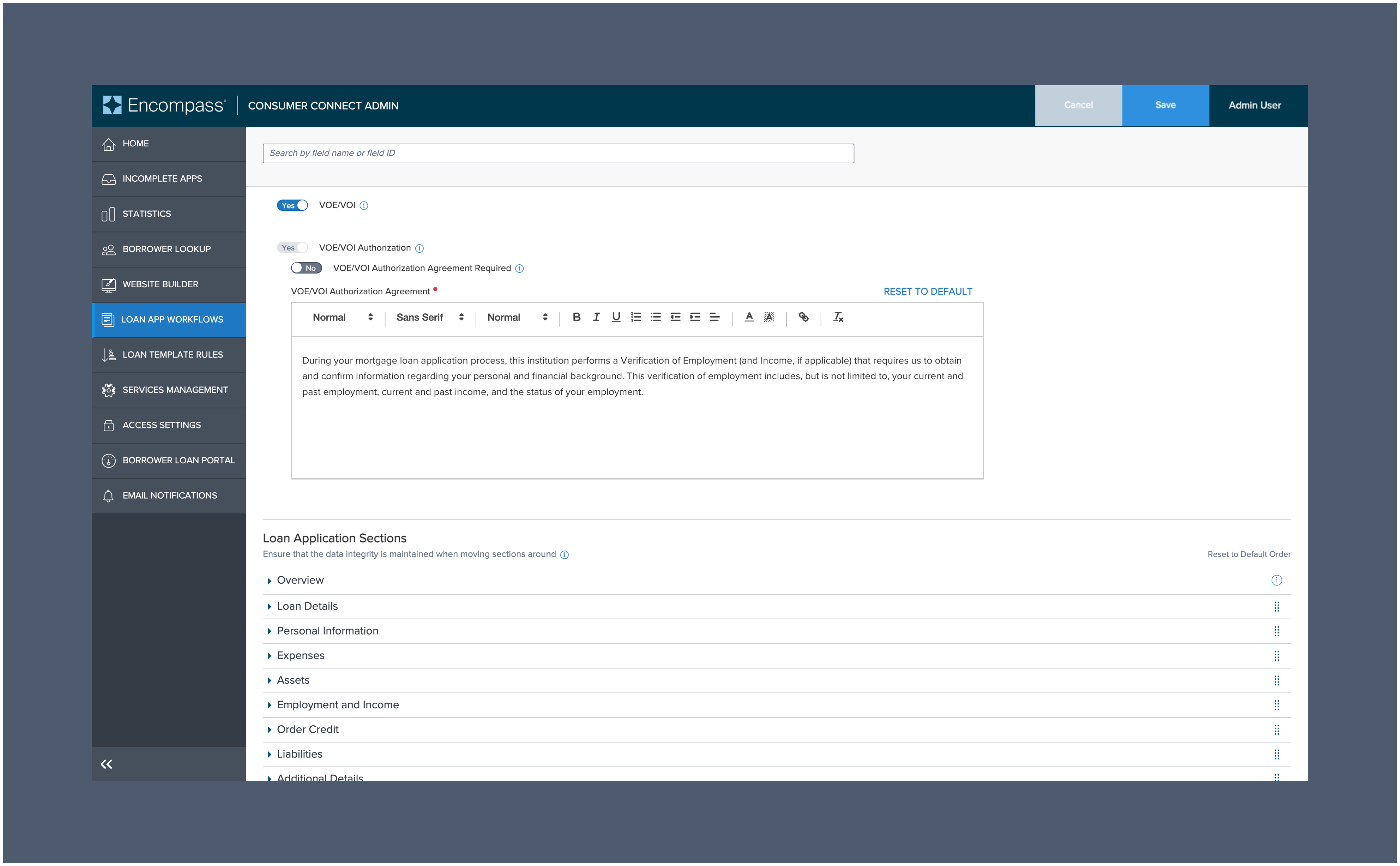
 4. Navigate to the **LOAN APP WORKFLOWS** section of the navigation menu, then select `Create Workflow`
 5. Within **Admin Configurations**, open the **Service Settings** toggle.
6. Scroll down to **VOE/VOI** and `enable the toggle` then click `Save`
5. Within **Admin Configurations**, open the **Service Settings** toggle.
6. Scroll down to **VOE/VOI** and `enable the toggle` then click `Save`
 *For further assistance, please reach out to [support@argyle.com](mailto:support@argyle.com) or your Customer Success Manager.*
### Testing profiles
1. Choose `Argyle Sandbox` when selecting a **Provider** during step 2 of [Admin setup](/integrations/pos-los/consumer-connect#admin-setup).
*For further assistance, please reach out to [support@argyle.com](mailto:support@argyle.com) or your Customer Success Manager.*
### Testing profiles
1. Choose `Argyle Sandbox` when selecting a **Provider** during step 2 of [Admin setup](/integrations/pos-los/consumer-connect#admin-setup).
 2. When testing [connecting payroll via Argyle](/integrations/pos-los/consumer-connect#connecting-payroll-via-argyle), use the following test credentials of Argyle's sample users:
| | Bob | Sarah | Joe\* |
| ------------------ | ----------------------------- | ----------------------------- | ----------------------------- |
| Email | test1@argyle.com | test2@argyle.com | test3@argyle.com |
| Username | test\_1 | test\_2 | test\_3 |
| Password | passgood | passgood | passgood |
| Verification code | 8081 | 8082 | 8083 |
| Phone number | (800) 900-0010 | (800) 900-0020 | (800) 900-0030 |
| Driver's license # | D1230010 | D1230020 | D1230030 |
2. When testing [connecting payroll via Argyle](/integrations/pos-los/consumer-connect#connecting-payroll-via-argyle), use the following test credentials of Argyle's sample users:
| | Bob | Sarah | Joe\* |
| ------------------ | ----------------------------- | ----------------------------- | ----------------------------- |
| Email | test1@argyle.com | test2@argyle.com | test3@argyle.com |
| Username | test\_1 | test\_2 | test\_3 |
| Password | passgood | passgood | passgood |
| Verification code | 8081 | 8082 | 8083 |
| Phone number | (800) 900-0010 | (800) 900-0020 | (800) 900-0030 |
| Driver's license # | D1230010 | D1230020 | D1230030 |
3. For specific scenario testing, the following sample users are also available:
| | Homer Loanseeker | Suzi Builder | Andy Freddie |
| ------------------ | ----------------------------------------- | ------------------------------------- | ---------------------------------------- |
| Email | homer\_loanseeker@argyle.com | suzi\_builder@argyle.com | andy\_freddie@argyle.com |
| Username | homer\_loanseeker | suzi\_builder | andy\_freddie |
| Password | passgood | passgood | passgood |
| Verification code | 9081 | 9084 | 9088 |
| Phone number | (800) 900-0101 | (800) 900-0104 | (800) 900-0108 |
| Driver's license # | D1230101 | D1230104 | D1230108 |
| **Returns** | **1 active employment** | **2 active employments** | **1 active and 1 terminated employment** |
## Financial accounts
### Overview
Argyle also provides a native bank connection experience within Consumer Connect:
1. Borrowers connect their financial accounts within the Argyle experience.
2. Asset data will automatically populate the borrower's Consumer Connect application.
3. After importing to Encompass®:
* Argyle will automatically generate a verification of assets (VOA) or verification of assets and income (VOAI) report.
* Asset data will automatically be added to the 1003 URLA and report identifiers required by GSEs will be added to the Encompass® loan file.
* Closing verification of employment (VOE) reports can be ordered as needed within Encompass®.
### Borrower experience
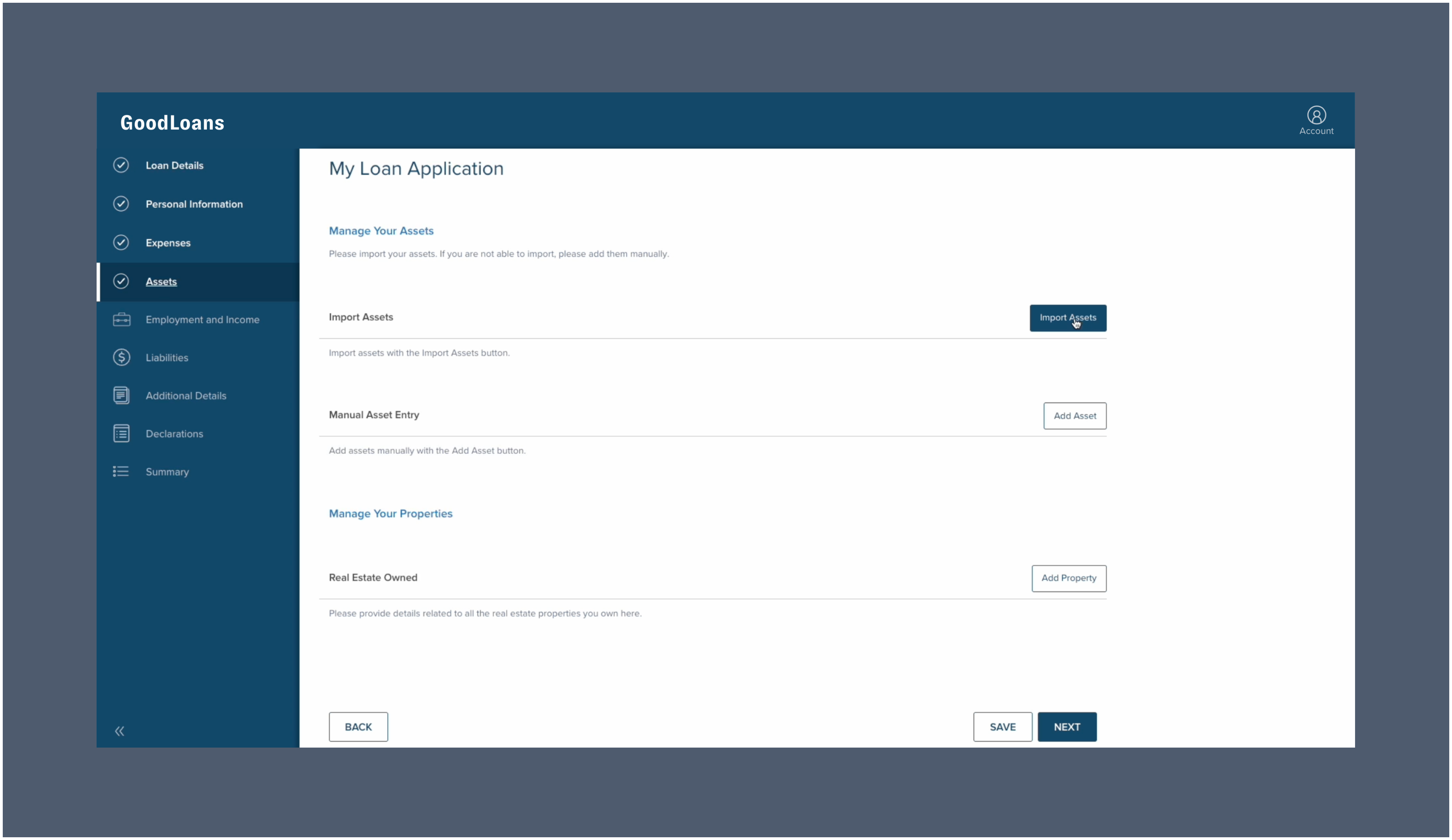
1. Borrower selects `Import Assets` within the **Assets** section of their application.
 2. The borrower will then fill out preliminary information such as their name, social security number, and date of birth (this information is typically pre-filled).
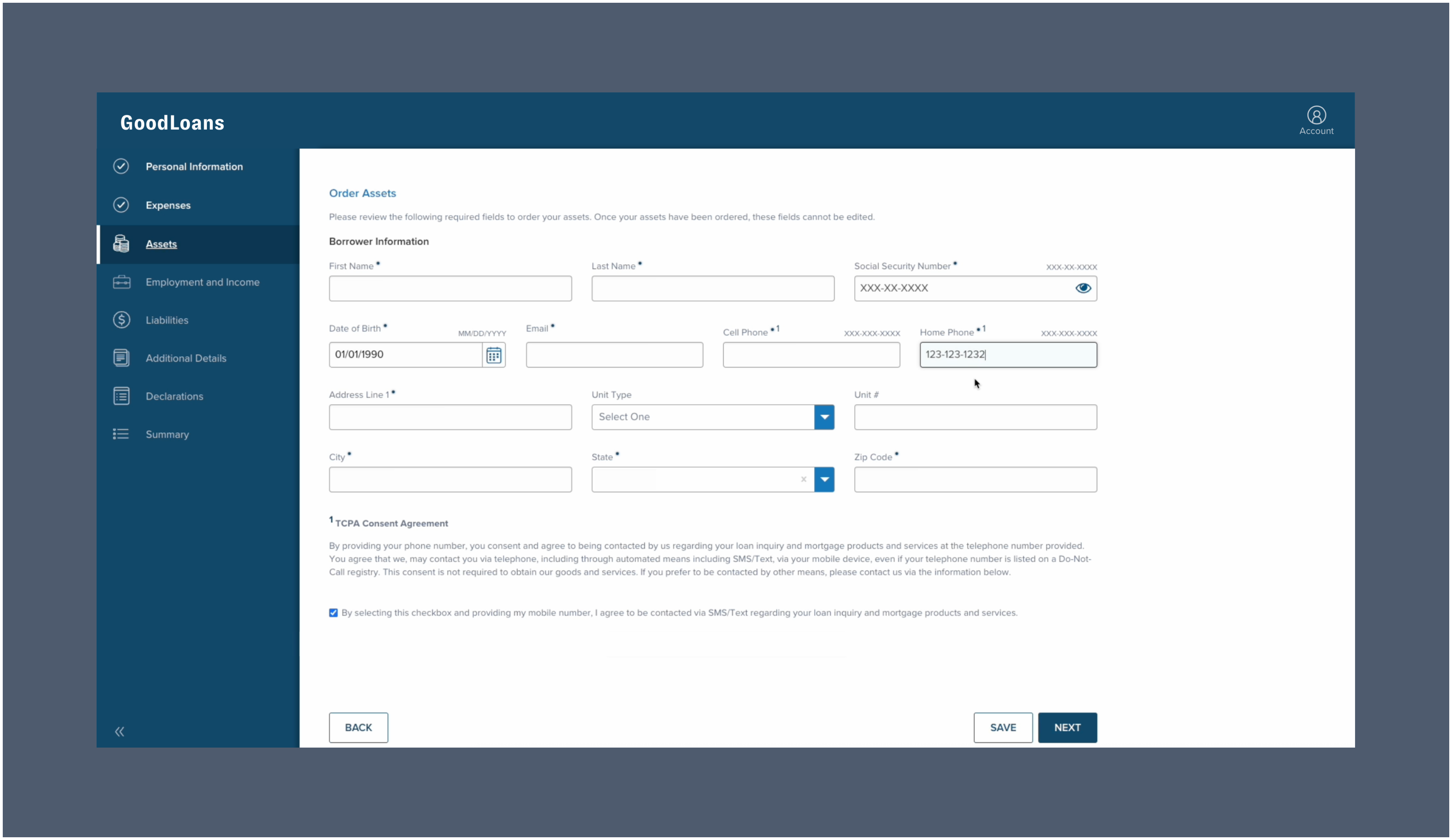 3. Once completed, the borrower must click `Next`. The borrower will then be guided through the process of logging in to their financial institutions to establish a data connection.
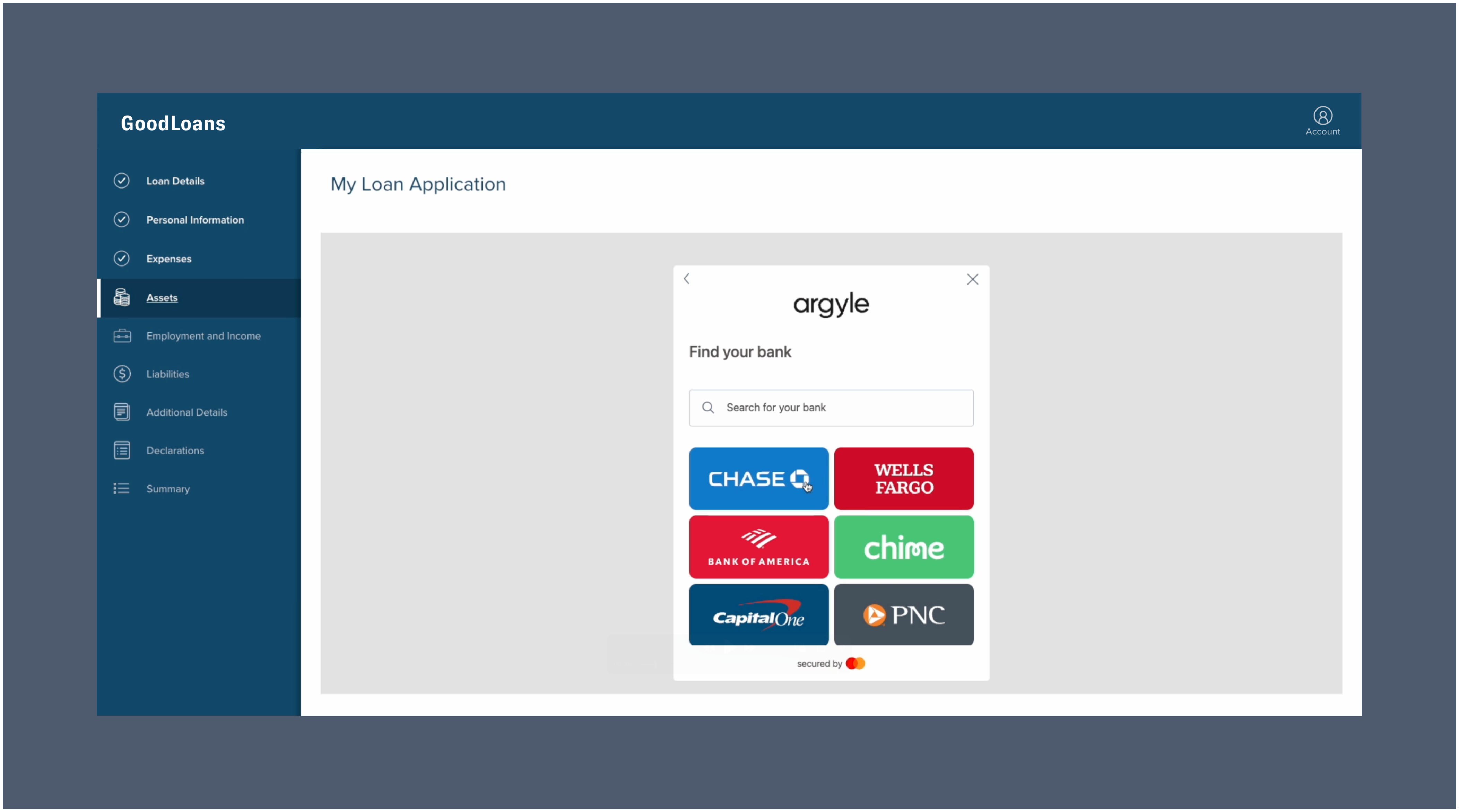 4. For each financial institution, the borrower will select which associated accounts to connect.
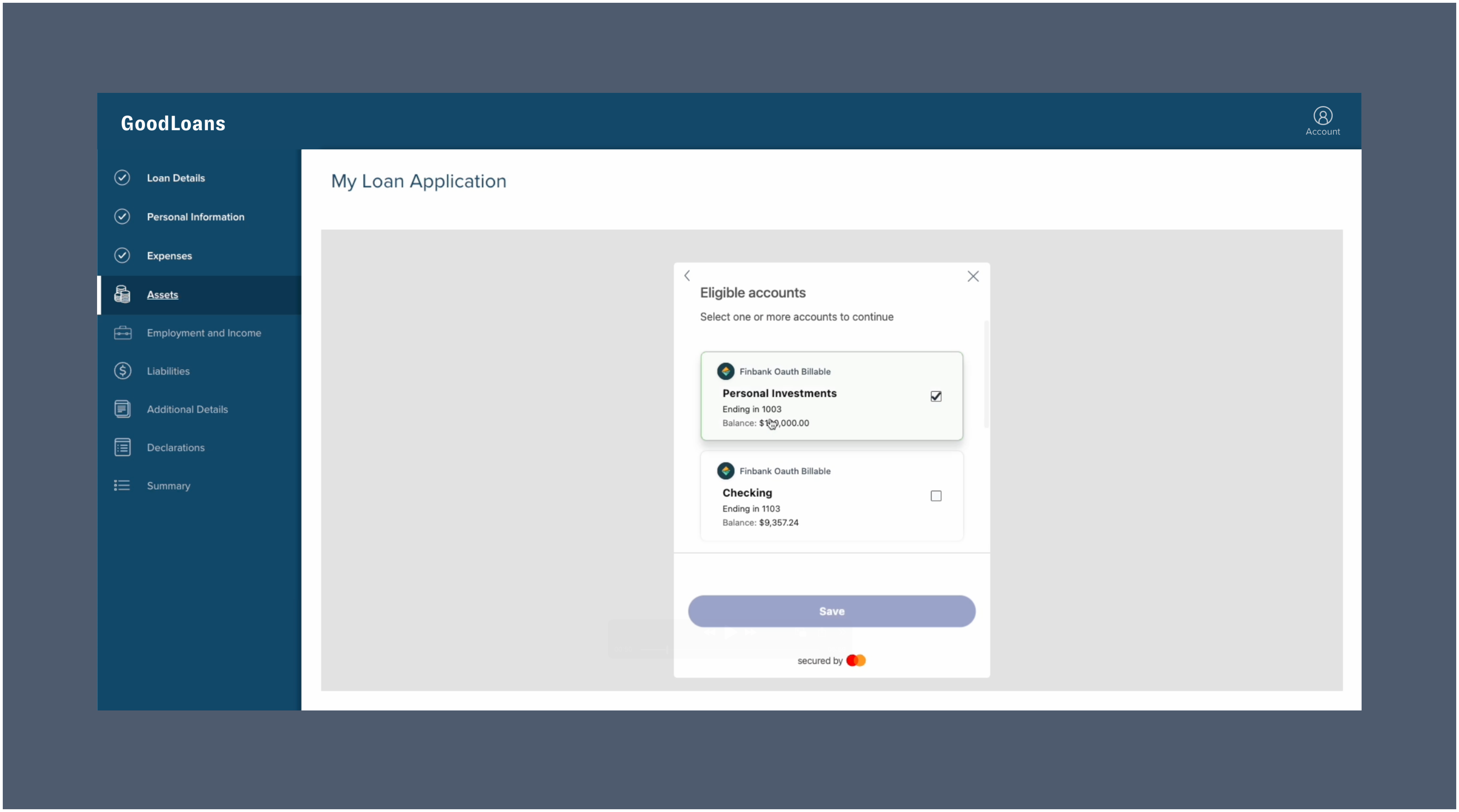 ### Asset data populates the application
After the borrower completes the Argyle connection process, verified asset data from their selected financial accounts will automatically begin to import and populate the borrower's Consumer Connect application. The borrower can manually add additional assets, or continue on to complete the remainder of their application.
### Asset data and verification reports available in Encompass
The borrower's asset data can be imported to Encompass®. Argyle will automatically generate a verification of assets (VOA) or verification of assets and income (VOAI) report and add it to the loan file, in addition to populating asset data in the 1003 URLA and report identifiers required by GSEs within the Encompass® loan file.
Closing verification of employment (VOE) reports can also be ordered as needed within Encompass®, as long as a verification of assets and income (VOAI) report has previously been generated.
### Admin setup
1. Log in to the **Consumer Connect Admin** portal via Encompass®.
2. Go to **Services Management** and select `Finicity` as the Provider next to **Asset Verification**.
3. When prompted, enter your **Application Key**, **Partner ID**, and **Partner Secret**.
Reach out to your Argyle representative to obtain these integration credentials.
### Asset data populates the application
After the borrower completes the Argyle connection process, verified asset data from their selected financial accounts will automatically begin to import and populate the borrower's Consumer Connect application. The borrower can manually add additional assets, or continue on to complete the remainder of their application.
### Asset data and verification reports available in Encompass
The borrower's asset data can be imported to Encompass®. Argyle will automatically generate a verification of assets (VOA) or verification of assets and income (VOAI) report and add it to the loan file, in addition to populating asset data in the 1003 URLA and report identifiers required by GSEs within the Encompass® loan file.
Closing verification of employment (VOE) reports can also be ordered as needed within Encompass®, as long as a verification of assets and income (VOAI) report has previously been generated.
### Admin setup
1. Log in to the **Consumer Connect Admin** portal via Encompass®.
2. Go to **Services Management** and select `Finicity` as the Provider next to **Asset Verification**.
3. When prompted, enter your **Application Key**, **Partner ID**, and **Partner Secret**.
Reach out to your Argyle representative to obtain these integration credentials.
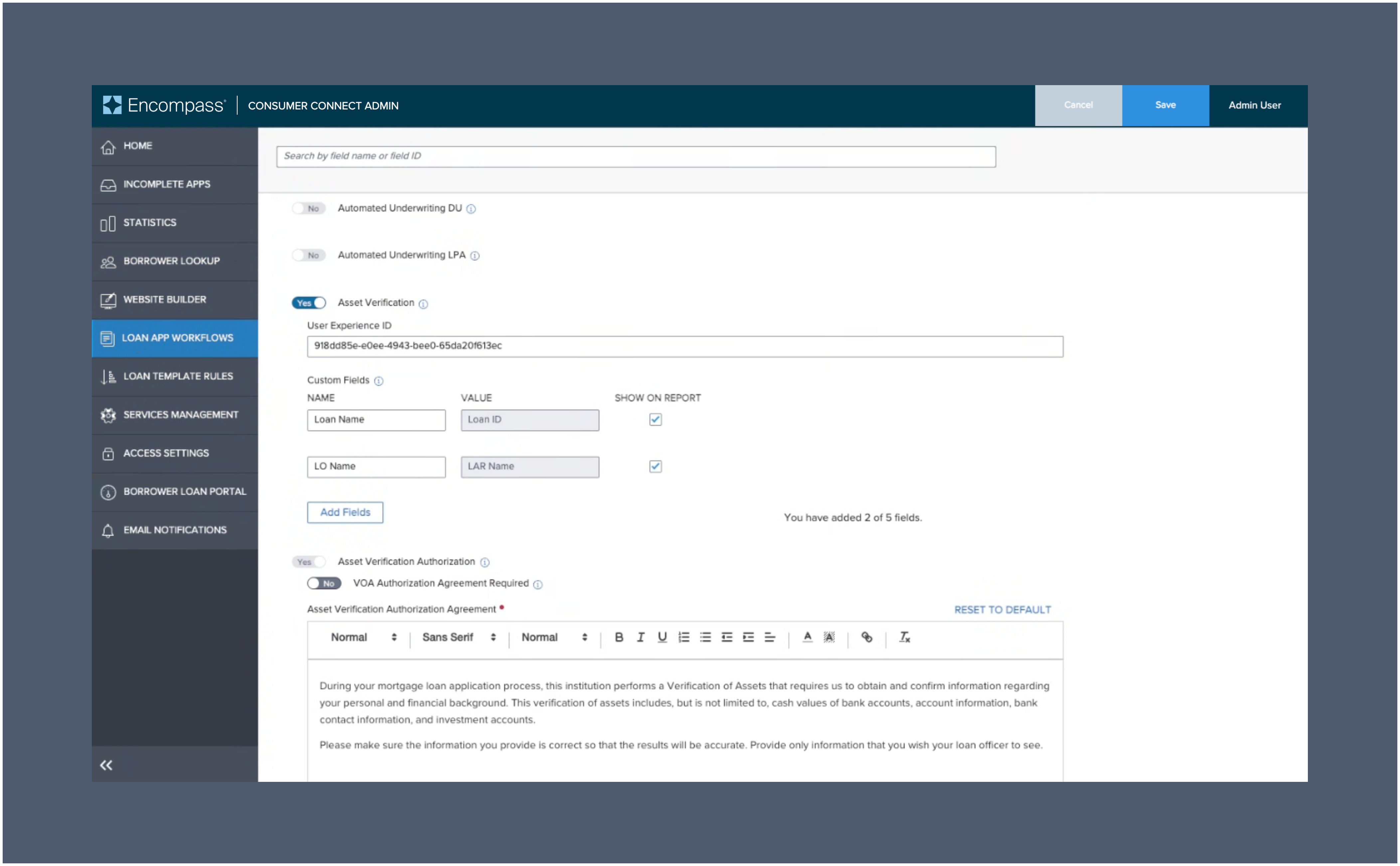
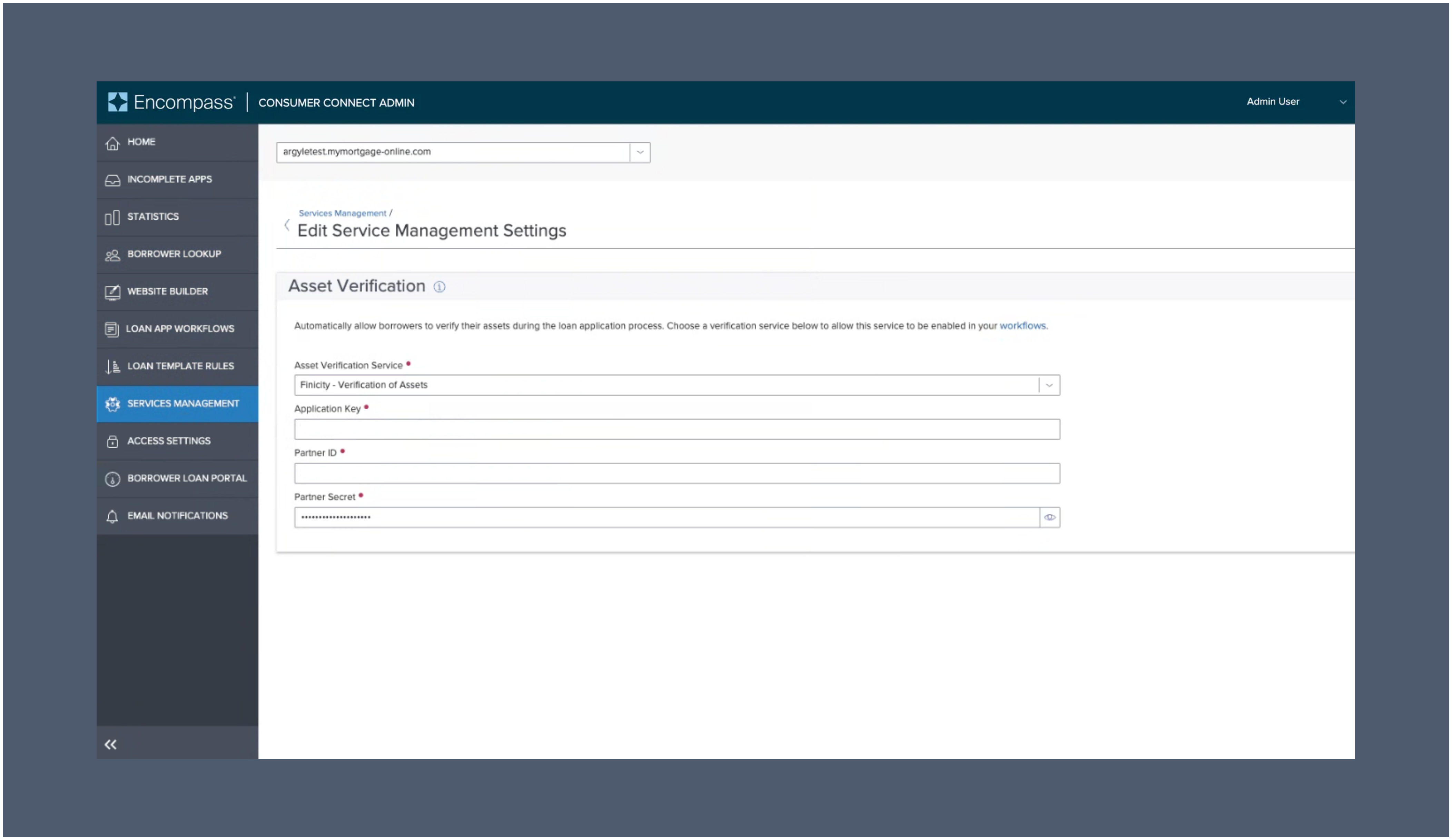 4. Navigate to the **LOAN APP WORKFLOWS** section of the navigation menu, then select `Create Workflow`
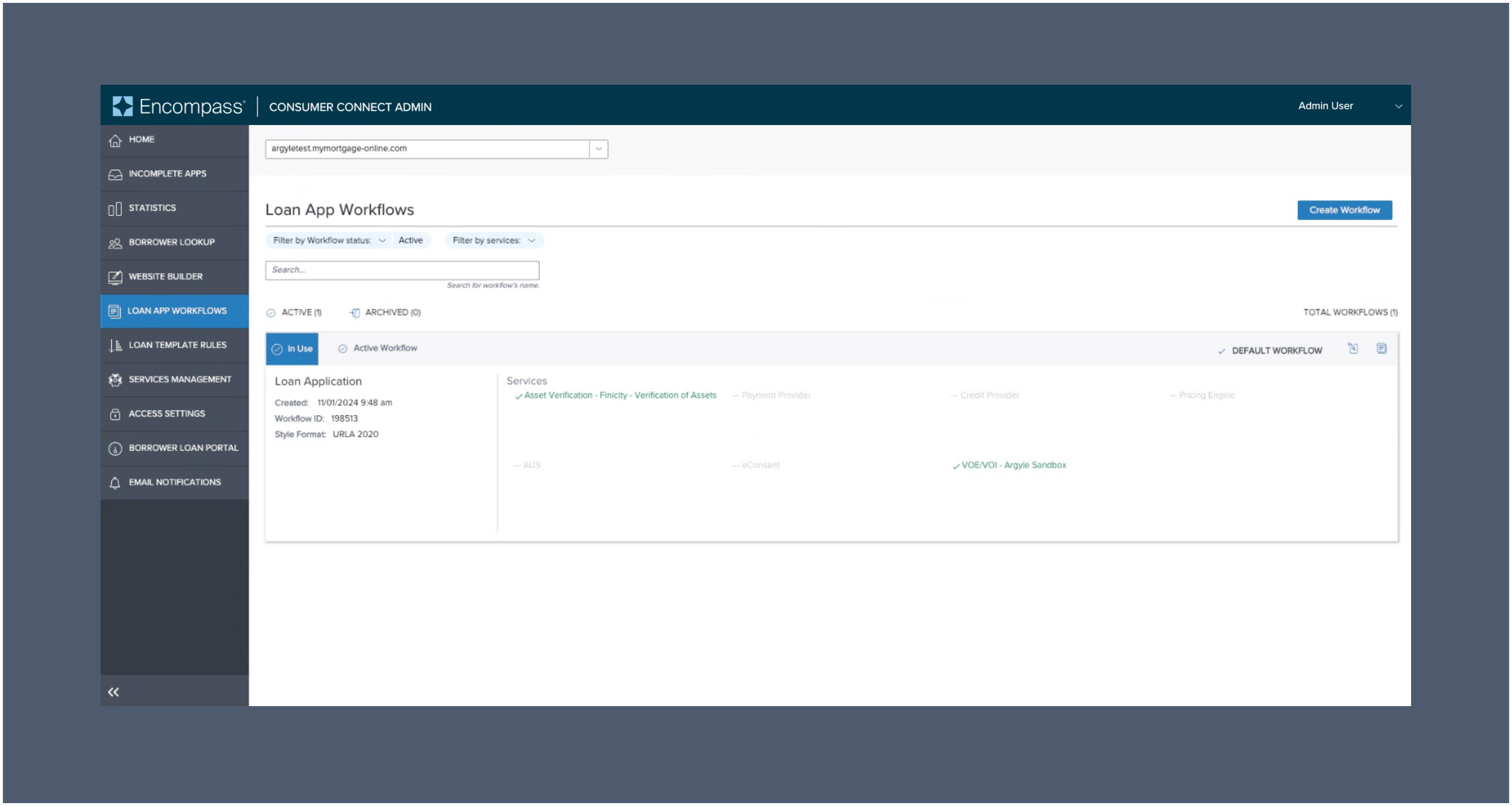 5. Within **Admin Configurations**, open the **Service Settings** toggle.
6. Scroll down to **Asset Verification** and `enable the toggle` then click `Save`
5. Within **Admin Configurations**, open the **Service Settings** toggle.
6. Scroll down to **Asset Verification** and `enable the toggle` then click `Save`
 *For further assistance, please reach out to [support@argyle.com](mailto:support@argyle.com) or your Customer Success Manager.*
### Testing profiles
1. Use sample banking credentials to log into either the `FinBank Billable` or `FinBank Oauth Billable` financial institutions for testing.
2. For specific scenario testing, the following sample users are also available:
| | Sue Wealthy | River Paycheck | Alex Student |
| ----------- | ------------------------------------------------------------------------------------------------------------------------------------------------------------------------------------------------------------------------------------------------------------------------------------------------------- | ------------------------------------------------------------------------------------------------------------------------------------------------------------------------------------------------------------------------------------------------------------------------- | ---------------------------------------------------------------------------------------------------------------------------------------------------------------------------------------------------------------------------------------------------------------------------------------------------------------------------------------------- |
| Username | sue\_wealthy | river\_paycheck | alex\_student |
| Password | profile\_700 | profile\_703 | profile\_704 |
| Description | Sue is working as a Product Manager with a good steady income, a mortgage, and multiple investment accounts. She has a loan account and leases a car. Sue travels a few times a year. She has typical expenses like groceries, clothes, entertainment, gym membership, car expenses, and she has a pet. | River works in construction. He rents an apartment and has typical expenses like groceries, clothes, entertainment, household and car expenses. He has some savings but no investments, no loans and no credit cards. In some months, River's expenses exceed his income. | Alex is working full-time with a good salary but she is still paying off her student loan. She makes regular monthly repayments, but she still has over \$30,000 to pay off. Alex has typical expenses like groceries, clothes, entertainment, household, and car expenses. She has limited savings and she has started an investment account. |
*For further assistance, please reach out to [support@argyle.com](mailto:support@argyle.com) or your Customer Success Manager.*
### Testing profiles
1. Use sample banking credentials to log into either the `FinBank Billable` or `FinBank Oauth Billable` financial institutions for testing.
2. For specific scenario testing, the following sample users are also available:
| | Sue Wealthy | River Paycheck | Alex Student |
| ----------- | ------------------------------------------------------------------------------------------------------------------------------------------------------------------------------------------------------------------------------------------------------------------------------------------------------- | ------------------------------------------------------------------------------------------------------------------------------------------------------------------------------------------------------------------------------------------------------------------------- | ---------------------------------------------------------------------------------------------------------------------------------------------------------------------------------------------------------------------------------------------------------------------------------------------------------------------------------------------- |
| Username | sue\_wealthy | river\_paycheck | alex\_student |
| Password | profile\_700 | profile\_703 | profile\_704 |
| Description | Sue is working as a Product Manager with a good steady income, a mortgage, and multiple investment accounts. She has a loan account and leases a car. Sue travels a few times a year. She has typical expenses like groceries, clothes, entertainment, gym membership, car expenses, and she has a pet. | River works in construction. He rents an apartment and has typical expenses like groceries, clothes, entertainment, household and car expenses. He has some savings but no investments, no loans and no credit cards. In some months, River's expenses exceed his income. | Alex is working full-time with a good salary but she is still paying off her student loan. She makes regular monthly repayments, but she still has over \$30,000 to pay off. Alex has typical expenses like groceries, clothes, entertainment, household, and car expenses. She has limited savings and she has started an investment account. |