> ## Documentation Index
> Fetch the complete documentation index at: https://docs.argyle.com/llms.txt
> Use this file to discover all available pages before exploring further.
# Day 1 Certainty® and AIM
> Achieve Day 1 Certainty® and AIM eligibility through Argyle income and employment verifications.
## Overview
Argyle's income and employment verification reports provide lenders an automated way to achieve:
* Day 1 Certainty® through Fannie Mae's Desktop Underwriter® (DU®) validation service.
* Assessment of borrower income and employment through Freddie Mac's asset and income modeler (AIM).
Reach out to your Customer Success Manager to enable Argyle's Day 1 Certainty and AIM functionality.
1. Borrowers [connect their payroll accounts](/overview/how-argyle-works#connecting-accounts) through Argyle.
2. Argyle generates verification reports from the borrowers' payroll data.
3. Lenders submit the reference number listed on Argyle's verification reports to Fannie Mae's DU validation service and/or Freddie Mac's Loan Product Advisor® (LPASM℠) along with the loan casefiles.
Fannie Mae and Freddie Mac will automatically receive a copy of Argyle's verification reports and the underlying income and employment data. After the information is validated, Day 1 Certainty and AIM eligibility will be delivered for eligible loans.
## Console
### Generating verification reports
1. After a borrower has connected their payroll account(s), go to the Connections section of Console.
2. Select the individual borrower from the Connections table.
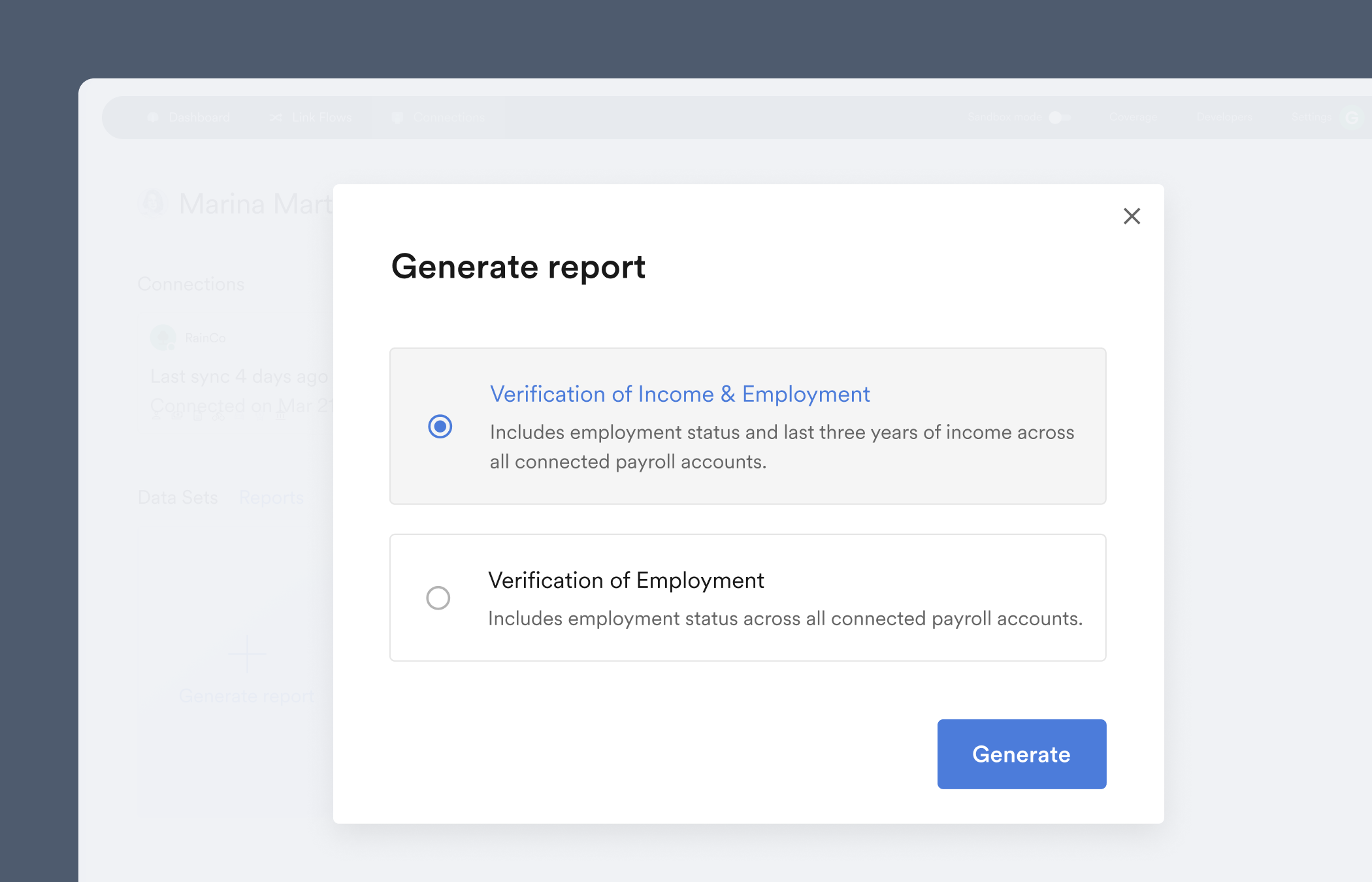
3. Select [Generate report](/overview/data-structure/reports#generating-reports).
 ### Locating reference numbers
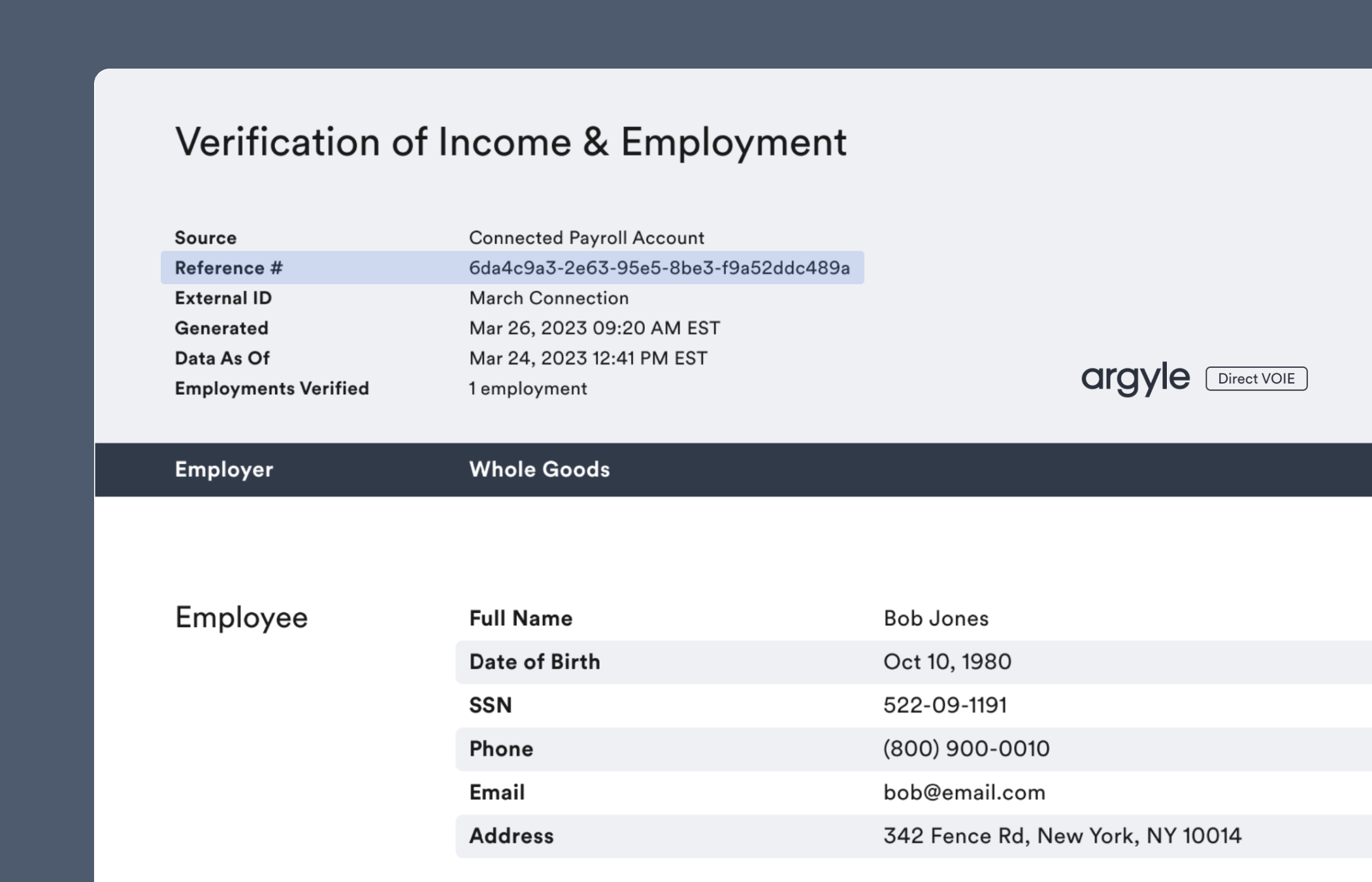
A `Reference #` will be listed at the top of Argyle's verification report that can be submitted to Fannie Mae for Day 1 Certainty® and Freddie Mac for AIM eligibility determinations.
### Locating reference numbers
A `Reference #` will be listed at the top of Argyle's verification report that can be submitted to Fannie Mae for Day 1 Certainty® and Freddie Mac for AIM eligibility determinations.
 ## API
### Webhooks
Argyle provides a [`reports.ready`](/api-reference/reports-webhooks/ready) webhook that will notify you when sufficient data has been retrieved from the borrower's connected payroll account(s) to generate a verification report.
You can subscribe to this webhook [via Console](/console/management/webhooks), or via the API by sending a POST request to `https://api.argyle.com/v2/webhooks`. In the API request body, include a JSON object in the following format:
```json theme={}
{
"events": ["reports.ready"],
"name": "My webhook",
"url": "https://your-webhook-backend.com",
"secret": "" // Optional.
}
```
The `reports.ready` webhook's payload provides a list of the borrower's payroll accounts that have synced a sufficient amount of data to be used in the report.
The [accounts.connected](/api-reference/accounts-webhooks/connected) and [accounts.failed](/api-reference/accounts-webhooks/failed) webhooks can be used to track multiple account connections. Compare them to the accounts listed in the `reports.ready` webhook payload to determine when to generate a report.
```json theme={}
{
"event": "reports.ready",
"name": "name-for-the-webhook-subscription",
"data": {
"user": "018051aa-f7a9-a0db-2f38-6cfa325e9d69",
"resource": {
"user": "018051aa-f7a9-a0db-2f38-6cfa325e9d69",
"external_id": "March Connection",
"accounts": [
{
"id": "0185a8b8-60eb-80ca-7482-5f24504573f7",
"last_synced_at": "2024-01-08T12:55:04.016Z"
},
{
"id": "0187c66e-e7e5-811c-b006-2232f00f426a",
"last_synced_at": "2024-01-08T12:58:06.023Z"
}
],
"documents": []
}
}
}
```
### Requesting verification reports
Send a **POST** request to the [reports endpoint](/api-reference/reports#generate) — `https://api.argyle.com/v2/reports/voie-mortgage`
The [report type](/api-reference/reports#generate-type) is specified in the request path — e.g. `/voie-mortgage` or `/voe-mortgage`
In the API request body, include a JSON object in the format below:
```json theme={}
{
"user": "018b8255-4ab1-be4b-aa2c-e9ff41d75809" // ID of the user
}
```
The initial API response will include the `id` of the report. After the report is generated, this `id` can be used to retrieve the report and is also the `Reference #` that can be submitted to Fannie Mae and/or Freddie Mac.
```json theme={}
{
"id": "e0dbf946-a400-419c-946f-0adc7b5fbe36", // ID of the report
"user": "018b8255-4ab1-be4b-aa2c-e9ff41d75809",
"reference_id": "e0dbf946-a400-419c-946f-0adc7b5fbe36",
"generated_at": "2024-01-23T20:46:03.254Z",
"created_at": "2024-01-23T20:46:03.254Z",
"type": "voie-mortgage",
"status": "generating",
"file_url": "www.argyle.com/storagename/pdf",
"json_url": "www.argyle.com/storagename/json",
"accounts": [
{
"id": "0185a8b8-60eb-80ca-7482-5f24504573f7",
"item": "item_123456789",
"last_synced_at": "2024-01-08T12:55:04.016Z"
},
{
"id": "0187c66e-e7e5-811c-b006-2232f00f426a",
"item": "item_000000001",
"last_synced_at": "2024-01-08T12:58:06.023Z"
}
],
"metadata": {},
"last_synced_at": "2024-01-08T12:58:06.023Z",
"external_id": "March Connection"
}
```
### Retrieving reference numbers
Send a **GET** request to the reports endpoint — `https://api.argyle.com/v2/reports/{id}`
Include the `id` of the report as the path parameter.
The report object returned in the API response will contain:
* An `id` field with the `Reference #` that can be submitted to both Fannie Mae and Freddie Mac.
* A `metadata` object containing the eligible accounts and employments (as determined by Fannie Mae and Freddie Mac's guidelines) that were included in the report.
```json theme={}
{
"id": "e0dbf946-a400-419c-946f-0adc7b5fbe36", // Reference number
"user": "018b8255-4ab1-be4b-aa2c-e9ff41d75809",
"reference_id": "e0dbf946-a400-419c-946f-0adc7b5fbe36",
"generated_at": "2024-01-23T20:46:03.254Z",
"created_at": "2024-01-23T20:46:03.254Z",
"type": "voie-mortgage",
"status": "generated",
"file_url": "www.argyle.com/storagename/pdf",
"json_url": "www.argyle.com/storagename/json",
"last_synced_at": "2024-01-22T16:44:25.889Z",
"accounts": [
{
"id": "0185a8b8-60eb-80ca-7482-5f24504573f7",
"item": "item_123456789",
"last_synced_at": "2024-01-08T12:55:04.016Z"
},
{
"id": "0187c66e-e7e5-811c-b006-2232f00f426a",
"item": "item_000000001",
"last_synced_at": "2024-01-08T12:58:06.023Z"
}
],
"metadata": {
"d1c_report": {
"status": "available",
"accounts": [
"0185a8b8-60eb-80ca-7482-5f24504573f7", // D1C eligible account
"0187c66e-e7e5-811c-b006-2232f00f426a", // D1C eligible account
],
"employments": [
"b967118b-7d81-3c1b-bce0-c24d631cf5aa",
"c235635a-5c55-2b8e-eba5-d99a326ad7ea",
]
},
"aim_report": {
"status": "available",
"accounts": [
"0185a8b8-60eb-80ca-7482-5f24504573f7", // AIM eligible account
"0187c66e-e7e5-811c-b006-2232f00f426a", // AIM eligible account
],
"employments": [
"b967118b-7d81-3c1b-bce0-c24d631cf5aa",
"c235635a-5c55-2b8e-eba5-d99a326ad7ea"
]
}
},
"external_id": "March Connection"
}
```
If the loan is not eligible for Day 1 Certainty and/or AIM, `not_available` will be shown in the `metadata` object in the respective area:
```json theme={}
"metadata": {
"d1c_report": {
"status": "not_available",
"accounts": [],
"employments": []
},
"aim_report": {
"status": "not_available",
"accounts": [],
"employments": []
}
}
```
If you are retrieving a report's contents in JSON format via the report's `json_url`, the `report_id` field will list the `Reference #`:
```json theme={}
{
"report_id": "e0dbf946-a400-419c-946f-0adc7b5fbe36", // Reference number
"type": "voie-mortgage",
"user_id": "018051aa-f7a9-a0db-2f38-6cfa325e9d69",
"external_id": "March Connection",
"created_at": "2024-03-15T18:44:53.830Z",
"last_synced_at": "2024-01-08T12:58:06.023Z",
"metadata": {
"d1c_report": {
"status": "available",
"accounts": [
"0185a8b8-60eb-80ca-7482-5f24504573f7",
"0187c66e-e7e5-811c-b006-2232f00f426a",
],
"employments": [
"b967118b-7d81-3c1b-bce0-c24d631cf5aa",
"c235635a-5c55-2b8e-eba5-d99a326ad7ea",
]
},
"aim_report": {
"status": "available",
"accounts": [
"0185a8b8-60eb-80ca-7482-5f24504573f7",
"0187c66e-e7e5-811c-b006-2232f00f426a",
],
"employments": [
"b967118b-7d81-3c1b-bce0-c24d631cf5aa",
"c235635a-5c55-2b8e-eba5-d99a326ad7ea"
]
}
},
"employments": [
{
"employment": "b967118b-7d81-3c1b-bce0-c24d631cf5aa",
"account": "0185a8b8-60eb-80ca-7482-5f24504573f7",
"last_synced_at": "2024-01-08T12:55:04.016Z",
"source": "Worknight",
"first_name": "Bob",
"last_name": "Jones",
"full_name": "Bob Jones",
"birth_date": "1980-10-10",
"ssn": "522-09-1191",
"phone_number": "+18009000010",
"email": "bob@email.com",
"employee_address": {
"line1": "342 Fence Rd",
"line2": null,
"city": "New York",
"state": "NY",
"postal_code": "10014",
"country": "US"
},
"employer": "Whole Goods",
"employer_address": {
"line1": "852 North W St",
"line2": null,
"city": "New York",
"state": "NY",
"postal_code": "10014",
"country": "US"
},
"status": "active",
"employment_type": "full-time",
"job_title": "Store Manager",
"base_pay": {
"amount": "75372.62",
"currency": "USD",
"period": "annual"
},
"pay_cycle": "monthly",
"start_date": "2020-08-28",
"original_hire_date": "2020-08-28",
"end_date": null,
"length_of_work": {
"years": "2",
"months": "6"
},
"last_pay_period_end_date": "2023-03-22",
"last_paystub_date": "2023-03-24",
"income": [
{
"period": "2023",
"currency": "USD",
"gross_pay": {
"total": "25124.20",
"base": "25124.20",
"overtime": "0.00",
"commission": "0.00",
"bonus": "0.00",
"other": "0.00"
}
},
{
"period": "2022",
"currency": "USD",
"gross_pay": {
"total": "82866.32",
"base": "81653.65",
"overtime": "0.00",
"commission": "881.09",
"bonus": "331.58",
"other": "0.00"
}
},
{
"period": "2021",
"currency": "USD",
"gross_pay": {
"total": "87854.76",
"base": "81653.65",
"overtime": "5774.51",
"commission": "426.60",
"bonus": "0.00",
"other": "0.00"
}
}
],
"monthly_income": {
"argyle": {
"total": "7102.33",
"base": "6902.55",
"overtime": "165.94",
"bonus": "5.22",
"commission": "28.62",
"other": "0.00"
}
},
"callouts": []
},
{
"employment": "c235635a-5c55-2b8e-eba5-d99a326ad7ea",
"account": "0187c66e-e7e5-811c-b006-2232f00f426a",
"last_synced_at": "2024-01-08T12:58:06.023Z",
"source": "Bullseye",
"first_name": "Bob",
"last_name": "Jones",
"full_name": "Bob Jones",
"birth_date": "1980-10-10",
"ssn": "522-09-1191",
"phone_number": "+18009000010",
"email": "bob@email.com",
"employee_address": {
"line1": "342 Fence Rd",
"line2": null,
"city": "New York",
"state": "NY",
"postal_code": "10014",
"country": "US"
},
"employer": "Bullseye",
"employer_address": {
"line1": "119 Green Ridge",
"line2": null,
"city": "New York",
"state": "NY",
"postal_code": "10014",
"country": "US"
},
"status": "active",
"employment_type": "part-time",
"job_title": "Clerk",
"base_pay": {
"amount": "61030.57",
"currency": "USD",
"period": "annual"
},
"pay_cycle": "monthly",
"start_date": "2020-06-29",
"original_hire_date": "2020-06-29",
"end_date": null,
"length_of_work": {
"years": "2",
"months": "9"
},
"last_pay_period_end_date": "2023-02-23",
"last_paystub_date": "2023-02-24",
"income": [
{
"period": "2023",
"currency": "USD",
"gross_pay": {
"total": "20848.92",
"base": "20343.52",
"overtime": "0.00",
"commission": "0.00",
"bonus": "505.40",
"other": "0.00"
}
},
{
"period": "2022",
"currency": "USD",
"gross_pay": {
"total": "68070.08",
"base": "66116.44",
"overtime": "0.00",
"commission": "777.54",
"bonus": "1176.10",
"other": "0.00"
}
},
{
"period": "2021",
"currency": "USD",
"gross_pay": {
"total": "68378.52",
"base": "66116.44",
"overtime": "0.00",
"commission": "641.94",
"bonus": "1620.14",
"other": "0.00"
}
}
],
"monthly_income": {
"argyle": {
"total": "5683.51",
"base": "5512.92",
"overtime": "0.00",
"bonus": "119.51",
"commission": "51.08",
"other": "0.00"
}
},
"callouts": []
}
]
}
```
## Encompass
Visit the [Day 1 Certainty® and AIM section](/integrations/pos-los/encompass/verifications#day-1-certainty-and-aim) of our Encompass Guide for more information on submitting reference numbers through the Encompass® by ICE Mortgage Technology® platform.
## Empower
Visit the [Day 1 Certainty® and AIM section](/integrations/pos-los/empower#day-1-certainty-and-aim) of our Empower Guide for more information on submitting reference numbers through the Empower® LOS platform.
## MeridianLink
Reference numbers can be submitted for Day 1 Certainty® through the [MeridianLink® LOS platform](https://www.meridianlink.com/solutions/loan-origination-system/).
1. [Copy a `Reference #` from an Argyle verification report.](/integrations/d1c-aim/verifications#locating-reference-numbers)
2. Within the MeridianLink® LOS:
1. Open the **Services** dropdown in the left sidebar and select **Submit to DO / DU**.
2. In the **DU Validation** section:
1. Select `Argyle` as the **3rd Party Data Provider Name**.
2. Insert the `Reference #` from Argyle's report into the **Reference Number** field.
3. Submit the loan to Fannie Mae's DU® validation service.
## LendingPad
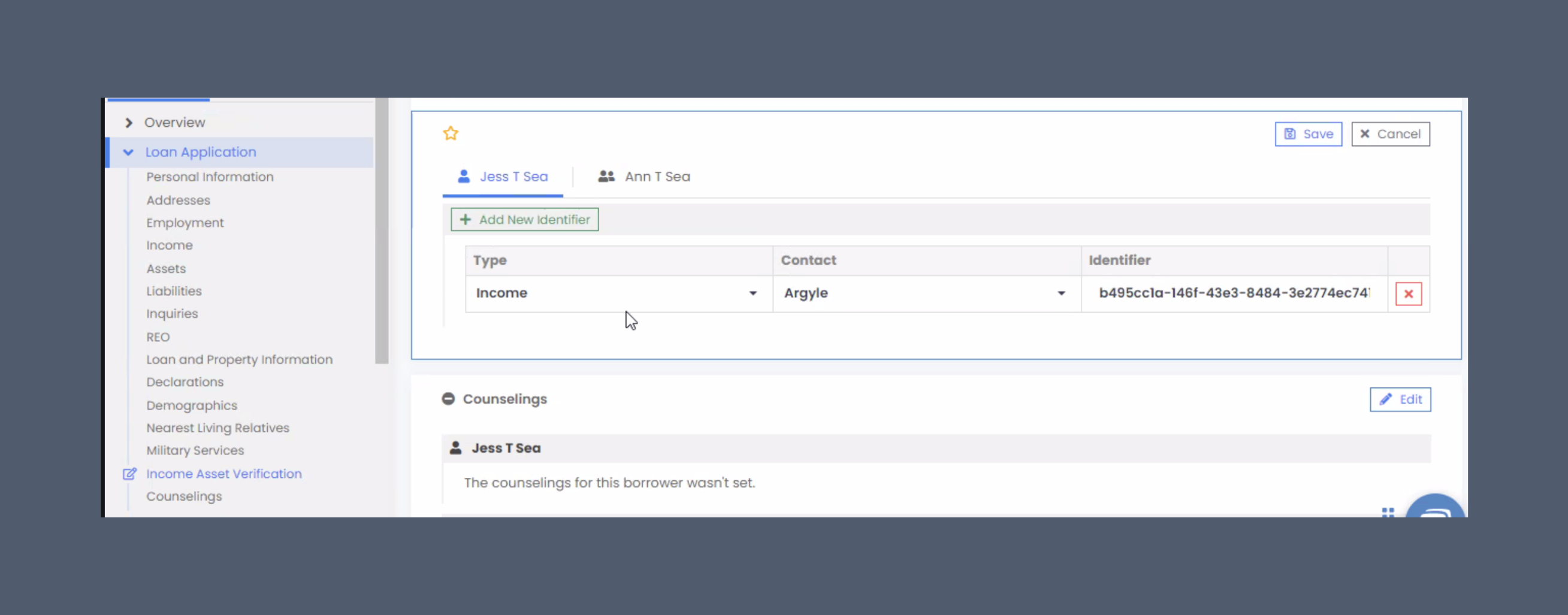
1. Select **Income Asset Verification** from the **Loan Application** dropdown.
2. Select `Income` as the **Type**.
3. Select `Argyle` as the **Contact**.
4. [Copy a `Reference #` from an Argyle verification report.](/integrations/d1c-aim/verifications#locating-reference-numbers).
5. Paste the `Reference #` as the **Identifier**.
6. Submit the loan file for AUS as normal.
## API
### Webhooks
Argyle provides a [`reports.ready`](/api-reference/reports-webhooks/ready) webhook that will notify you when sufficient data has been retrieved from the borrower's connected payroll account(s) to generate a verification report.
You can subscribe to this webhook [via Console](/console/management/webhooks), or via the API by sending a POST request to `https://api.argyle.com/v2/webhooks`. In the API request body, include a JSON object in the following format:
```json theme={}
{
"events": ["reports.ready"],
"name": "My webhook",
"url": "https://your-webhook-backend.com",
"secret": "" // Optional.
}
```
The `reports.ready` webhook's payload provides a list of the borrower's payroll accounts that have synced a sufficient amount of data to be used in the report.
The [accounts.connected](/api-reference/accounts-webhooks/connected) and [accounts.failed](/api-reference/accounts-webhooks/failed) webhooks can be used to track multiple account connections. Compare them to the accounts listed in the `reports.ready` webhook payload to determine when to generate a report.
```json theme={}
{
"event": "reports.ready",
"name": "name-for-the-webhook-subscription",
"data": {
"user": "018051aa-f7a9-a0db-2f38-6cfa325e9d69",
"resource": {
"user": "018051aa-f7a9-a0db-2f38-6cfa325e9d69",
"external_id": "March Connection",
"accounts": [
{
"id": "0185a8b8-60eb-80ca-7482-5f24504573f7",
"last_synced_at": "2024-01-08T12:55:04.016Z"
},
{
"id": "0187c66e-e7e5-811c-b006-2232f00f426a",
"last_synced_at": "2024-01-08T12:58:06.023Z"
}
],
"documents": []
}
}
}
```
### Requesting verification reports
Send a **POST** request to the [reports endpoint](/api-reference/reports#generate) — `https://api.argyle.com/v2/reports/voie-mortgage`
The [report type](/api-reference/reports#generate-type) is specified in the request path — e.g. `/voie-mortgage` or `/voe-mortgage`
In the API request body, include a JSON object in the format below:
```json theme={}
{
"user": "018b8255-4ab1-be4b-aa2c-e9ff41d75809" // ID of the user
}
```
The initial API response will include the `id` of the report. After the report is generated, this `id` can be used to retrieve the report and is also the `Reference #` that can be submitted to Fannie Mae and/or Freddie Mac.
```json theme={}
{
"id": "e0dbf946-a400-419c-946f-0adc7b5fbe36", // ID of the report
"user": "018b8255-4ab1-be4b-aa2c-e9ff41d75809",
"reference_id": "e0dbf946-a400-419c-946f-0adc7b5fbe36",
"generated_at": "2024-01-23T20:46:03.254Z",
"created_at": "2024-01-23T20:46:03.254Z",
"type": "voie-mortgage",
"status": "generating",
"file_url": "www.argyle.com/storagename/pdf",
"json_url": "www.argyle.com/storagename/json",
"accounts": [
{
"id": "0185a8b8-60eb-80ca-7482-5f24504573f7",
"item": "item_123456789",
"last_synced_at": "2024-01-08T12:55:04.016Z"
},
{
"id": "0187c66e-e7e5-811c-b006-2232f00f426a",
"item": "item_000000001",
"last_synced_at": "2024-01-08T12:58:06.023Z"
}
],
"metadata": {},
"last_synced_at": "2024-01-08T12:58:06.023Z",
"external_id": "March Connection"
}
```
### Retrieving reference numbers
Send a **GET** request to the reports endpoint — `https://api.argyle.com/v2/reports/{id}`
Include the `id` of the report as the path parameter.
The report object returned in the API response will contain:
* An `id` field with the `Reference #` that can be submitted to both Fannie Mae and Freddie Mac.
* A `metadata` object containing the eligible accounts and employments (as determined by Fannie Mae and Freddie Mac's guidelines) that were included in the report.
```json theme={}
{
"id": "e0dbf946-a400-419c-946f-0adc7b5fbe36", // Reference number
"user": "018b8255-4ab1-be4b-aa2c-e9ff41d75809",
"reference_id": "e0dbf946-a400-419c-946f-0adc7b5fbe36",
"generated_at": "2024-01-23T20:46:03.254Z",
"created_at": "2024-01-23T20:46:03.254Z",
"type": "voie-mortgage",
"status": "generated",
"file_url": "www.argyle.com/storagename/pdf",
"json_url": "www.argyle.com/storagename/json",
"last_synced_at": "2024-01-22T16:44:25.889Z",
"accounts": [
{
"id": "0185a8b8-60eb-80ca-7482-5f24504573f7",
"item": "item_123456789",
"last_synced_at": "2024-01-08T12:55:04.016Z"
},
{
"id": "0187c66e-e7e5-811c-b006-2232f00f426a",
"item": "item_000000001",
"last_synced_at": "2024-01-08T12:58:06.023Z"
}
],
"metadata": {
"d1c_report": {
"status": "available",
"accounts": [
"0185a8b8-60eb-80ca-7482-5f24504573f7", // D1C eligible account
"0187c66e-e7e5-811c-b006-2232f00f426a", // D1C eligible account
],
"employments": [
"b967118b-7d81-3c1b-bce0-c24d631cf5aa",
"c235635a-5c55-2b8e-eba5-d99a326ad7ea",
]
},
"aim_report": {
"status": "available",
"accounts": [
"0185a8b8-60eb-80ca-7482-5f24504573f7", // AIM eligible account
"0187c66e-e7e5-811c-b006-2232f00f426a", // AIM eligible account
],
"employments": [
"b967118b-7d81-3c1b-bce0-c24d631cf5aa",
"c235635a-5c55-2b8e-eba5-d99a326ad7ea"
]
}
},
"external_id": "March Connection"
}
```
If the loan is not eligible for Day 1 Certainty and/or AIM, `not_available` will be shown in the `metadata` object in the respective area:
```json theme={}
"metadata": {
"d1c_report": {
"status": "not_available",
"accounts": [],
"employments": []
},
"aim_report": {
"status": "not_available",
"accounts": [],
"employments": []
}
}
```
If you are retrieving a report's contents in JSON format via the report's `json_url`, the `report_id` field will list the `Reference #`:
```json theme={}
{
"report_id": "e0dbf946-a400-419c-946f-0adc7b5fbe36", // Reference number
"type": "voie-mortgage",
"user_id": "018051aa-f7a9-a0db-2f38-6cfa325e9d69",
"external_id": "March Connection",
"created_at": "2024-03-15T18:44:53.830Z",
"last_synced_at": "2024-01-08T12:58:06.023Z",
"metadata": {
"d1c_report": {
"status": "available",
"accounts": [
"0185a8b8-60eb-80ca-7482-5f24504573f7",
"0187c66e-e7e5-811c-b006-2232f00f426a",
],
"employments": [
"b967118b-7d81-3c1b-bce0-c24d631cf5aa",
"c235635a-5c55-2b8e-eba5-d99a326ad7ea",
]
},
"aim_report": {
"status": "available",
"accounts": [
"0185a8b8-60eb-80ca-7482-5f24504573f7",
"0187c66e-e7e5-811c-b006-2232f00f426a",
],
"employments": [
"b967118b-7d81-3c1b-bce0-c24d631cf5aa",
"c235635a-5c55-2b8e-eba5-d99a326ad7ea"
]
}
},
"employments": [
{
"employment": "b967118b-7d81-3c1b-bce0-c24d631cf5aa",
"account": "0185a8b8-60eb-80ca-7482-5f24504573f7",
"last_synced_at": "2024-01-08T12:55:04.016Z",
"source": "Worknight",
"first_name": "Bob",
"last_name": "Jones",
"full_name": "Bob Jones",
"birth_date": "1980-10-10",
"ssn": "522-09-1191",
"phone_number": "+18009000010",
"email": "bob@email.com",
"employee_address": {
"line1": "342 Fence Rd",
"line2": null,
"city": "New York",
"state": "NY",
"postal_code": "10014",
"country": "US"
},
"employer": "Whole Goods",
"employer_address": {
"line1": "852 North W St",
"line2": null,
"city": "New York",
"state": "NY",
"postal_code": "10014",
"country": "US"
},
"status": "active",
"employment_type": "full-time",
"job_title": "Store Manager",
"base_pay": {
"amount": "75372.62",
"currency": "USD",
"period": "annual"
},
"pay_cycle": "monthly",
"start_date": "2020-08-28",
"original_hire_date": "2020-08-28",
"end_date": null,
"length_of_work": {
"years": "2",
"months": "6"
},
"last_pay_period_end_date": "2023-03-22",
"last_paystub_date": "2023-03-24",
"income": [
{
"period": "2023",
"currency": "USD",
"gross_pay": {
"total": "25124.20",
"base": "25124.20",
"overtime": "0.00",
"commission": "0.00",
"bonus": "0.00",
"other": "0.00"
}
},
{
"period": "2022",
"currency": "USD",
"gross_pay": {
"total": "82866.32",
"base": "81653.65",
"overtime": "0.00",
"commission": "881.09",
"bonus": "331.58",
"other": "0.00"
}
},
{
"period": "2021",
"currency": "USD",
"gross_pay": {
"total": "87854.76",
"base": "81653.65",
"overtime": "5774.51",
"commission": "426.60",
"bonus": "0.00",
"other": "0.00"
}
}
],
"monthly_income": {
"argyle": {
"total": "7102.33",
"base": "6902.55",
"overtime": "165.94",
"bonus": "5.22",
"commission": "28.62",
"other": "0.00"
}
},
"callouts": []
},
{
"employment": "c235635a-5c55-2b8e-eba5-d99a326ad7ea",
"account": "0187c66e-e7e5-811c-b006-2232f00f426a",
"last_synced_at": "2024-01-08T12:58:06.023Z",
"source": "Bullseye",
"first_name": "Bob",
"last_name": "Jones",
"full_name": "Bob Jones",
"birth_date": "1980-10-10",
"ssn": "522-09-1191",
"phone_number": "+18009000010",
"email": "bob@email.com",
"employee_address": {
"line1": "342 Fence Rd",
"line2": null,
"city": "New York",
"state": "NY",
"postal_code": "10014",
"country": "US"
},
"employer": "Bullseye",
"employer_address": {
"line1": "119 Green Ridge",
"line2": null,
"city": "New York",
"state": "NY",
"postal_code": "10014",
"country": "US"
},
"status": "active",
"employment_type": "part-time",
"job_title": "Clerk",
"base_pay": {
"amount": "61030.57",
"currency": "USD",
"period": "annual"
},
"pay_cycle": "monthly",
"start_date": "2020-06-29",
"original_hire_date": "2020-06-29",
"end_date": null,
"length_of_work": {
"years": "2",
"months": "9"
},
"last_pay_period_end_date": "2023-02-23",
"last_paystub_date": "2023-02-24",
"income": [
{
"period": "2023",
"currency": "USD",
"gross_pay": {
"total": "20848.92",
"base": "20343.52",
"overtime": "0.00",
"commission": "0.00",
"bonus": "505.40",
"other": "0.00"
}
},
{
"period": "2022",
"currency": "USD",
"gross_pay": {
"total": "68070.08",
"base": "66116.44",
"overtime": "0.00",
"commission": "777.54",
"bonus": "1176.10",
"other": "0.00"
}
},
{
"period": "2021",
"currency": "USD",
"gross_pay": {
"total": "68378.52",
"base": "66116.44",
"overtime": "0.00",
"commission": "641.94",
"bonus": "1620.14",
"other": "0.00"
}
}
],
"monthly_income": {
"argyle": {
"total": "5683.51",
"base": "5512.92",
"overtime": "0.00",
"bonus": "119.51",
"commission": "51.08",
"other": "0.00"
}
},
"callouts": []
}
]
}
```
## Encompass
Visit the [Day 1 Certainty® and AIM section](/integrations/pos-los/encompass/verifications#day-1-certainty-and-aim) of our Encompass Guide for more information on submitting reference numbers through the Encompass® by ICE Mortgage Technology® platform.
## Empower
Visit the [Day 1 Certainty® and AIM section](/integrations/pos-los/empower#day-1-certainty-and-aim) of our Empower Guide for more information on submitting reference numbers through the Empower® LOS platform.
## MeridianLink
Reference numbers can be submitted for Day 1 Certainty® through the [MeridianLink® LOS platform](https://www.meridianlink.com/solutions/loan-origination-system/).
1. [Copy a `Reference #` from an Argyle verification report.](/integrations/d1c-aim/verifications#locating-reference-numbers)
2. Within the MeridianLink® LOS:
1. Open the **Services** dropdown in the left sidebar and select **Submit to DO / DU**.
2. In the **DU Validation** section:
1. Select `Argyle` as the **3rd Party Data Provider Name**.
2. Insert the `Reference #` from Argyle's report into the **Reference Number** field.
3. Submit the loan to Fannie Mae's DU® validation service.
## LendingPad
1. Select **Income Asset Verification** from the **Loan Application** dropdown.
2. Select `Income` as the **Type**.
3. Select `Argyle` as the **Contact**.
4. [Copy a `Reference #` from an Argyle verification report.](/integrations/d1c-aim/verifications#locating-reference-numbers).
5. Paste the `Reference #` as the **Identifier**.
6. Submit the loan file for AUS as normal.
 ## Byte
BytePro's Fannie Mae and Freddie Mac LPA interfaces let you reissue verifications via **Verification Services**.
## Byte
BytePro's Fannie Mae and Freddie Mac LPA interfaces let you reissue verifications via **Verification Services**.
 1. Select `Interfaces > Fannie Mae` or `Interfaces > Freddie Mac`
2. Select either:
* `DO` or `DU XIS` for Fannie Mae
* `LPA System-to-System` for Freddie Mac
3. Proceed to **Verification Services**.
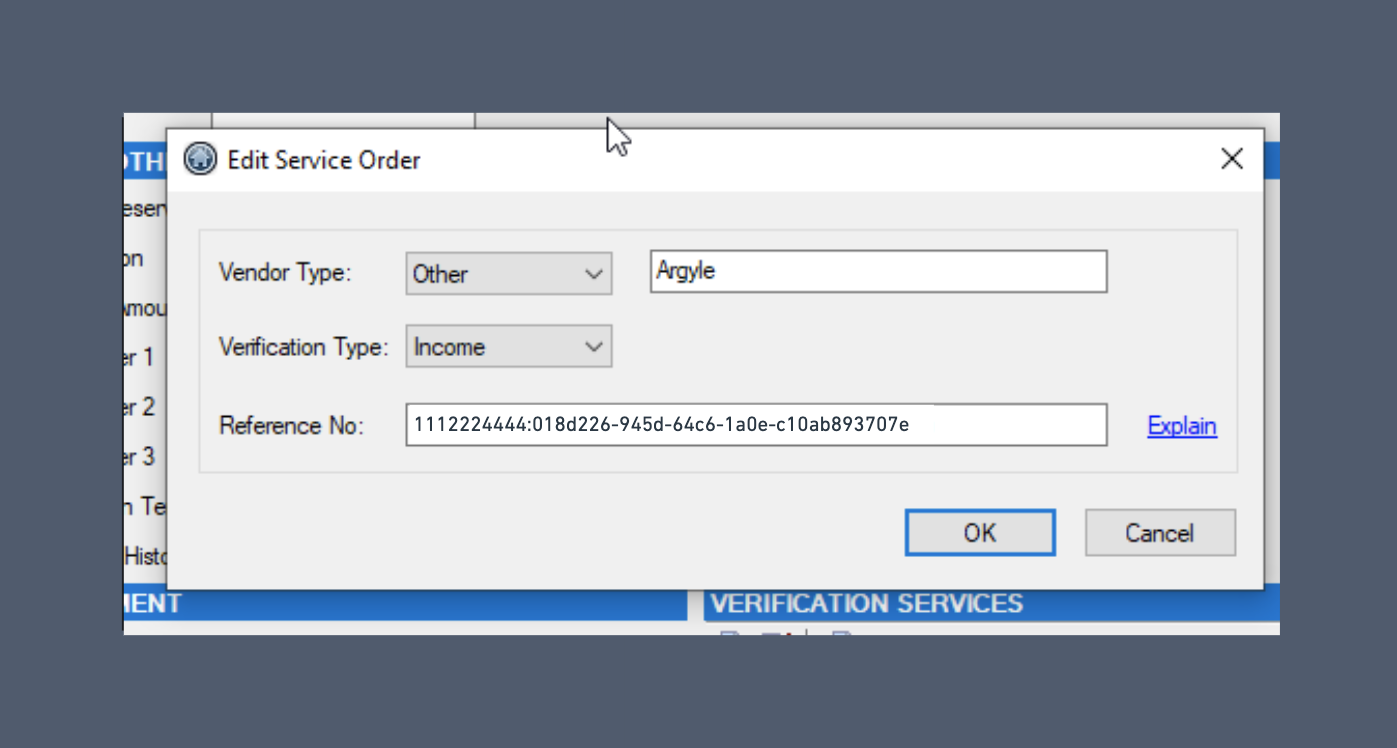
4. On the **Edit Service Order** screen:
* Select your `Vendor Type`
* Use `Other` + `Argyle` for Fannie Mae
* Use `Other` + `ARGL` for Freddie Mac
* Select your `Verification Type`
* Select `Income`
* Input the `Reference Number`
* Include the borrower's `Social Security Number` before Argyle's [`Reference Number`](/integrations/d1c-aim/verifications#locating-reference-numbers)
* Use a colon `:` separator:
* For example: `1112224444:018d226-945d-64c6-1a0e-c10ab893707e`
* Values are case-sensitive and may include non-alphanumeric characters such as hyphens
1. Select `Interfaces > Fannie Mae` or `Interfaces > Freddie Mac`
2. Select either:
* `DO` or `DU XIS` for Fannie Mae
* `LPA System-to-System` for Freddie Mac
3. Proceed to **Verification Services**.
4. On the **Edit Service Order** screen:
* Select your `Vendor Type`
* Use `Other` + `Argyle` for Fannie Mae
* Use `Other` + `ARGL` for Freddie Mac
* Select your `Verification Type`
* Select `Income`
* Input the `Reference Number`
* Include the borrower's `Social Security Number` before Argyle's [`Reference Number`](/integrations/d1c-aim/verifications#locating-reference-numbers)
* Use a colon `:` separator:
* For example: `1112224444:018d226-945d-64c6-1a0e-c10ab893707e`
* Values are case-sensitive and may include non-alphanumeric characters such as hyphens