> ## Documentation Index
> Fetch the complete documentation index at: https://docs.argyle.com/llms.txt
> Use this file to discover all available pages before exploring further.
# Overview
> Console is where you learn about, manage, and operate Argyle.
## Getting started
If you haven't already, sign up to begin exploring Console first-hand.
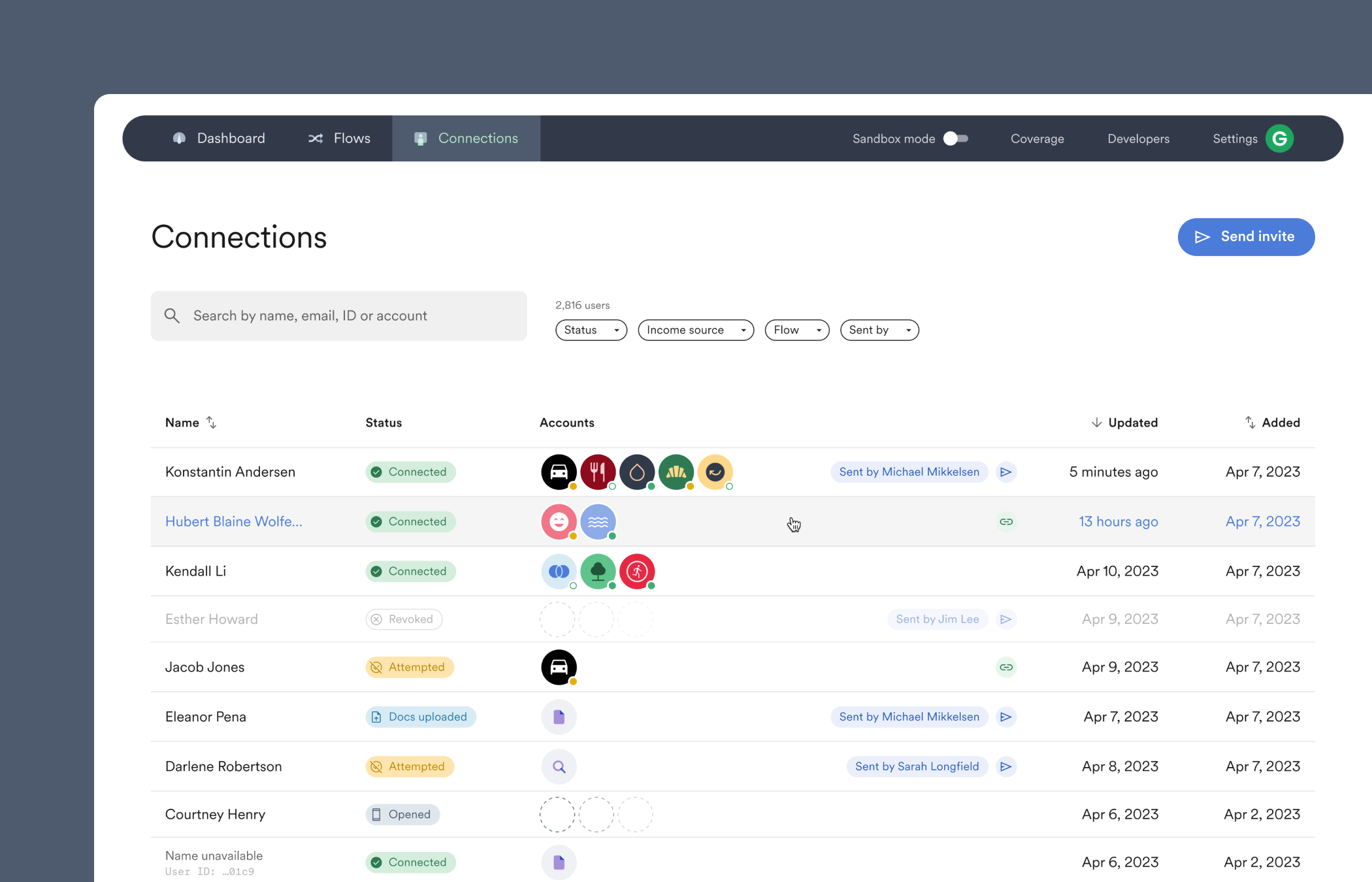 We've designed Console in a way that walks you through how to:
* Get started connecting accounts.
* Select a **Connection** to view data and generate reports.
* Invite someone, yourself, or a [test user](/overview/sandbox-testing) to connect an account through Link.
* Use the **Dashboard** to monitor accounts and view other metrics.
* Find developer tools, including API keys.
## Test mode
When the "Sandbox mode" toggle at the top of Console is enabled, all of Console switches into a testing environment.
You can customize Link's payroll connection experience in **Flows** and test it on sample users, see the sample accounts appear in the **Connections** tab, and select a sample user to view their payroll data or generate a report. Or, head over to **Settings** to test out different email and text invite templates.
After testing, disable the "Sandbox mode" toggle to begin connecting real accounts.
## Sections of Console
### Dashboard
* See which employers and payroll platforms are the most selected.
* Compare how many account connections have happened across different time periods.
* Check which Link customizations have the highest connection success rate, and where users drop off.
### Flows
* Customize and preview account connections in Link.
* Adjust Link to enable [document uploading](/workflows/document-processing) or bypass search to [directly connect](/workflows/account-connections#direct-login) a user to a specific payroll login.
### Connections
* View successful and attempted account connections.
* Invite and re-send invites, or check the status of a previously sent invite.
* Monitor accounts to make sure they continue to be [continuously scanned for new data](/overview/ongoing-refresh).
* Select a connected account to view payroll data, payroll documents, and generate reports.
### Coverage
* Explore Argyle's extensive list of supported payroll connections.
* Filter and sort Items by their [type](/overview/data-structure/items#types-of-items), [health status](/overview/data-structure/items#health-status), [mapping status](/api-reference/items#object-mapping_status), or whether they support [ongoing refresh](/overview/ongoing-refresh).
* Select a specific Item to see exactly which data fields are supported.
### Developers
* Obtain and create API keys.
* Subscribe to and manage automatic [webhook notifications](/console/management/webhooks).
* Integrate third party business systems.
### Settings
* Manage membership roles, billing, and access permissions.
* Enable or disable organization-level features and user invitation settings.
### Get started
* Zoom out to learn more about different parts of Console and Argyle.
### Contact support
* Select the **?** to reach out if you need assistance.
We've designed Console in a way that walks you through how to:
* Get started connecting accounts.
* Select a **Connection** to view data and generate reports.
* Invite someone, yourself, or a [test user](/overview/sandbox-testing) to connect an account through Link.
* Use the **Dashboard** to monitor accounts and view other metrics.
* Find developer tools, including API keys.
## Test mode
When the "Sandbox mode" toggle at the top of Console is enabled, all of Console switches into a testing environment.
You can customize Link's payroll connection experience in **Flows** and test it on sample users, see the sample accounts appear in the **Connections** tab, and select a sample user to view their payroll data or generate a report. Or, head over to **Settings** to test out different email and text invite templates.
After testing, disable the "Sandbox mode" toggle to begin connecting real accounts.
## Sections of Console
### Dashboard
* See which employers and payroll platforms are the most selected.
* Compare how many account connections have happened across different time periods.
* Check which Link customizations have the highest connection success rate, and where users drop off.
### Flows
* Customize and preview account connections in Link.
* Adjust Link to enable [document uploading](/workflows/document-processing) or bypass search to [directly connect](/workflows/account-connections#direct-login) a user to a specific payroll login.
### Connections
* View successful and attempted account connections.
* Invite and re-send invites, or check the status of a previously sent invite.
* Monitor accounts to make sure they continue to be [continuously scanned for new data](/overview/ongoing-refresh).
* Select a connected account to view payroll data, payroll documents, and generate reports.
### Coverage
* Explore Argyle's extensive list of supported payroll connections.
* Filter and sort Items by their [type](/overview/data-structure/items#types-of-items), [health status](/overview/data-structure/items#health-status), [mapping status](/api-reference/items#object-mapping_status), or whether they support [ongoing refresh](/overview/ongoing-refresh).
* Select a specific Item to see exactly which data fields are supported.
### Developers
* Obtain and create API keys.
* Subscribe to and manage automatic [webhook notifications](/console/management/webhooks).
* Integrate third party business systems.
### Settings
* Manage membership roles, billing, and access permissions.
* Enable or disable organization-level features and user invitation settings.
### Get started
* Zoom out to learn more about different parts of Console and Argyle.
### Contact support
* Select the **?** to reach out if you need assistance.