> ## Documentation Index
> Fetch the complete documentation index at: https://docs.argyle.com/llms.txt
> Use this file to discover all available pages before exploring further.
# Document Verifications
> Implementation guide for document-based income verifications.
This workflow has been deprecated in favor of Argyle's new 3-in-1 verification experience for payroll, banking, and document verifications. See our [Verifications Implementation Guide](/api-reference/verifications-guide) to learn more.
## Overview
Receive Freddie Mac monthly income calculations from uploaded paystubs and W2s.
* Upload paystubs and W-2s when borrower cannot connect via Argyle with a direct payroll login
* Generate an Argyle Doc VOI report with rep & warrant determination for income and employment
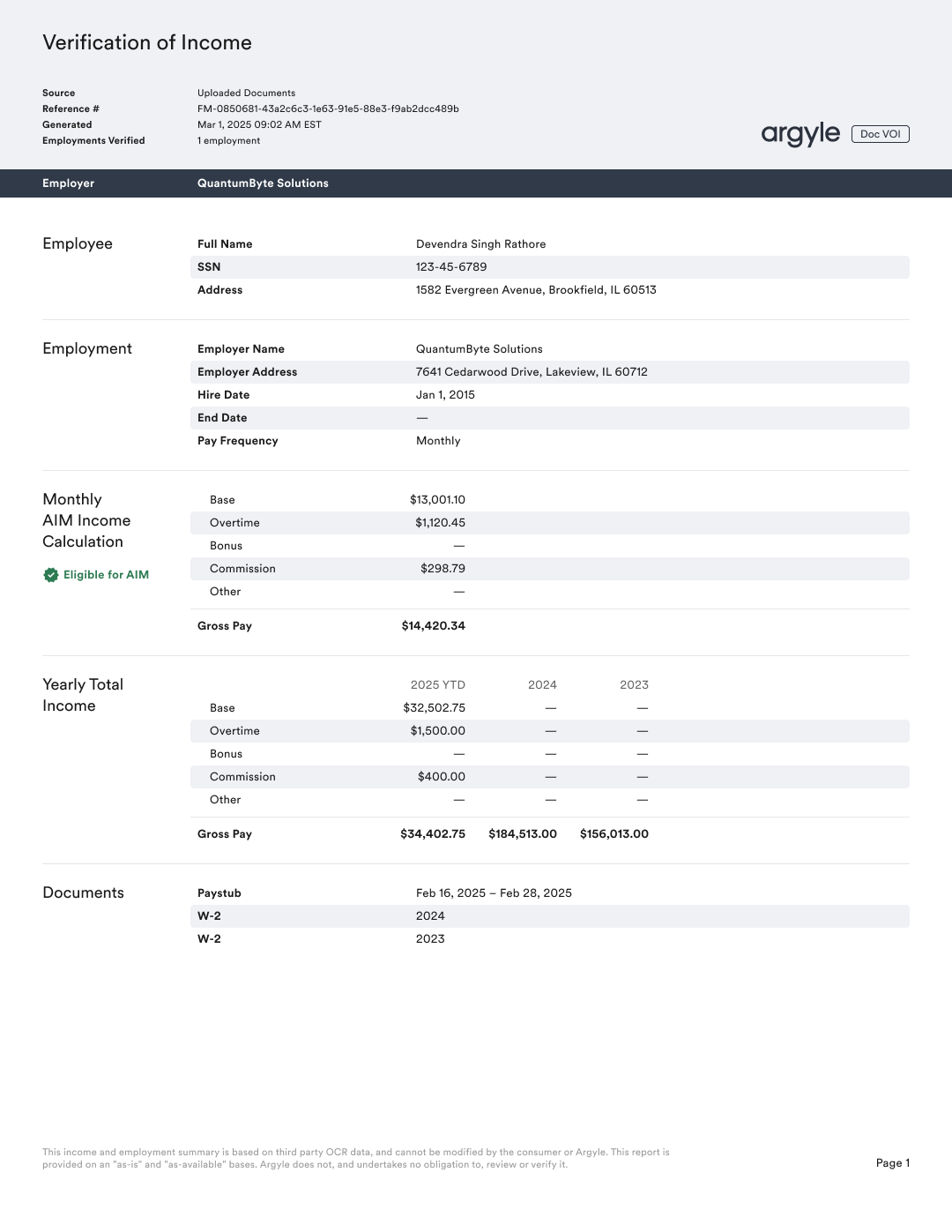 ## Supported report types
* Verification of Income (Doc VOI)
## Workflow
Argyle's [Postman collection](/api-guide/postman) contains examples of the document upload and verification endpoints mentioned below.
### Subscribe to webhook
1. Subscribe to the [verifications.updated](/api-reference/verifications-webhooks/updated) webhook.
When subscribing, it is recommended to set `include_resource` to `true` to receive the full verification object in the webhook payload, which includes the verification's status `state`.
### Request a verification
1. Order a verification through the [`/verifications`](/api-reference/verifications/order-a-verification) API endpoint.
In your request, at minimum you are required to provide:
* Borrower details: first name, last name, and ssn
* Employment details: employer name(s), employment status, hire date, and termination date (for previous employments)
One year and one month of previous employment history is required.
2. After ordering a verification through this legacy workflow, an Argyle user will be created automatically. The `user` id will be returned in the API response.
For current Doc VOI implementations, use the [Verifications Implementation Guide](/api-reference/verifications-guide). The current flow supports ordering a new Doc VOI verification for an existing user when refreshing a report with additional documents.
### Upload documents
3. Upload documents for the `user` through the [`/user-uploads`](/api-reference/user-uploads#upload) API endpoint.
Most recent paystub and previous year W-2s or December paystubs for each employment are typically required.
## Supported report types
* Verification of Income (Doc VOI)
## Workflow
Argyle's [Postman collection](/api-guide/postman) contains examples of the document upload and verification endpoints mentioned below.
### Subscribe to webhook
1. Subscribe to the [verifications.updated](/api-reference/verifications-webhooks/updated) webhook.
When subscribing, it is recommended to set `include_resource` to `true` to receive the full verification object in the webhook payload, which includes the verification's status `state`.
### Request a verification
1. Order a verification through the [`/verifications`](/api-reference/verifications/order-a-verification) API endpoint.
In your request, at minimum you are required to provide:
* Borrower details: first name, last name, and ssn
* Employment details: employer name(s), employment status, hire date, and termination date (for previous employments)
One year and one month of previous employment history is required.
2. After ordering a verification through this legacy workflow, an Argyle user will be created automatically. The `user` id will be returned in the API response.
For current Doc VOI implementations, use the [Verifications Implementation Guide](/api-reference/verifications-guide). The current flow supports ordering a new Doc VOI verification for an existing user when refreshing a report with additional documents.
### Upload documents
3. Upload documents for the `user` through the [`/user-uploads`](/api-reference/user-uploads#upload) API endpoint.
Most recent paystub and previous year W-2s or December paystubs for each employment are typically required.
*— Contact your Argyle customer success manager for more information.*
### Retrieve Doc VOI report
1. When a `verifications.updated` webhook is received and the status `state` is `COMPLETED`, a Doc VOI report can be retrieved via:
* [`file_url`](/api-reference/verifications/retrieve-a-verification) — retrieves PDF report
* [`json_url`](/api-reference/verifications/retrieve-a-verification) — retrieves report in JSON format
## Testing
### Sandbox
1. Order a verification and use the following for the `employments` array:
```json theme={}
"employments": [
{
"employer": "Warehouse Services Inc",
"status": "active",
"hire_date": "2023-02-01",
"termination_date": null
}
],
```
2. Upload the following documents:
Do not adjust file names.
* Warehouse\_Services\_Inc\_paystub.pdf
* Warehouse\_Services\_Inc\_paystub\_2025.pdf
* Warehouse\_Services\_Inc\_paystub\_2024.pdf
1. Order a verification and use the following for the `employments` array:
```json theme={}
"employments": [
{
"employer": "Warehouse Services Inc",
"status": "active",
"hire_date": "2023-02-01",
"termination_date": null
}
],
```
2. Upload the following documents:
Do not adjust file names.
* Warehouse\_Services\_Inc\_ineligible.pdf
* Warehouse\_Services\_Inc\_paystub\_2025.pdf
* Warehouse\_Services\_Inc\_paystub\_2024.pdf
1. Order a verification and use the following for the `employments` array:
```json theme={}
"employments": [
{
"employer": "Warehouse Services Inc",
"status": "active",
"hire_date": "2023-02-01",
"termination_date": null
}
],
```
2. Upload only the following documents:
Do not adjust the file name.
* Warehouse\_Services\_Inc\_paystub.pdf
### Production
Production testing can be done with real documents. If needed, the below test documents can also be used.
1. Order a verification and use the following for the `employments` array:
```json theme={}
"employments": [
{
"employer": "Warehouse Services Inc",
"status": "active",
"hire_date": "2023-02-01",
"termination_date": null
}
],
```
2. Upload the following documents:
Do not adjust file names.
* sandbox\_Warehouse\_Services\_Inc\_paystub.pdf
* sandbox\_Warehouse\_Services\_Inc\_paystub\_2025.pdf
* sandbox\_Warehouse\_Services\_Inc\_paystub\_2024.pdf
1. Order a verification and use the following for the `employments` array:
```json theme={}
"employments": [
{
"employer": "Warehouse Services Inc",
"status": "active",
"hire_date": "2023-02-01",
"termination_date": null
}
],
```
2. Upload the following documents:
Do not adjust file names.
* sandbox\_Warehouse\_Services\_Inc\_paystub\_ineligible.pdf
* sandbox\_Warehouse\_Services\_Inc\_paystub\_2025.pdf
* sandbox\_Warehouse\_Services\_Inc\_paystub\_2024.pdf
1. Order a verification and use the following for the `employments` array:
```json theme={}
"employments": [
{
"employer": "Warehouse Services Inc",
"status": "active",
"hire_date": "2023-02-01",
"termination_date": null
}
],
```
2. Upload only the following documents:
Do not adjust the file name.
* sandbox\_Warehouse\_Services\_Inc\_paystub.pdf
## FAQs
* PDF, JPEG, PNG, HEIC file types accepted
* 16MB max file size
* No, additional criteria may not be met.*— For example, calculations and rep & warrant relief is not given when there is excessive fluctuation in income over time.*
* 120 days
* Variable.
* Exact amount is 14 days from the pay date of the most recent paystub.*— For example, if today is July 31, 2025 and the most recent paystub uploaded had a pay date of July 21, 2025, only 4 days of employment rep & warrant relief would be given.*