> ## Documentation Index
> Fetch the complete documentation index at: https://docs.argyle.com/llms.txt
> Use this file to discover all available pages before exploring further.
# Banking Overview Guide
> Implementation guide for banking reports.
This workflow has been deprecated in favor of Argyle's new 3-in-1 verification experience for payroll, banking, and document verifications. See our [Verifications Implementation Guide](/api-reference/verifications-guide) to learn more.
## Overview
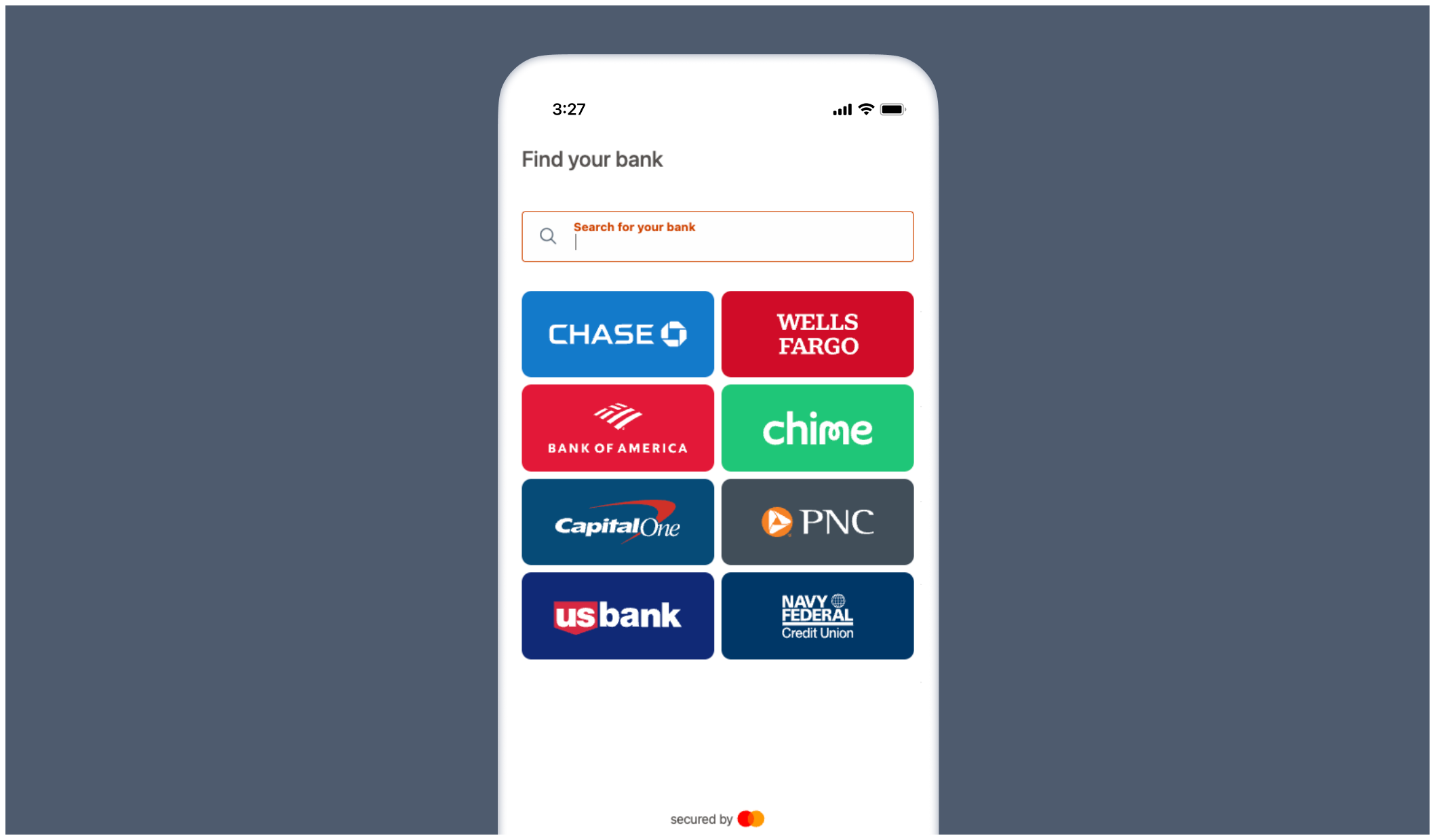
Verify assets and income and generate verification reports by allowing users to directly connect their financial institutions.
 ## Supported report types
* Verification of Assets (VOA)
* Verification of Income (VOI)
* Verification of Assets & Income (VOAI)
## Workflow
Argyle's [Postman collection](/api-guide/postman) contains examples of the banking endpoints mentioned below.
### Create an Argyle user
The Sandbox testing environment for banking supports a maximum of 500 users. To stay within this limit, implement user-management workflows and remove inactive users when they are no longer needed.
1. [Create](/api-reference/users#create) or [update](/api-reference/users#update) an Argyle user.
2. In the request body, include the following **required** [user fields](/api-reference/users#object) (*only required for banking reports*):
* The top-level (root) object should contain user details (user being the borrower in most cases).
If all fields cannot be populated, speak to your Argyle representative.
* The `external_metadata` object should contain details about the person or entity making the lending decision.
The `external_metadata` object is **optional**.
```json theme={}
{
"first_name": "Bob",
"last_name": "Jones",
"email": "bob@email.com",
"phone_number": "555-111-2222", // must be 10 or 11 digits (with or without hyphens) — e.g. 5551112222 or 555-111-2222 or 15551112222 or 1-555-111-2222
"ssn": "123456789", // must be 9 digits (with or without hyphens) — e.g. 123456789 or 123-45-6789
"address": {
"city": "New York",
"line1": "759 Victoria Plaza",
"line2": null,
"state": "New York",
"country": "US",
"postal_code": "10014"
},
"birth_date": {
"year": 1980, // integer (must be 1900 or later)
"month": 12, // integer (must be between 1 and 12)
"day": 3 // integer (must be between 1 and 31)
},
"external_metadata": { // this object & all its properties are optional
"open_banking": {
"end_user": {
"name": "Loan Officer",
"address": "759 Victoria Plaza",
"city": "New York",
"state": "NY",
"zip": "10014",
"phone": "7778889999" // must be 10 or 11 digits (with or without hyphens) — e.g. 5551112222 or 555-111-2222 or 15551112222 or 1-555-111-2222
}
}
}
}
```
### Create connection link
1. [Create](/api-reference/connect-url#create) a Connect URL — a temporary link that allows the user to securely authorize access to their bank data.
2. In the request body, make sure to specify via the `webhook` field where to receive [Connect Event](/api-reference/banking-overview#connect-events) webhooks.
Each [environment](/api-guide/overview#environments) (Sandbox and Production) requires its own webhook. Subscriptions do not transfer between environments.
3. Share the Connect URL with the user directly, or embed the bank connection experience within your application. For new embedded banking UI implementations, use the banking SDK. Hosted or no-SDK banking flows must be enabled by Argyle before use. Reach out to your Argyle customer success manager before using this implementation path.
1. Contact your Argyle customer success manager to manually register a webhook URL where you will receive [Connect Events](/api-reference/banking-overview#connect-events).
Each [environment](/api-guide/overview#environments) (Sandbox and Production) requires its own webhook. Subscriptions do not transfer between environments.
2. Review the following customization options.
* Go to the Flows section of Console. Select "New Flow" and "Email/SMS Template" — (alternatively, an existing "Email/SMS Template" can be edited.)
* In the "Landing page" flow step, make sure the "Connect bank account" toggle is ON.
* If you want to customize the banking experience, your Argyle customer success manager will provide an `Experience ID` that can be entered at the bottom of the same page under "Integration reference".
* Save the Flow in Console and copy the `Flow ID` (will be used in the next step).
* Your company name and logo shown to borrowers can be adjusted.
* Which financial institutions are shown by default on the home screen.
* After the borrower connects a financial institution, they will be shown a list of detected accounts (e.g. checking, savings, 401k).
* 457
* 529
* 401a
* 401k
* 403b
* Brokerage Account
* CD
* Checking
* Credit Card
* Crypto Currency
* Education Savings
* Employee Stock Purchase Plan
* Health Savings Account
* Investment
* Investment Tax Deferred
* IRA
* Keogh
* Line of Credit
* Loan
* Money Market
* Mortgage
* Non Taxable Brokerage Account
* Pension
* Profit Sharing Plan
* Rollover
* Roth
* Roth 401k
* Savings
* SEP IRA
* Simple IRA
* Student Loan
* Thrift Savings Plan
* UGMA
* Unknown
* UTMA
* Variable Annuity
3. [Send an invite](/api-reference/invites#send-invite) to the user.
* In the request body, only `user_id` and `flow_id` are required.
* `user_id` is returned after creating an Argyle user.
* `flow_id` is obtained after customizing the invite and banking experience.
* By default the name, email, and phone number provided when [creating an Argyle user](/api-reference/banking-overview#create-an-argyle-user) will be used. You can optionally override any of these contact values by also specifying them in the request body:
```json theme={}
// Example request body:
{
"user_id": "{{ID of the user}}", // required
"flow_id": "{{Flow ID}}", // required
"first_name": "Bobby", // optional
"last_name": "J", // optional
"email": "bobby@email.com", // optional
"phone_number": "555-333-4444" // optional
}
```
### Generate a banking report
1. When you receive a Connect Event webhook with `"event_type": "done"` a banking report can be generated — this event signifies the user has connected their banking accounts and successfully authorized the related connections.
2. [Generate](/api-reference/banking-reports#generate) a banking report and specify the [report type](/api-reference/banking-overview#supported-report-types) in the request.
3. (Optional) Specify via the `webhook` field where to receive the [Connect Event](/api-reference/banking-overview#connect-events) webhook notifying you that the report has been generated.
4. Save the `file_url` and `json_url` values returned in the response after generating a report.
If the user only connected account types (e.g. Line of credit) that are not eligible for the specified report type, the API will return a **400 (Bad Request)** response:
```json theme={}
{
"detail": "INVALID_ARGUMENT: Code: 5030, error: No matching account types apply"
}
```
### Retrieve report PDFs and JSONs
1. When you receive a Connect Event webhook with `"event_name": "done"` a banking report has been successfully generated and can be retrieved.
2. To retrieve a PDF version of the report, call **GET** `{file_url}` — make sure to include [Argyle authentication headers](/api-guide/overview#authentication).
3. To retrieve a JSON version of the report, call **GET** `{json_url}` — make sure to include [Argyle authentication headers](/api-guide/overview#authentication).
### Day 1 Certainty® and AIM
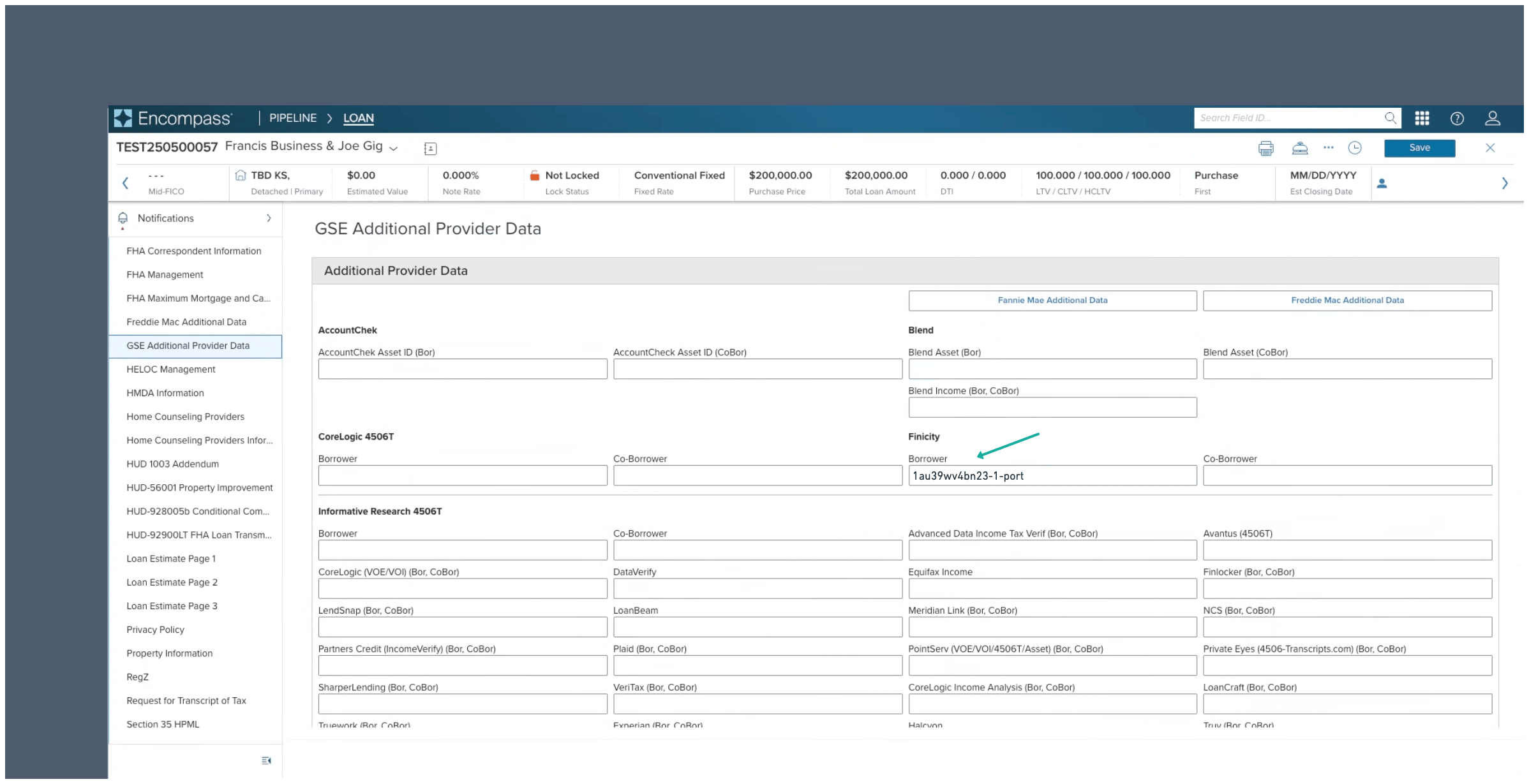
For mortgage use cases, the reference number for Day 1 Certainty® or AIM is provided in the `portfolio` field returned after calling **GET** `{json_url}`. In Encompass®, this reference number can be submitted in the **Finicity Borrower** field:
## Supported report types
* Verification of Assets (VOA)
* Verification of Income (VOI)
* Verification of Assets & Income (VOAI)
## Workflow
Argyle's [Postman collection](/api-guide/postman) contains examples of the banking endpoints mentioned below.
### Create an Argyle user
The Sandbox testing environment for banking supports a maximum of 500 users. To stay within this limit, implement user-management workflows and remove inactive users when they are no longer needed.
1. [Create](/api-reference/users#create) or [update](/api-reference/users#update) an Argyle user.
2. In the request body, include the following **required** [user fields](/api-reference/users#object) (*only required for banking reports*):
* The top-level (root) object should contain user details (user being the borrower in most cases).
If all fields cannot be populated, speak to your Argyle representative.
* The `external_metadata` object should contain details about the person or entity making the lending decision.
The `external_metadata` object is **optional**.
```json theme={}
{
"first_name": "Bob",
"last_name": "Jones",
"email": "bob@email.com",
"phone_number": "555-111-2222", // must be 10 or 11 digits (with or without hyphens) — e.g. 5551112222 or 555-111-2222 or 15551112222 or 1-555-111-2222
"ssn": "123456789", // must be 9 digits (with or without hyphens) — e.g. 123456789 or 123-45-6789
"address": {
"city": "New York",
"line1": "759 Victoria Plaza",
"line2": null,
"state": "New York",
"country": "US",
"postal_code": "10014"
},
"birth_date": {
"year": 1980, // integer (must be 1900 or later)
"month": 12, // integer (must be between 1 and 12)
"day": 3 // integer (must be between 1 and 31)
},
"external_metadata": { // this object & all its properties are optional
"open_banking": {
"end_user": {
"name": "Loan Officer",
"address": "759 Victoria Plaza",
"city": "New York",
"state": "NY",
"zip": "10014",
"phone": "7778889999" // must be 10 or 11 digits (with or without hyphens) — e.g. 5551112222 or 555-111-2222 or 15551112222 or 1-555-111-2222
}
}
}
}
```
### Create connection link
1. [Create](/api-reference/connect-url#create) a Connect URL — a temporary link that allows the user to securely authorize access to their bank data.
2. In the request body, make sure to specify via the `webhook` field where to receive [Connect Event](/api-reference/banking-overview#connect-events) webhooks.
Each [environment](/api-guide/overview#environments) (Sandbox and Production) requires its own webhook. Subscriptions do not transfer between environments.
3. Share the Connect URL with the user directly, or embed the bank connection experience within your application. For new embedded banking UI implementations, use the banking SDK. Hosted or no-SDK banking flows must be enabled by Argyle before use. Reach out to your Argyle customer success manager before using this implementation path.
1. Contact your Argyle customer success manager to manually register a webhook URL where you will receive [Connect Events](/api-reference/banking-overview#connect-events).
Each [environment](/api-guide/overview#environments) (Sandbox and Production) requires its own webhook. Subscriptions do not transfer between environments.
2. Review the following customization options.
* Go to the Flows section of Console. Select "New Flow" and "Email/SMS Template" — (alternatively, an existing "Email/SMS Template" can be edited.)
* In the "Landing page" flow step, make sure the "Connect bank account" toggle is ON.
* If you want to customize the banking experience, your Argyle customer success manager will provide an `Experience ID` that can be entered at the bottom of the same page under "Integration reference".
* Save the Flow in Console and copy the `Flow ID` (will be used in the next step).
* Your company name and logo shown to borrowers can be adjusted.
* Which financial institutions are shown by default on the home screen.
* After the borrower connects a financial institution, they will be shown a list of detected accounts (e.g. checking, savings, 401k).
* 457
* 529
* 401a
* 401k
* 403b
* Brokerage Account
* CD
* Checking
* Credit Card
* Crypto Currency
* Education Savings
* Employee Stock Purchase Plan
* Health Savings Account
* Investment
* Investment Tax Deferred
* IRA
* Keogh
* Line of Credit
* Loan
* Money Market
* Mortgage
* Non Taxable Brokerage Account
* Pension
* Profit Sharing Plan
* Rollover
* Roth
* Roth 401k
* Savings
* SEP IRA
* Simple IRA
* Student Loan
* Thrift Savings Plan
* UGMA
* Unknown
* UTMA
* Variable Annuity
3. [Send an invite](/api-reference/invites#send-invite) to the user.
* In the request body, only `user_id` and `flow_id` are required.
* `user_id` is returned after creating an Argyle user.
* `flow_id` is obtained after customizing the invite and banking experience.
* By default the name, email, and phone number provided when [creating an Argyle user](/api-reference/banking-overview#create-an-argyle-user) will be used. You can optionally override any of these contact values by also specifying them in the request body:
```json theme={}
// Example request body:
{
"user_id": "{{ID of the user}}", // required
"flow_id": "{{Flow ID}}", // required
"first_name": "Bobby", // optional
"last_name": "J", // optional
"email": "bobby@email.com", // optional
"phone_number": "555-333-4444" // optional
}
```
### Generate a banking report
1. When you receive a Connect Event webhook with `"event_type": "done"` a banking report can be generated — this event signifies the user has connected their banking accounts and successfully authorized the related connections.
2. [Generate](/api-reference/banking-reports#generate) a banking report and specify the [report type](/api-reference/banking-overview#supported-report-types) in the request.
3. (Optional) Specify via the `webhook` field where to receive the [Connect Event](/api-reference/banking-overview#connect-events) webhook notifying you that the report has been generated.
4. Save the `file_url` and `json_url` values returned in the response after generating a report.
If the user only connected account types (e.g. Line of credit) that are not eligible for the specified report type, the API will return a **400 (Bad Request)** response:
```json theme={}
{
"detail": "INVALID_ARGUMENT: Code: 5030, error: No matching account types apply"
}
```
### Retrieve report PDFs and JSONs
1. When you receive a Connect Event webhook with `"event_name": "done"` a banking report has been successfully generated and can be retrieved.
2. To retrieve a PDF version of the report, call **GET** `{file_url}` — make sure to include [Argyle authentication headers](/api-guide/overview#authentication).
3. To retrieve a JSON version of the report, call **GET** `{json_url}` — make sure to include [Argyle authentication headers](/api-guide/overview#authentication).
### Day 1 Certainty® and AIM
For mortgage use cases, the reference number for Day 1 Certainty® or AIM is provided in the `portfolio` field returned after calling **GET** `{json_url}`. In Encompass®, this reference number can be submitted in the **Finicity Borrower** field:
 ## Connect events
Connect Event webhooks are sent:
* When the user completes certain steps of the connection process.
* When a report is being and has been successfully generated.
*Most common Connect Event webhooks (examples):*
```json theme={}
{
"user": "01975aea-3882-d5fb-7eb5-e4821a573167",
"event_type": "started",
"event_id": "1749577051464-49bbb425bbe60e0fdfd14da0",
"payload": {}
}
```
```json theme={}
{
"user": "01975c4e-fee2-0162-a341-e5f61359da49",
"event_type": "institutionSupported",
"event_id": "1749604002888-f1342c3918d21aee221d5388",
"payload": {
"institution": "102168"
}
}
```
```json theme={}
{
"user": "01975c4e-fee2-0162-a341-e5f61359da49",
"event_type": "adding",
"event_id": "1749604018215-941d6b8cd2ec7f1d3353ccab",
"payload": {
"institution": "102168",
"oauth": "false"
}
}
```
```json theme={}
{
"user": "01975c4e-fee2-0162-a341-e5f61359da49",
"event_type": "invalidCredentials",
"event_id": "1749604019315-a7f974879a932f939dd45532",
"payload": {
"institution": "102168"
}
}
```
```json theme={}
{
"user": "01975c4e-fee2-0162-a341-e5f61359da49",
"event_type": "adding",
"event_id": "1749604149048-d2ffdf7f0954f9b7029e219d",
"payload": {
"institution": "102168",
"oauth": "false"
}
}
```
```json theme={}
{
"user": "01975c4e-fee2-0162-a341-e5f61359da49",
"event_type": "discovered",
"event_id": "1749604157634-d425a8628178de589cc447e7",
"payload": {
"accounts": [
{
"id": 8057734470,
"number": "xx2121",
"name": "401K",
"balance": 9005,
"type": "401k",
"status": "pending",
"institution_login": 8029207213
},
{
"id": 8057734471,
"number": "xx2020",
"name": "IRA",
"balance": 7030,
"type": "ira",
"status": "pending",
"institution_login": 8029207213
},
{
"id": 8057734472,
"number": "xx3333",
"name": "Credit Card",
"balance": -1952.71,
"type": "creditCard",
"status": "pending",
"institution_login": 8029207213
},
{
"id": 8057734474,
"number": "xx2222",
"name": "Savings",
"balance": 22327.3,
"type": "savings",
"status": "pending",
"institution_login": 8029207213
}
],
"mfa": null,
"institution": "102168"
}
}
```
```json theme={}
{
"user": "01975c4e-fee2-0162-a341-e5f61359da49",
"event_type": "added",
"event_id": "1749604256032-f2402c85f88e2188534d5b2b",
"payload": {
"institution": "102168",
"accounts": [
{
"id": "8057734474",
"number": "xx2222",
"real_account_number_last4": "2222",
"account_number_display": "2222",
"name": "Savings",
"balance": 22327.3,
"type": "savings",
"status": "active",
"user": "01975c4e-fee2-0162-a341-e5f61359da49",
"institution": "102168",
"balance_date": "2025-06-11T01:09:17.000Z",
"created_date": "2025-06-11T01:09:17.000Z",
"last_updated_date": "2025-06-11T01:10:55.000Z",
"currency": "USD",
"institution_login": "8029207213",
"display_position": "1",
"financialinstitution_account_status": null,
"account_nickname": "Savings",
"market_segment": "personal"
}
],
"oauth": false
}
}
```
```json theme={}
{
"user": "01975c4e-fee2-0162-a341-e5f61359da49",
"event_type": "done",
"event_id": "1749604309359-1248d979c904efc4519431f8",
"payload": {}
}
```
```json theme={}
{
"user": "01975c4e-fee2-0162-a341-e5f61359da49",
"event_name": "inProgress",
"id": "kkc7xyd800ur",
"type": "voa",
"status": "inProgress",
"portfolio_id": "eumj6fqkqzw6-3-port",
"report_custom_fields": null
}
```
```json theme={}
{
"user": "01975c4e-fee2-0162-a341-e5f61359da49",
"event_name": "done",
"id": "kkc7xyd800ur",
"type": "voa",
"status": "success",
"portfolio_id": "eumj6fqkqzw6-3-port",
"report_custom_fields": null
}
```
## Related endpoints
* The [reports endpoint](/api-reference/reports) can be used to retrieve reports by user or report ID.
* The [bank accounts endpoint](/api-reference/bank-accounts) can be used to retrieve a list of the user's bank accounts.
* The [financial institutions endpoint](/api-reference/financial-institutions) can be used to search for supported financial institutions.
## Testing profiles
When you're ready to begin testing, contact your Argyle Customer Success Manager to enable banking permissions.
The Sandbox testing environment for banking supports a maximum of 500 users. To stay within this limit, implement user-management workflows and remove inactive users when they are no longer needed.
The following sample test profiles can be connected to:
* **Sandbox** — the `FinBank Profiles A` or `FinBank Profiles B` financial institutions
* **Production** — the `FinBank Billable` or `FinBank Oauth Billable` financial institutions
| Username | Password | Account Types | Supported Products |
| ----------- | ----------- | ------------------------------------------------------------------------- | -------------------------------------------------------------------- |
| profile\_02 | profile\_02 | Savings, IRA, 401k, Credit Card | voa, voi, voai |
| profile\_03 | profile\_03 | Checking, Personal Investment, 401K, Roth, Savings (Joint Account owners) | voa, voi, voai |
| profile\_04 | profile\_04 | Checking, 403B, 529, Rollover, Mortgage | voa, voi, voai |
| profile\_05 | profile\_05 | Checking, Investment, Stocks, UGMA, UTMA (Joint Account owners) | voa, voi, voai |
| profile\_06 | profile\_06 | Checking, Retirement, KEOGH, 457, Credit Card | voa, voi, voai |
| profile\_07 | profile\_07 | Checking, Stocks, CD, Investment Tax-Deferred, Employee Stock | voa, voi, voai |
| profile\_08 | profile\_08 | Checking, Primary Savings, Money Market, 401A, Line of credit | voa, voi, voai |
| profile\_09 | profile\_09 | Checking, Savings, Checking Failed Report. Errors include 102, 103, 185 | voa \*(failed report)\*voi \*(failed report)\*voai *(failed report)* |
For specific scenario testing, the following sample test users are also available:
| | Sue Wealthy | River Paycheck | Alex Student |
| ----------- | ------------------------------------------------------------------------------------------------------------------------------------------------------------------------------------------------------------------------------------------------------------------------------------------------------- | ------------------------------------------------------------------------------------------------------------------------------------------------------------------------------------------------------------------------------------------------------------------------- | ---------------------------------------------------------------------------------------------------------------------------------------------------------------------------------------------------------------------------------------------------------------------------------------------------------------------------------------------- |
| Username | sue\_wealthy | river\_paycheck | alex\_student |
| Password | profile\_700 | profile\_703 | profile\_704 |
| Description | Sue is working as a Product Manager with a good steady income, a mortgage, and multiple investment accounts. She has a loan account and leases a car. Sue travels a few times a year. She has typical expenses like groceries, clothes, entertainment, gym membership, car expenses, and she has a pet. | River works in construction. He rents an apartment and has typical expenses like groceries, clothes, entertainment, household and car expenses. He has some savings but no investments, no loans and no credit cards. In some months, River's expenses exceed his income. | Alex is working full-time with a good salary but she is still paying off her student loan. She makes regular monthly repayments, but she still has over \$30,000 to pay off. Alex has typical expenses like groceries, clothes, entertainment, household, and car expenses. She has limited savings and she has started an investment account. |
## Connect events
Connect Event webhooks are sent:
* When the user completes certain steps of the connection process.
* When a report is being and has been successfully generated.
*Most common Connect Event webhooks (examples):*
```json theme={}
{
"user": "01975aea-3882-d5fb-7eb5-e4821a573167",
"event_type": "started",
"event_id": "1749577051464-49bbb425bbe60e0fdfd14da0",
"payload": {}
}
```
```json theme={}
{
"user": "01975c4e-fee2-0162-a341-e5f61359da49",
"event_type": "institutionSupported",
"event_id": "1749604002888-f1342c3918d21aee221d5388",
"payload": {
"institution": "102168"
}
}
```
```json theme={}
{
"user": "01975c4e-fee2-0162-a341-e5f61359da49",
"event_type": "adding",
"event_id": "1749604018215-941d6b8cd2ec7f1d3353ccab",
"payload": {
"institution": "102168",
"oauth": "false"
}
}
```
```json theme={}
{
"user": "01975c4e-fee2-0162-a341-e5f61359da49",
"event_type": "invalidCredentials",
"event_id": "1749604019315-a7f974879a932f939dd45532",
"payload": {
"institution": "102168"
}
}
```
```json theme={}
{
"user": "01975c4e-fee2-0162-a341-e5f61359da49",
"event_type": "adding",
"event_id": "1749604149048-d2ffdf7f0954f9b7029e219d",
"payload": {
"institution": "102168",
"oauth": "false"
}
}
```
```json theme={}
{
"user": "01975c4e-fee2-0162-a341-e5f61359da49",
"event_type": "discovered",
"event_id": "1749604157634-d425a8628178de589cc447e7",
"payload": {
"accounts": [
{
"id": 8057734470,
"number": "xx2121",
"name": "401K",
"balance": 9005,
"type": "401k",
"status": "pending",
"institution_login": 8029207213
},
{
"id": 8057734471,
"number": "xx2020",
"name": "IRA",
"balance": 7030,
"type": "ira",
"status": "pending",
"institution_login": 8029207213
},
{
"id": 8057734472,
"number": "xx3333",
"name": "Credit Card",
"balance": -1952.71,
"type": "creditCard",
"status": "pending",
"institution_login": 8029207213
},
{
"id": 8057734474,
"number": "xx2222",
"name": "Savings",
"balance": 22327.3,
"type": "savings",
"status": "pending",
"institution_login": 8029207213
}
],
"mfa": null,
"institution": "102168"
}
}
```
```json theme={}
{
"user": "01975c4e-fee2-0162-a341-e5f61359da49",
"event_type": "added",
"event_id": "1749604256032-f2402c85f88e2188534d5b2b",
"payload": {
"institution": "102168",
"accounts": [
{
"id": "8057734474",
"number": "xx2222",
"real_account_number_last4": "2222",
"account_number_display": "2222",
"name": "Savings",
"balance": 22327.3,
"type": "savings",
"status": "active",
"user": "01975c4e-fee2-0162-a341-e5f61359da49",
"institution": "102168",
"balance_date": "2025-06-11T01:09:17.000Z",
"created_date": "2025-06-11T01:09:17.000Z",
"last_updated_date": "2025-06-11T01:10:55.000Z",
"currency": "USD",
"institution_login": "8029207213",
"display_position": "1",
"financialinstitution_account_status": null,
"account_nickname": "Savings",
"market_segment": "personal"
}
],
"oauth": false
}
}
```
```json theme={}
{
"user": "01975c4e-fee2-0162-a341-e5f61359da49",
"event_type": "done",
"event_id": "1749604309359-1248d979c904efc4519431f8",
"payload": {}
}
```
```json theme={}
{
"user": "01975c4e-fee2-0162-a341-e5f61359da49",
"event_name": "inProgress",
"id": "kkc7xyd800ur",
"type": "voa",
"status": "inProgress",
"portfolio_id": "eumj6fqkqzw6-3-port",
"report_custom_fields": null
}
```
```json theme={}
{
"user": "01975c4e-fee2-0162-a341-e5f61359da49",
"event_name": "done",
"id": "kkc7xyd800ur",
"type": "voa",
"status": "success",
"portfolio_id": "eumj6fqkqzw6-3-port",
"report_custom_fields": null
}
```
## Related endpoints
* The [reports endpoint](/api-reference/reports) can be used to retrieve reports by user or report ID.
* The [bank accounts endpoint](/api-reference/bank-accounts) can be used to retrieve a list of the user's bank accounts.
* The [financial institutions endpoint](/api-reference/financial-institutions) can be used to search for supported financial institutions.
## Testing profiles
When you're ready to begin testing, contact your Argyle Customer Success Manager to enable banking permissions.
The Sandbox testing environment for banking supports a maximum of 500 users. To stay within this limit, implement user-management workflows and remove inactive users when they are no longer needed.
The following sample test profiles can be connected to:
* **Sandbox** — the `FinBank Profiles A` or `FinBank Profiles B` financial institutions
* **Production** — the `FinBank Billable` or `FinBank Oauth Billable` financial institutions
| Username | Password | Account Types | Supported Products |
| ----------- | ----------- | ------------------------------------------------------------------------- | -------------------------------------------------------------------- |
| profile\_02 | profile\_02 | Savings, IRA, 401k, Credit Card | voa, voi, voai |
| profile\_03 | profile\_03 | Checking, Personal Investment, 401K, Roth, Savings (Joint Account owners) | voa, voi, voai |
| profile\_04 | profile\_04 | Checking, 403B, 529, Rollover, Mortgage | voa, voi, voai |
| profile\_05 | profile\_05 | Checking, Investment, Stocks, UGMA, UTMA (Joint Account owners) | voa, voi, voai |
| profile\_06 | profile\_06 | Checking, Retirement, KEOGH, 457, Credit Card | voa, voi, voai |
| profile\_07 | profile\_07 | Checking, Stocks, CD, Investment Tax-Deferred, Employee Stock | voa, voi, voai |
| profile\_08 | profile\_08 | Checking, Primary Savings, Money Market, 401A, Line of credit | voa, voi, voai |
| profile\_09 | profile\_09 | Checking, Savings, Checking Failed Report. Errors include 102, 103, 185 | voa \*(failed report)\*voi \*(failed report)\*voai *(failed report)* |
For specific scenario testing, the following sample test users are also available:
| | Sue Wealthy | River Paycheck | Alex Student |
| ----------- | ------------------------------------------------------------------------------------------------------------------------------------------------------------------------------------------------------------------------------------------------------------------------------------------------------- | ------------------------------------------------------------------------------------------------------------------------------------------------------------------------------------------------------------------------------------------------------------------------- | ---------------------------------------------------------------------------------------------------------------------------------------------------------------------------------------------------------------------------------------------------------------------------------------------------------------------------------------------- |
| Username | sue\_wealthy | river\_paycheck | alex\_student |
| Password | profile\_700 | profile\_703 | profile\_704 |
| Description | Sue is working as a Product Manager with a good steady income, a mortgage, and multiple investment accounts. She has a loan account and leases a car. Sue travels a few times a year. She has typical expenses like groceries, clothes, entertainment, gym membership, car expenses, and she has a pet. | River works in construction. He rents an apartment and has typical expenses like groceries, clothes, entertainment, household and car expenses. He has some savings but no investments, no loans and no credit cards. In some months, River's expenses exceed his income. | Alex is working full-time with a good salary but she is still paying off her student loan. She makes regular monthly repayments, but she still has over \$30,000 to pay off. Alex has typical expenses like groceries, clothes, entertainment, household, and car expenses. She has limited savings and she has started an investment account. |