> ## Documentation Index
> Fetch the complete documentation index at: https://docs.argyle.com/llms.txt
> Use this file to discover all available pages before exploring further.
# Overview
Learn about the Argyle API.
## Introduction
* The Argyle API is built on RESTful principles.
* The API operates over HTTPS to ensure the security of data being transferred.
* All requests and responses are sent in JSON.
 * Visit our [API Reference](/api-reference/users) to learn more about each endpoint, and see example requests and responses.
* Subscribe to our [Changelog](https://changelog.argyle.com/) to receive updates on changes to the API.
Implementations should accommodate additional fields and response values being added to existing endpoints as we continuously expand our data granularity.
## Creating API keys
Production and Sandbox API keys can be created in [Console](https://console.argyle.com/api-keys).
API key secrets are only visible during API key creation and partially obfuscated thereafter. Please ensure you copy and securely store API secrets when creating new API keys.
## Authentication
All API requests are authenticated over standard [HTTP basic authentication](https://en.wikipedia.org/wiki/Basic_access_authentication).
* username — `api_key_id`
* password — `api_key_secret`
#### Example
```text theme={}
$ curl https://api-sandbox.argyle.com/v2/accounts \
-u api_key_id: api_key_secret
```
When making API requests, API keys must match the base URL environment (see below), otherwise a **401-Unauthorized** response code will be returned.
Protect your API keys from being revealed. See [security](/api-guide/overview#security) for best practices.
## Environments
Argyle provides two environments:
| Environment | Purpose | Base URL |
| ----------- | ---------------- | ----------------------------------- |
| Sandbox | Testing | `https://api-sandbox.argyle.com/v2` |
| Production | Real connections | `https://api.argyle.com/v2` |
Both Link and the API can be used in either the Sandbox or Production environment.
The Sandbox environment lets you connect sample users in Link, and retrieve their sample data via the API. Visit our dedicated [Sandbox Testing Guide](/overview/sandbox-testing) for more information.
All API endpoints can be used in either the Sandbox or Production environment, with the exception of an additional Sandbox endpoint that lets you [simulate data refreshes](/overview/sandbox-testing#simulate-a-data-refresh) and [update sample data](/overview/sandbox-testing#update-sample-data).
## Data availability
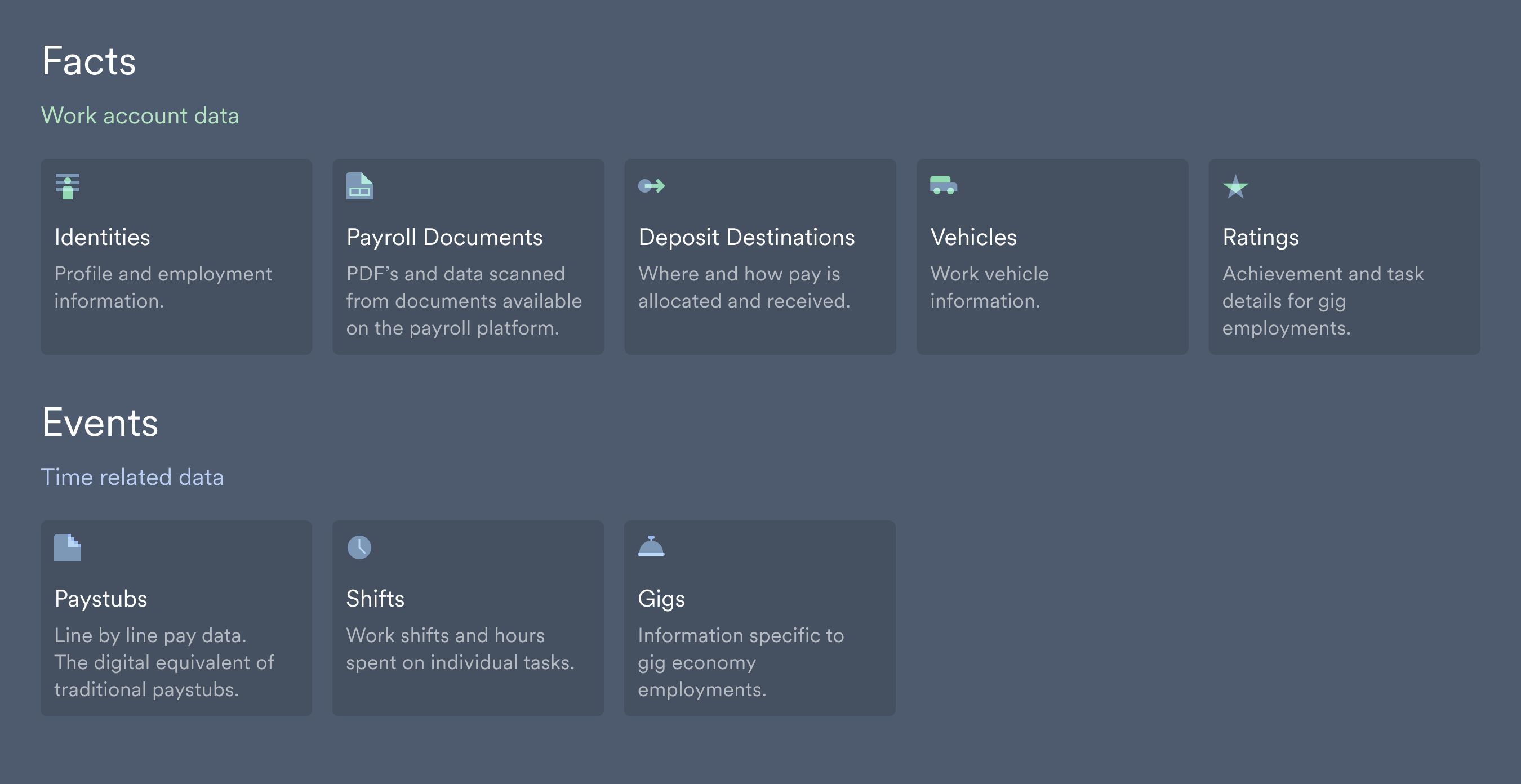
Data is collected in stages after a new account is connected:
#### Fact data
* Available soon after a payroll connection.
* Static information that tends to change less over time.
#### Event data
* Retrieved and made available from most recent to least recent.
* Time-dependent information that can go back a number of years.
* Visit our [API Reference](/api-reference/users) to learn more about each endpoint, and see example requests and responses.
* Subscribe to our [Changelog](https://changelog.argyle.com/) to receive updates on changes to the API.
Implementations should accommodate additional fields and response values being added to existing endpoints as we continuously expand our data granularity.
## Creating API keys
Production and Sandbox API keys can be created in [Console](https://console.argyle.com/api-keys).
API key secrets are only visible during API key creation and partially obfuscated thereafter. Please ensure you copy and securely store API secrets when creating new API keys.
## Authentication
All API requests are authenticated over standard [HTTP basic authentication](https://en.wikipedia.org/wiki/Basic_access_authentication).
* username — `api_key_id`
* password — `api_key_secret`
#### Example
```text theme={}
$ curl https://api-sandbox.argyle.com/v2/accounts \
-u api_key_id: api_key_secret
```
When making API requests, API keys must match the base URL environment (see below), otherwise a **401-Unauthorized** response code will be returned.
Protect your API keys from being revealed. See [security](/api-guide/overview#security) for best practices.
## Environments
Argyle provides two environments:
| Environment | Purpose | Base URL |
| ----------- | ---------------- | ----------------------------------- |
| Sandbox | Testing | `https://api-sandbox.argyle.com/v2` |
| Production | Real connections | `https://api.argyle.com/v2` |
Both Link and the API can be used in either the Sandbox or Production environment.
The Sandbox environment lets you connect sample users in Link, and retrieve their sample data via the API. Visit our dedicated [Sandbox Testing Guide](/overview/sandbox-testing) for more information.
All API endpoints can be used in either the Sandbox or Production environment, with the exception of an additional Sandbox endpoint that lets you [simulate data refreshes](/overview/sandbox-testing#simulate-a-data-refresh) and [update sample data](/overview/sandbox-testing#update-sample-data).
## Data availability
Data is collected in stages after a new account is connected:
#### Fact data
* Available soon after a payroll connection.
* Static information that tends to change less over time.
#### Event data
* Retrieved and made available from most recent to least recent.
* Time-dependent information that can go back a number of years.
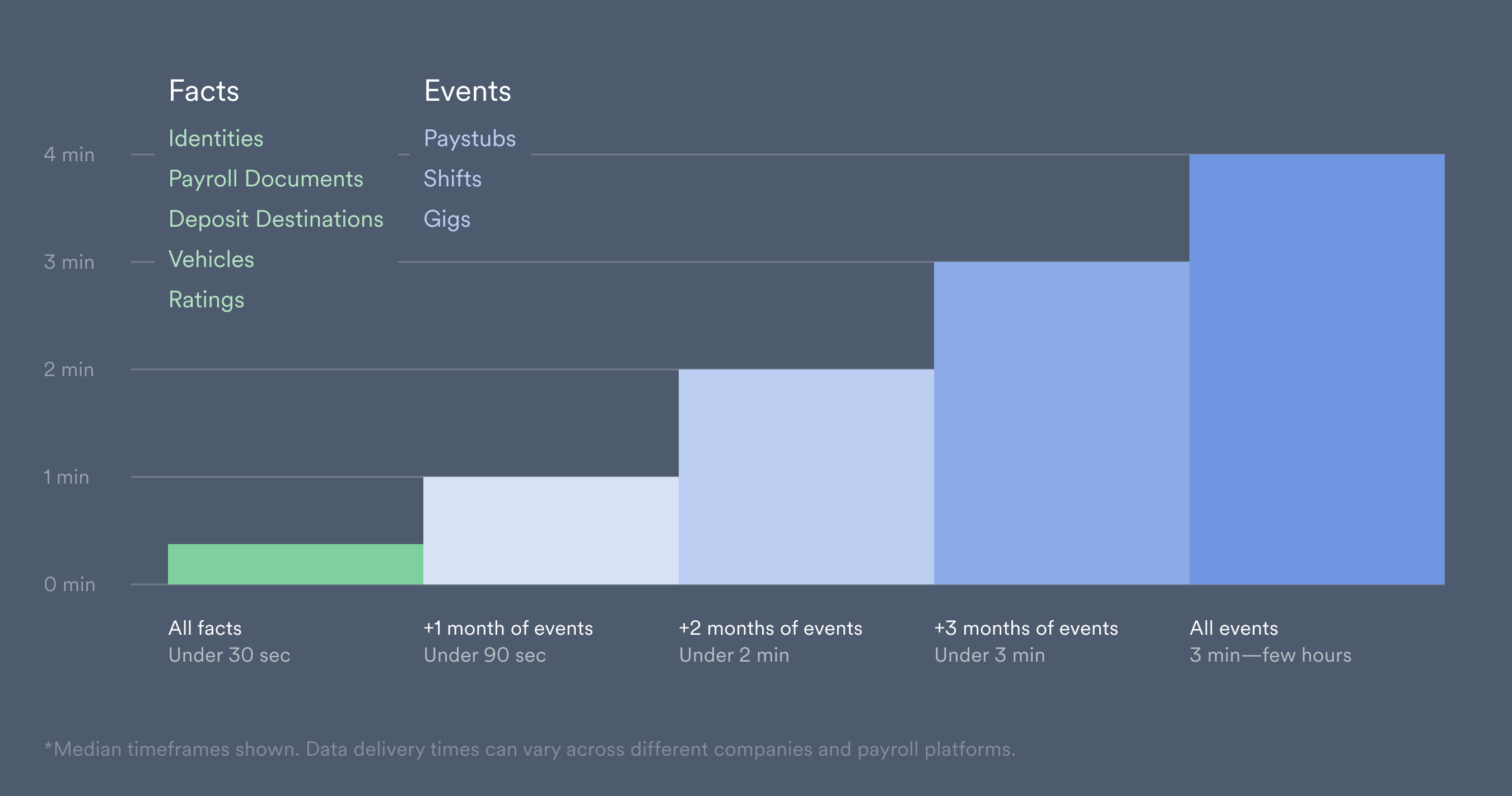 Fact data is initially used to populate fields within Argyle's [data sets](/overview/data-structure/data-sets#categories). As event data is retrieved, previously populated fields are updated and refined, and new data is added to the relevant fields that were previously empty.
Visit our [Data Delivery Guide](/overview/data-delivery) for more information on data availability after a new account connection.
After initial data retrieval, Argyle [continuously scans](/overview/ongoing-refresh) and retrieves any new data that is added to a user's payroll account.
## Breaking changes
Subscribe to our [Changelog](https://changelog.argyle.com) to receive updates on changes to the API.
*Implementations should accommodate additional fields and response values being added to existing endpoints as we continuously expand our data granularity.*
Argyle considers the following changes to be breaking:
* Changing authentication or authorization requirements
* Removing or re-naming an endpoint
* Removing or re-naming a webhook
* Removing or re-naming a required [request parameter](https://rapidapi.com/guides/learn-api-request-parameters)
* Adding a required request parameter (including previously optional parameters)
* Removing or re-naming any field name (including objects, arrays, or individual properties)
* Changing the type of any field, request parameter, or query parameter
Argyle considers the following changes to be non-breaking:
* Adding an endpoint
* Adding a webhook
* Adding an optional request parameter
* Adding additional response fields (including objects, arrays, or individual properties)
* Returning new response field values
* Returning additional enum values, including new errors
* Changes to error messages
* Fixes to [HTTP response codes](/api-guide/overview#status-codes) from an incorrect code to a correct code
## Security
Secure your API keys using these best practices:
* Only invoke the Argyle API from your own server-side applications.
* Avoid including or adding checks for your API keys in client-side code.
* Store API keys in environment variables or files outside your application's source tree, instead of embedding them directly in your application.
Storing API keys outside your application's source tree is particularly important if you use a public source code management system such as Github.
* Use one set of API keys for each backend system on your platform. This limits the scope of compromised API keys.
* Delete unused API keys.
## System status
Argyle publishes operational status by product and channel on [status.argyle.com](https://status.argyle.com/). Incidents, updates, and related messaging are posted there and sent automatically to subscribers.
**GET** requests made to the following URLs can also be used to retrieve status and incident information programmatically:
| URL | Description |
| ---------------------------------------------------------------------------------------------------- | --------------------------------------------------------------- |
| [https://status.argyle.com/api/v2/status.json](https://status.argyle.com/api/v2/status.json) | System-wide operational status |
| [https://status.argyle.com/api/v2/components.json](https://status.argyle.com/api/v2/components.json) | Individual operational status by product and channel |
| [https://status.argyle.com/api/v2/summary.json](https://status.argyle.com/api/v2/summary.json) | Both system-wide and individual component statuses |
| [https://status.argyle.com/api/v2/incidents.json](https://status.argyle.com/api/v2/incidents.json) | History of past incidents, messaging, and time until resolution |
## Status codes
The Argyle API uses the following HTTP response codes:
| Status code | Description |
| ---------------------------------- | -------------------------------------------------------------------------------------------------------------- |
| 200 - OK | The request succeeded. |
| 201 - Created | The request succeeded and a new resource was created. |
| 204 - No Content | The request succeeded and no content was returned. |
| 400 - Bad Request | The request was invalid and could not be processed. |
| 401 - Unauthorized | Invalid API keys were provided. |
| 402 - Request Failed | The request was valid but could not be processed. |
| 403 - Forbidden | The API keys provided do not have the necessary permissions required to perform the request. |
| 404 - Not Found | The requested resource could not be found. |
| 409 - Conflict | The request conflicts with the server state and could not be processed. |
| 429 - Too Many Requests | Too many requests were sent in a given amount of time. See [rate limiting](/api-guide/overview#rate-limiting). |
| 500, 502, 503, 504 - Server Errors | The request failed due to errors on Argyle servers. |
| 520 - External Server Error | The request failed due to errors on an upstream server. |
## Error responses
When an error occurs, a JSON object is sent in the response describing the error.
#### Example
```json theme={}
{ "detail": "Authentication credentials were not provided." }
```
Field validation errors in **POST** requests return a JSON object that lists the invalid fields alongside troubleshooting suggestions.
#### Example
```json theme={}
// Example error response when creating a new webhook:
{ "name": ["This field may not be blank."], "url": ["Enter a valid URL."] }
```
## Null values
*If all data fields are not available, Argyle will still return partial data records.*
Individual fields may return `null` values when:
* The data source does not support that field.
* The data source supports the field, but no information is present.
Arrays may return an empty `[]`.
Objects may return either an empty `{}` or object instance where all properties are set to `null`.
#### Example
```json theme={}
{
"...",
"address": {
"line1": "759 Victoria Plaza",
"line2": null,
"state": "NY",
"country": "US",
"postal_code": "10014"
},
"first_name": "Bob",
"last_name": "Jones",
"marital_status": null,
"..."
}
```
## Pagination
All “List” **GET** requests (“list paystubs”, “list identities”, etc.) return paginated results.
The number of results per page can be defined by using the `limit` parameter when making the request. The default number of results per page is 10, and the maximum is 200.
Paginated responses will have `next` and `previous` page URLs:
```json theme={}
// List users - GET https://api-sandbox.argyle.com/v2/users
{
"next": "https://api-sandbox.argyle.com/v2/users?cursor=bC0yMDIzLTAyLTA5KzE2JTNCMzAlM0EzNC43MDU0MDMlMkIwMCUzQTAw",
"previous": null,
"results": [
{ "..." },
{ "..." }
[
}
```
To retrieve the next page of results, repeat the **GET** request using the URL in the `next` field.
Following the `next` and `previous` page URLs helps avoid retrieving duplicate results and eliminates redundant calls. This ensures no two requests can happen in parallel to avoid `429` [rate limiting](/api-guide/overview#rate-limiting) responses.
See [concurrency](/api-guide/overview#concurrency) below if you are bulk fetching data using parallel requests.
## Rate limiting
The API allows **50 requests per second**. If this rate is exceeded, a `429` status code will be returned.
Rate limiting may occur during periods of high request volume, often related to analytical or data migration operations.
We recommend including a retry method in your applications that responds to `429` status codes by scaling down your request volume and returning rate limited requests to your queue.
## Concurrency
The API does not use HTTP caching to ensure the data you retrieve is up-to-date. Any caching layers used must be between your application and the API.
We recommend limiting the amount of simultaneous requests to the API. This prevents rate limiting and helps avoid repeat queries, resulting in improved data synchronization.
[API Reference](/api-reference/users#object)
Fact data is initially used to populate fields within Argyle's [data sets](/overview/data-structure/data-sets#categories). As event data is retrieved, previously populated fields are updated and refined, and new data is added to the relevant fields that were previously empty.
Visit our [Data Delivery Guide](/overview/data-delivery) for more information on data availability after a new account connection.
After initial data retrieval, Argyle [continuously scans](/overview/ongoing-refresh) and retrieves any new data that is added to a user's payroll account.
## Breaking changes
Subscribe to our [Changelog](https://changelog.argyle.com) to receive updates on changes to the API.
*Implementations should accommodate additional fields and response values being added to existing endpoints as we continuously expand our data granularity.*
Argyle considers the following changes to be breaking:
* Changing authentication or authorization requirements
* Removing or re-naming an endpoint
* Removing or re-naming a webhook
* Removing or re-naming a required [request parameter](https://rapidapi.com/guides/learn-api-request-parameters)
* Adding a required request parameter (including previously optional parameters)
* Removing or re-naming any field name (including objects, arrays, or individual properties)
* Changing the type of any field, request parameter, or query parameter
Argyle considers the following changes to be non-breaking:
* Adding an endpoint
* Adding a webhook
* Adding an optional request parameter
* Adding additional response fields (including objects, arrays, or individual properties)
* Returning new response field values
* Returning additional enum values, including new errors
* Changes to error messages
* Fixes to [HTTP response codes](/api-guide/overview#status-codes) from an incorrect code to a correct code
## Security
Secure your API keys using these best practices:
* Only invoke the Argyle API from your own server-side applications.
* Avoid including or adding checks for your API keys in client-side code.
* Store API keys in environment variables or files outside your application's source tree, instead of embedding them directly in your application.
Storing API keys outside your application's source tree is particularly important if you use a public source code management system such as Github.
* Use one set of API keys for each backend system on your platform. This limits the scope of compromised API keys.
* Delete unused API keys.
## System status
Argyle publishes operational status by product and channel on [status.argyle.com](https://status.argyle.com/). Incidents, updates, and related messaging are posted there and sent automatically to subscribers.
**GET** requests made to the following URLs can also be used to retrieve status and incident information programmatically:
| URL | Description |
| ---------------------------------------------------------------------------------------------------- | --------------------------------------------------------------- |
| [https://status.argyle.com/api/v2/status.json](https://status.argyle.com/api/v2/status.json) | System-wide operational status |
| [https://status.argyle.com/api/v2/components.json](https://status.argyle.com/api/v2/components.json) | Individual operational status by product and channel |
| [https://status.argyle.com/api/v2/summary.json](https://status.argyle.com/api/v2/summary.json) | Both system-wide and individual component statuses |
| [https://status.argyle.com/api/v2/incidents.json](https://status.argyle.com/api/v2/incidents.json) | History of past incidents, messaging, and time until resolution |
## Status codes
The Argyle API uses the following HTTP response codes:
| Status code | Description |
| ---------------------------------- | -------------------------------------------------------------------------------------------------------------- |
| 200 - OK | The request succeeded. |
| 201 - Created | The request succeeded and a new resource was created. |
| 204 - No Content | The request succeeded and no content was returned. |
| 400 - Bad Request | The request was invalid and could not be processed. |
| 401 - Unauthorized | Invalid API keys were provided. |
| 402 - Request Failed | The request was valid but could not be processed. |
| 403 - Forbidden | The API keys provided do not have the necessary permissions required to perform the request. |
| 404 - Not Found | The requested resource could not be found. |
| 409 - Conflict | The request conflicts with the server state and could not be processed. |
| 429 - Too Many Requests | Too many requests were sent in a given amount of time. See [rate limiting](/api-guide/overview#rate-limiting). |
| 500, 502, 503, 504 - Server Errors | The request failed due to errors on Argyle servers. |
| 520 - External Server Error | The request failed due to errors on an upstream server. |
## Error responses
When an error occurs, a JSON object is sent in the response describing the error.
#### Example
```json theme={}
{ "detail": "Authentication credentials were not provided." }
```
Field validation errors in **POST** requests return a JSON object that lists the invalid fields alongside troubleshooting suggestions.
#### Example
```json theme={}
// Example error response when creating a new webhook:
{ "name": ["This field may not be blank."], "url": ["Enter a valid URL."] }
```
## Null values
*If all data fields are not available, Argyle will still return partial data records.*
Individual fields may return `null` values when:
* The data source does not support that field.
* The data source supports the field, but no information is present.
Arrays may return an empty `[]`.
Objects may return either an empty `{}` or object instance where all properties are set to `null`.
#### Example
```json theme={}
{
"...",
"address": {
"line1": "759 Victoria Plaza",
"line2": null,
"state": "NY",
"country": "US",
"postal_code": "10014"
},
"first_name": "Bob",
"last_name": "Jones",
"marital_status": null,
"..."
}
```
## Pagination
All “List” **GET** requests (“list paystubs”, “list identities”, etc.) return paginated results.
The number of results per page can be defined by using the `limit` parameter when making the request. The default number of results per page is 10, and the maximum is 200.
Paginated responses will have `next` and `previous` page URLs:
```json theme={}
// List users - GET https://api-sandbox.argyle.com/v2/users
{
"next": "https://api-sandbox.argyle.com/v2/users?cursor=bC0yMDIzLTAyLTA5KzE2JTNCMzAlM0EzNC43MDU0MDMlMkIwMCUzQTAw",
"previous": null,
"results": [
{ "..." },
{ "..." }
[
}
```
To retrieve the next page of results, repeat the **GET** request using the URL in the `next` field.
Following the `next` and `previous` page URLs helps avoid retrieving duplicate results and eliminates redundant calls. This ensures no two requests can happen in parallel to avoid `429` [rate limiting](/api-guide/overview#rate-limiting) responses.
See [concurrency](/api-guide/overview#concurrency) below if you are bulk fetching data using parallel requests.
## Rate limiting
The API allows **50 requests per second**. If this rate is exceeded, a `429` status code will be returned.
Rate limiting may occur during periods of high request volume, often related to analytical or data migration operations.
We recommend including a retry method in your applications that responds to `429` status codes by scaling down your request volume and returning rate limited requests to your queue.
## Concurrency
The API does not use HTTP caching to ensure the data you retrieve is up-to-date. Any caching layers used must be between your application and the API.
We recommend limiting the amount of simultaneous requests to the API. This prevents rate limiting and helps avoid repeat queries, resulting in improved data synchronization.
[API Reference](/api-reference/users#object)